





Best 7 Free SERP Analysis Tools For Smarter SEO Decisions


Struggling to rank higher on Google? And tired of endless guessing on how to get a better rank?
Your website deserves more visibility and you can achieve that with a data-driven approach. Additionally, technical errors, missed opportunities, and the fierce battle can really hold you back.
Don’t let your website get lost from the first page! Make it appear in the first place. And that you can do by leveraging a SERP analysis tool. It will help you identify opportunities, fix errors, and climb the search engine ladder.
So, let’s start digging into what these top free SERP tools are that you must try!
Overview of SERP Analysis
SERP stands for Search Engine Results Page. With the word analysis added to it, it now pertains to a process of examining the websites that rank for a certain keyword or search query on the SERP.
When performing SERP analysis, you should make a detailed plan for these steps:
What should you look at when conducting SERP analysis for SEO?
As it is a process of determining the website that ranks, one should not miss analyzing and take note of these factors:
- Domain authority,
- Page content,
- Keyword usage,
- Backlinks, and
- User-intent.
With an understanding of these factors influencing the rank, you can optimize your website and gain more traffic even outranking your competitor. Here’s what you can gain from SERP analysis:
- Discover relevant keywords and assess the level of their difficulty, which you can use to optimize your content.
- Identify the gaps why you’re behind the rank as compared to your competitors and learn from their` tactics.
- Fully understand the user intent so you can update your content satisfying the user’s intent.
- Identify technical issues that hinder your website’s ranking.
7 Free SERP Analysis Tools [Compared]
Here are 7 powerful, free SERP ranking analysis tools that can help you gain valuable insights for your SEO efforts:
| Feature | GetGenie | SERPWatcher | SERanking | Semrush SERP Checker | WhatsMySerp | Backlinko | SERP Surf |
| Target Users | Content creators and small businesses | Small to medium businesses | Agencies and SEO professionals | Large-scale SEO teams and enterprises | Anyone interested in improving their search engine rankings | Anyone interested in understanding SERP landscape | SEO professionals and marketers |
| Learning Curve | Easy to navigate | Easy to navigate | Moderate, some advanced features | Steeper due to vast features and depth | Relatively ease to learn and use | Requires some exploration to fully utilize the tool | Requires some understanding of SEO concepts |
| Ease of Use | User-friendly, intuitive for beginners | Simple dashboard with clear visuals | Clean interface for tracking trends | Advanced tools suited for experienced users | Easy to navigate | User-friendly interface | User-friendly interface |
| Strengths | Predicts future SERP trends, ideal for content creators. | Excellent for long-term rank tracking with daily updates. | Comprehensive features for overall SEO, beginner-friendly. | Highly detailed SERP and traffic analysis, extensive data for professionals. | Offers valuable data on SERP features like featured snippets, people also ask boxes, and knowledge panels. | Can help identify content gaps and opportunities | Provides in-depth analysis of on-page SEO factors. |
| Limitations | Limited advanced features in the free version | Focuses more on tracking than analysis | Free version limits access to premium features like deep competitor analysis | Steeper learning curve, free plan is heavily restricted | Limited number of searches or data points available in the free version | Limited number of searches available in the free version | May require a deeper understanding of SEO concepts to fully utilize |
1. GetGenie
Among the 10 SERP analysis tools, GetGenie is the most unique. GetGenie uses an AI-powered approach to predict future SERP trends that you can monitor to optimize your content. It combines SERP analysis and content generation, making it an all-in-one solution for SEO.
Additionally, this tool is ideal for different types of users including content writers, content marketers, SEO professionals, etc because of its unparalleled user-friendly interface. This SERP tool integrates well with WordPress and SaaS (playground) platforms. You can either directly use its features in your WordPress site or through its playground. It only requires you to enter your target keyword and click on the analyze the keyword button to switch to the competitor tab for analysis.
GetGenie offers various features to help you with your SERP analysis and here are as follows:
SEO Research & Ai-Filtered Keywords:
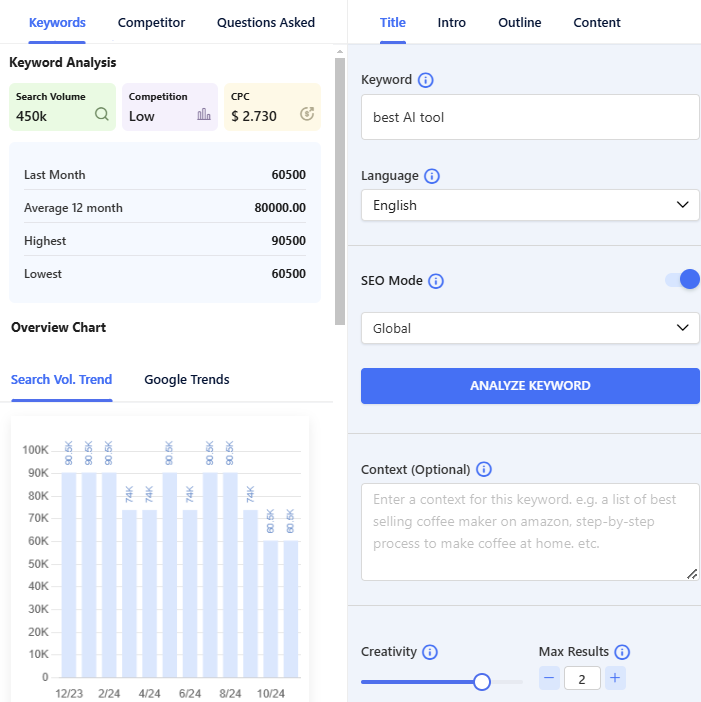
GetGenie analyzes seed keywords in-depth and picks relevant keywords you can use to optimize your content. It will give you the search volume, competition level, and CPC. Also, the tool will provide you with the related keywords you can incorporate into your blog content.
Analyze Competitors:
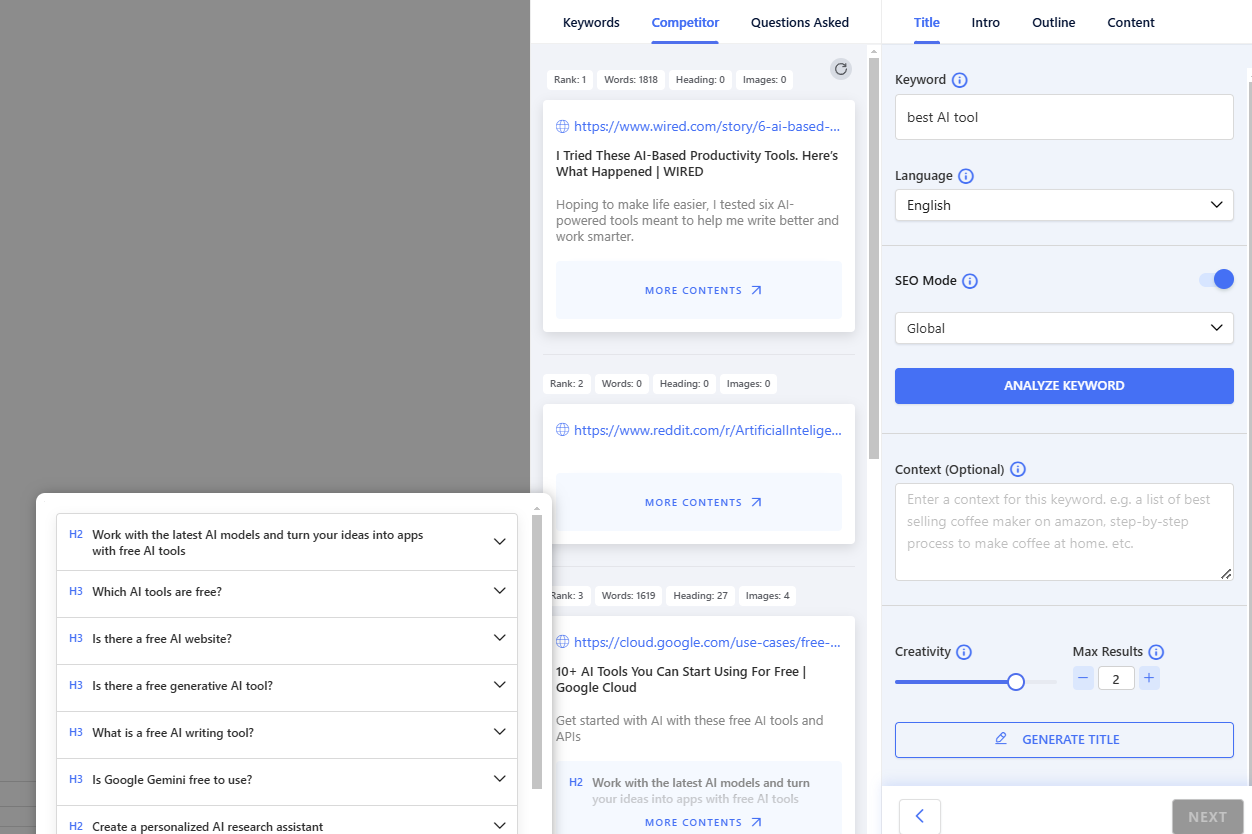
GetGenie finds the ranked blogs/competitors for your seed keyword. This tool analyzes the content gaps as well as the strengths of your competitors, which is very helpful to outrank them in the search engine ranking.
GetGenie gives you the information of the competitors including:
- Position/ranking
- Number of content words
- Number of headings
- Number of images
Questions Asked:
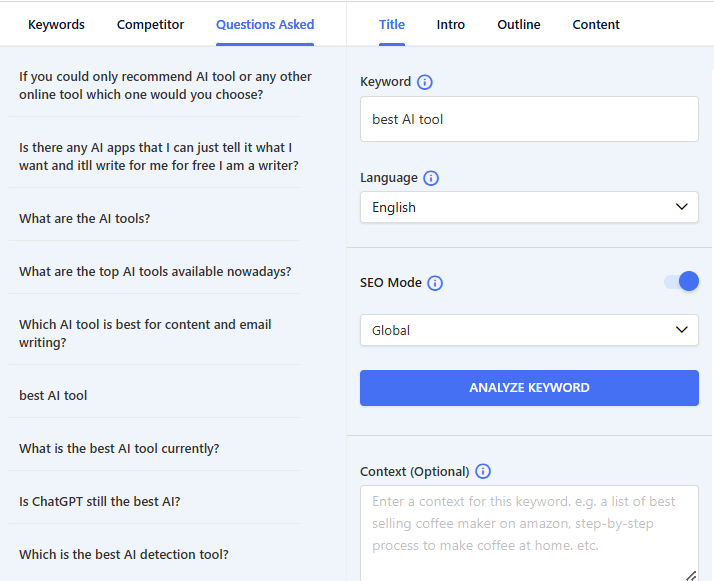
Another method of ensuring your rank in the search engine competition is to incorporate frequently asked questions in your blog. And GetGenie offers you to do that. It gathers all the related questions people are asking from various platforms such as Reddit, Quora, etc.
What’s more about GetGenie that makes it most recommendable for SERP analysis?
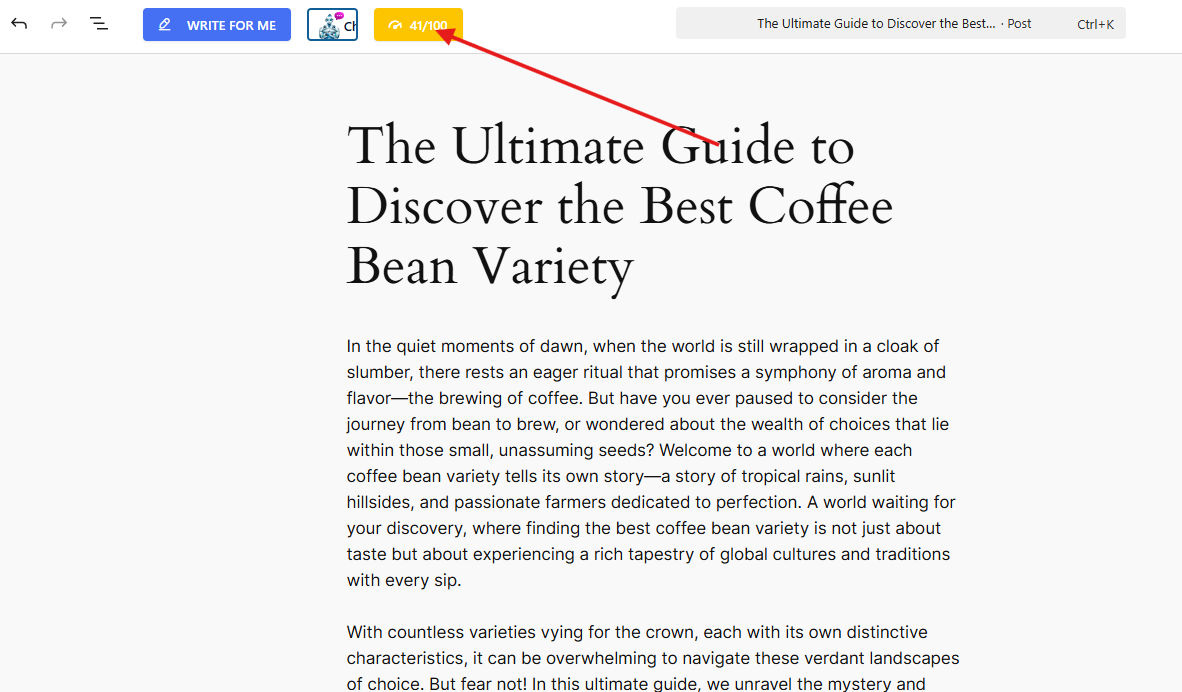
Well! GetGenie as a writing assistant as its main function offers predictive SEO AI scoring. This means that when you use GetGenie to write a blog post for your website, you can ensure that your content is SEO optimized before publishing it. It can determine the SEO score, which is very essential so that you will know which parameter/s of your blog needs to be adjusted.
This feature will provide the results according to these parameters:
- Position/ranking
- Number of content words
- Number of headings
- Number of images
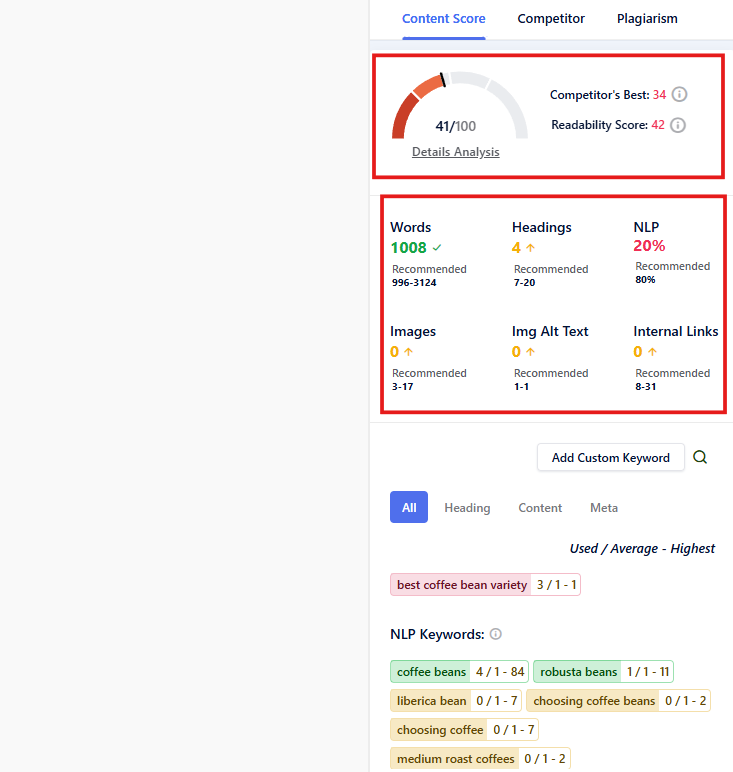
You can then compare the results with the SEO details of your competitors. The results will enable you to make necessary adjustments so that your blogpost will surely outrank the competitors.

2. SERPWatcher
SERPWatcher is a free SERP tracking tool which focuses on real-time rank tracking and competitor analysis. It has a user-friendly interface that makes it easy to monitor keyword performance. The tool also detects shifts in rankings.
Moreover, this tool has 45+ metrics such as keyword difficulty, majestic and moz, etc. It also gives you an opportunity to see your competitors’ strengths and weaknesses, assess SERP positions, and even detect SERP features positions.
So, how does SERPWatcher really work?
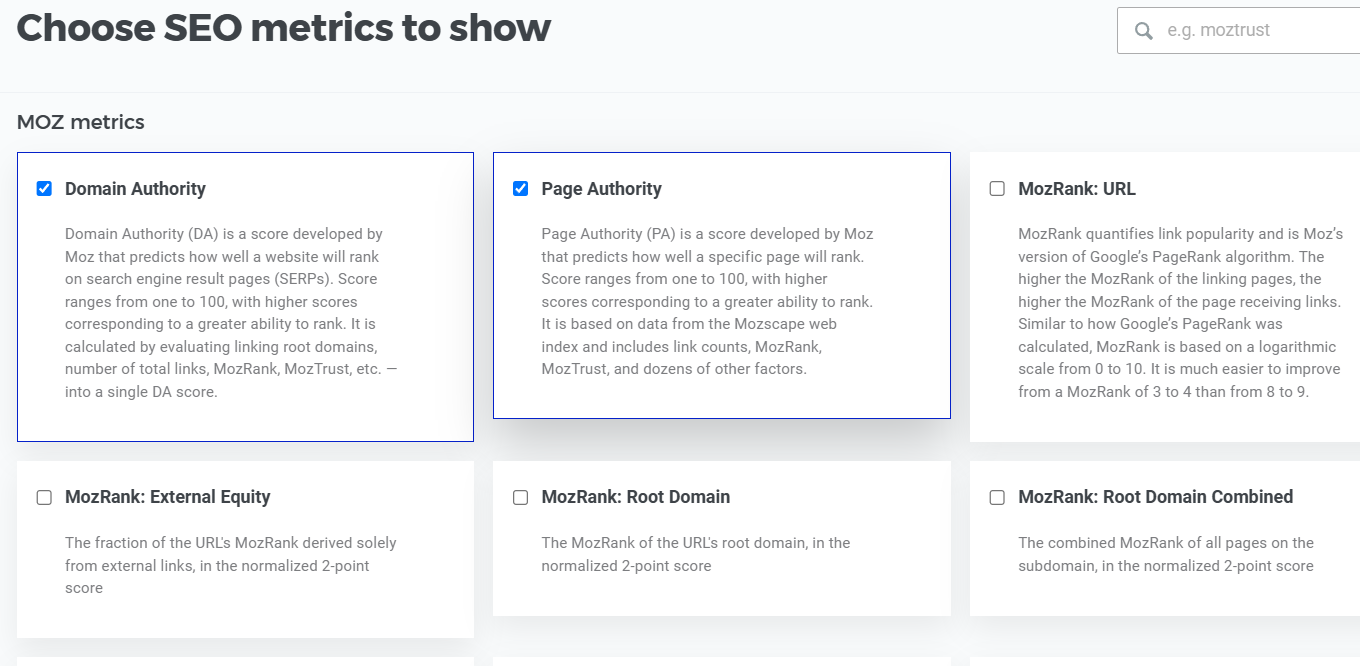
SERPWatcher allows you to select the SEO metrics in the metrics settings you wish to include in the result for your SERP analysis.
Additionally, SERPWatcher allows you to conduct SERP features analysis including snippets that influence organic results.
Now, how to identify the influence of these SERP features?
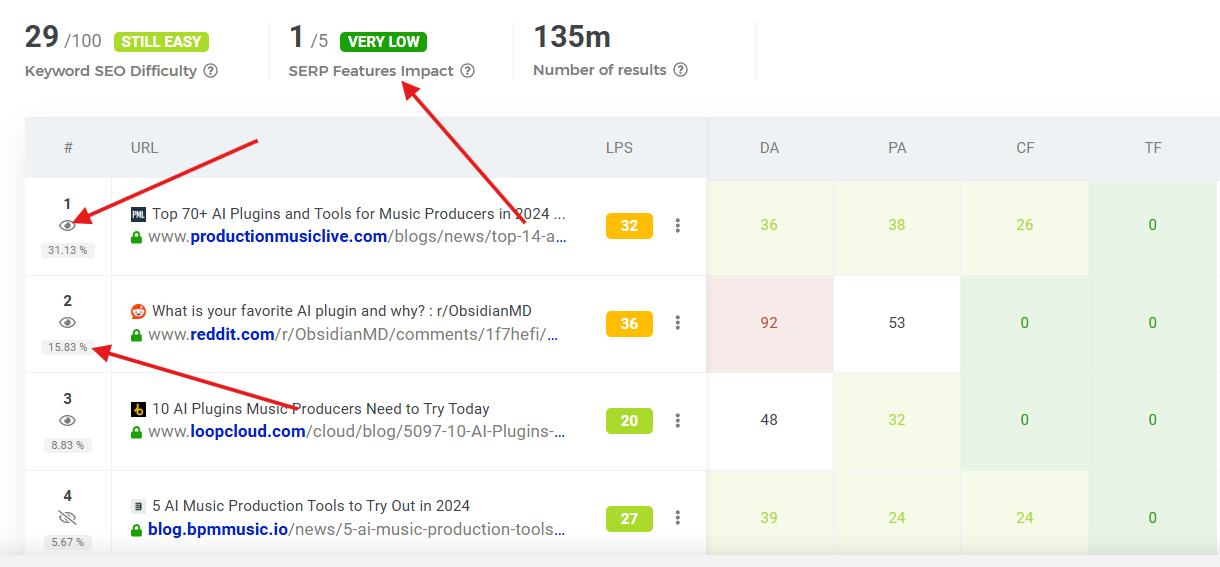
SERPWatcher offers 3 useful indicators to help estimate the influence, namely:
- SERP features impact that evaluates how SERP features like snippets affect organic engagement on a scale of 1 to 5.
- Visibility of each organic search result is evaluated based on how it mostly appears.
- CTR which are estimated through the benchmark data and may vary due to the influence of SERP features.
3. SERanking
SERanking is not just a tool for SEO auditing, but also a commendable SERP analysis tool. It allows you to monitor multiple keywords, evaluate backlink profiles, and analyze competitor performance and strategies in a 360-degree view.
With this tool, you’ll get insights into the SEO performance of your competitors. These insights include:
- Page trust metrics,
- Estimated organic traffic,
- Domain trust,
- Number of backlinks, and
- The count of keywords for which a domain appears in organic search results.
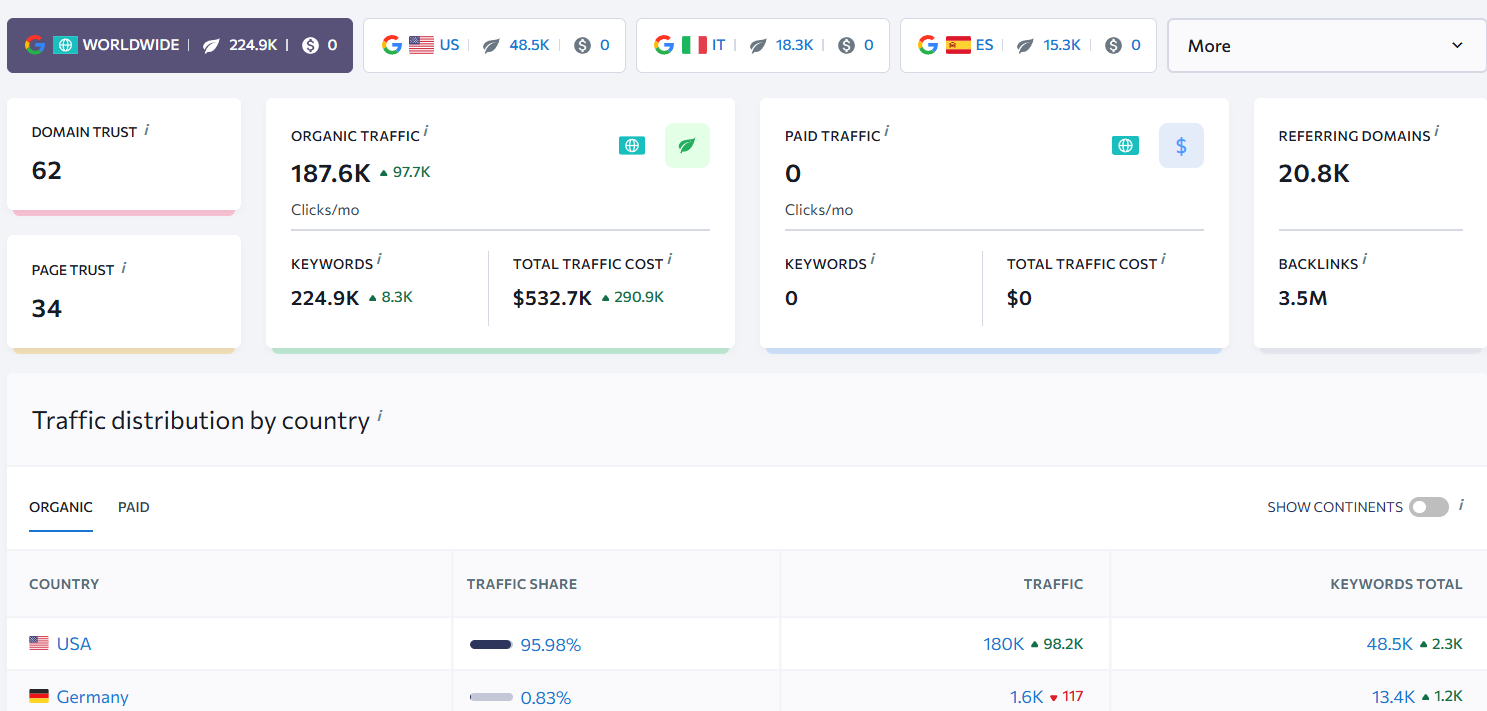
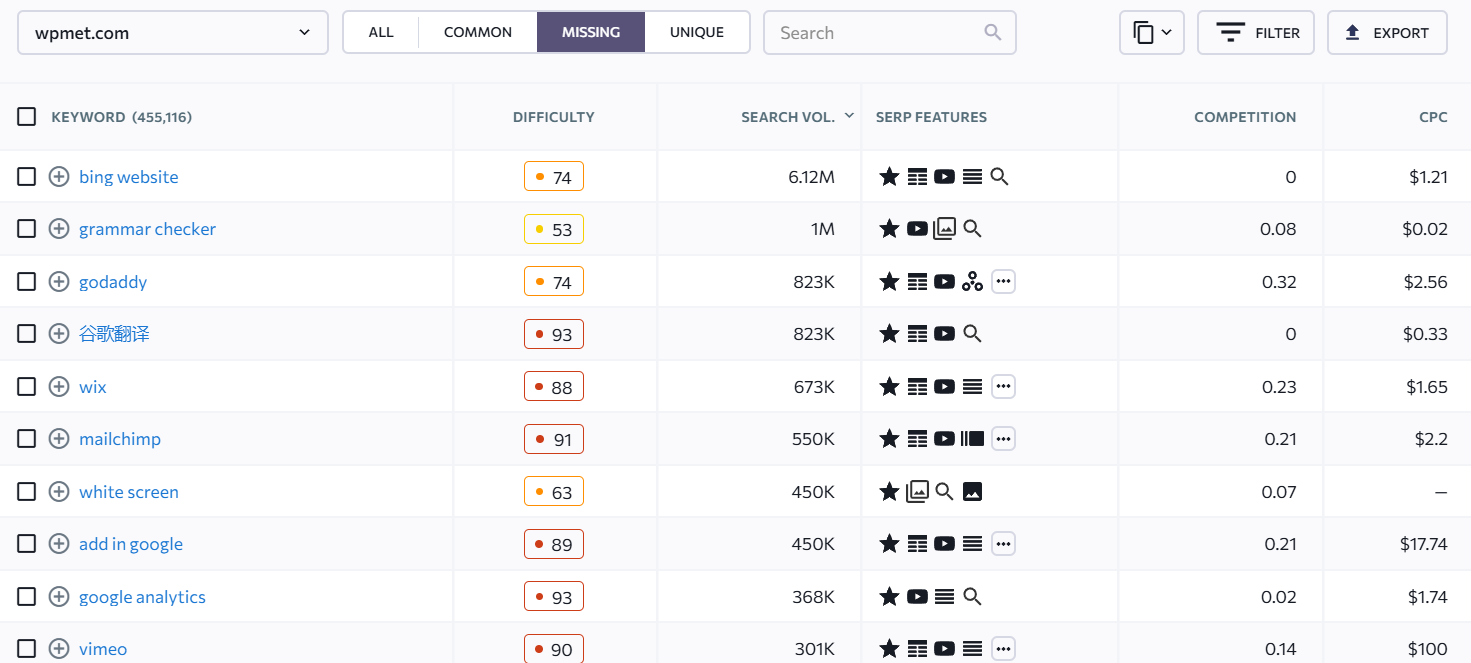
Furthermore, SERanking allows you to identify the keyword gap. These are the keywords that your competitors have ranked that you do not have.
4. Semrush SERP Checker
Semrush SERP checker is a powerful tool that allows you to analyze Google search results for specific keywords. It provides valuable insights into the competition analysis. The tool helps you to determine opportunities to improve the website’s visibility and organic traffic.
With Semrush, you will gain a comprehensive understanding on the top-ranking websites for the target keyword including:
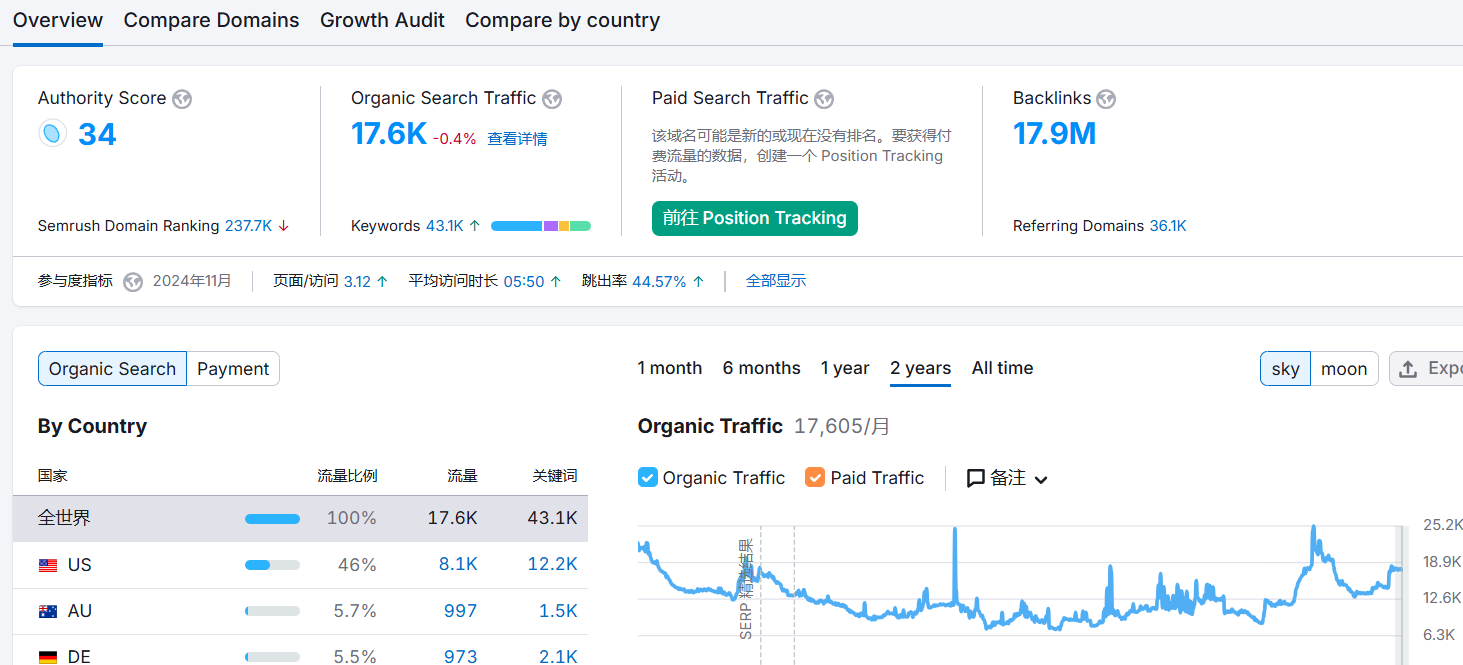
- Domain overview which includes authority score, organic search traffic, paid search traffic, and backlinks.
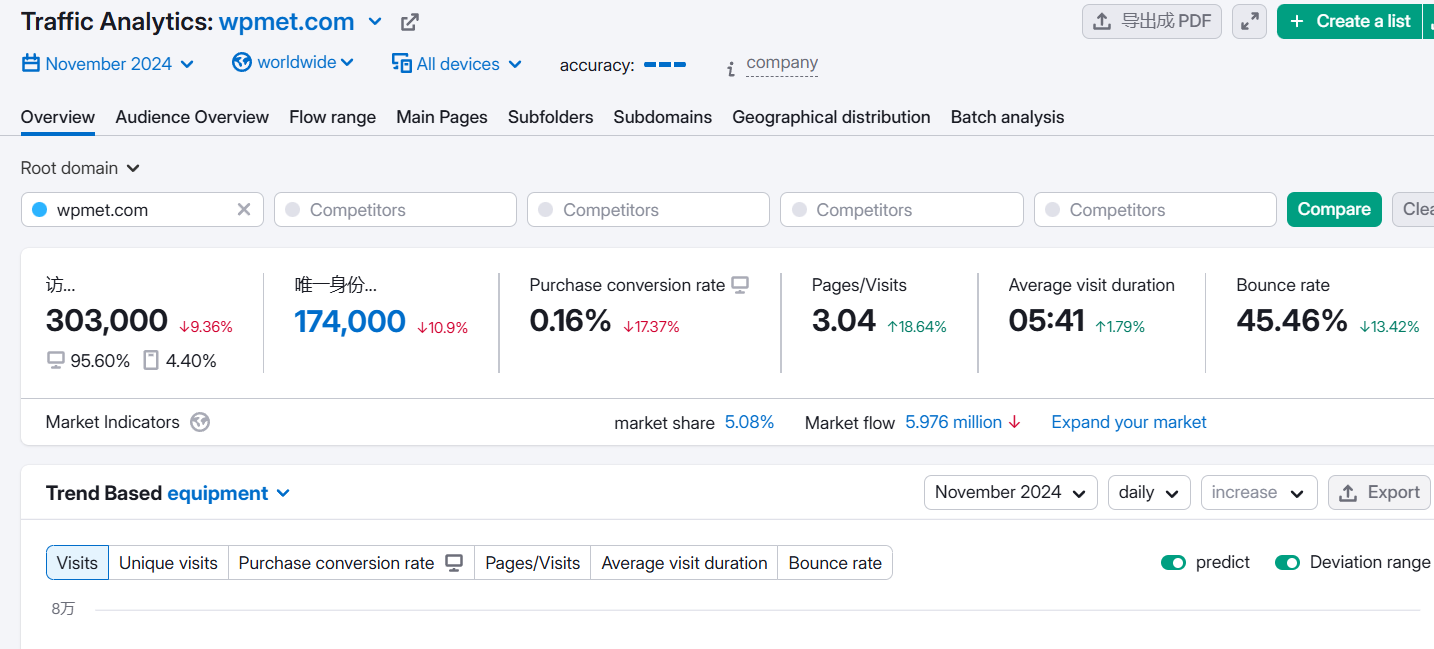
- Traffic analysis that includes unique visits, purchase conversion rates, bounce rates, etc.
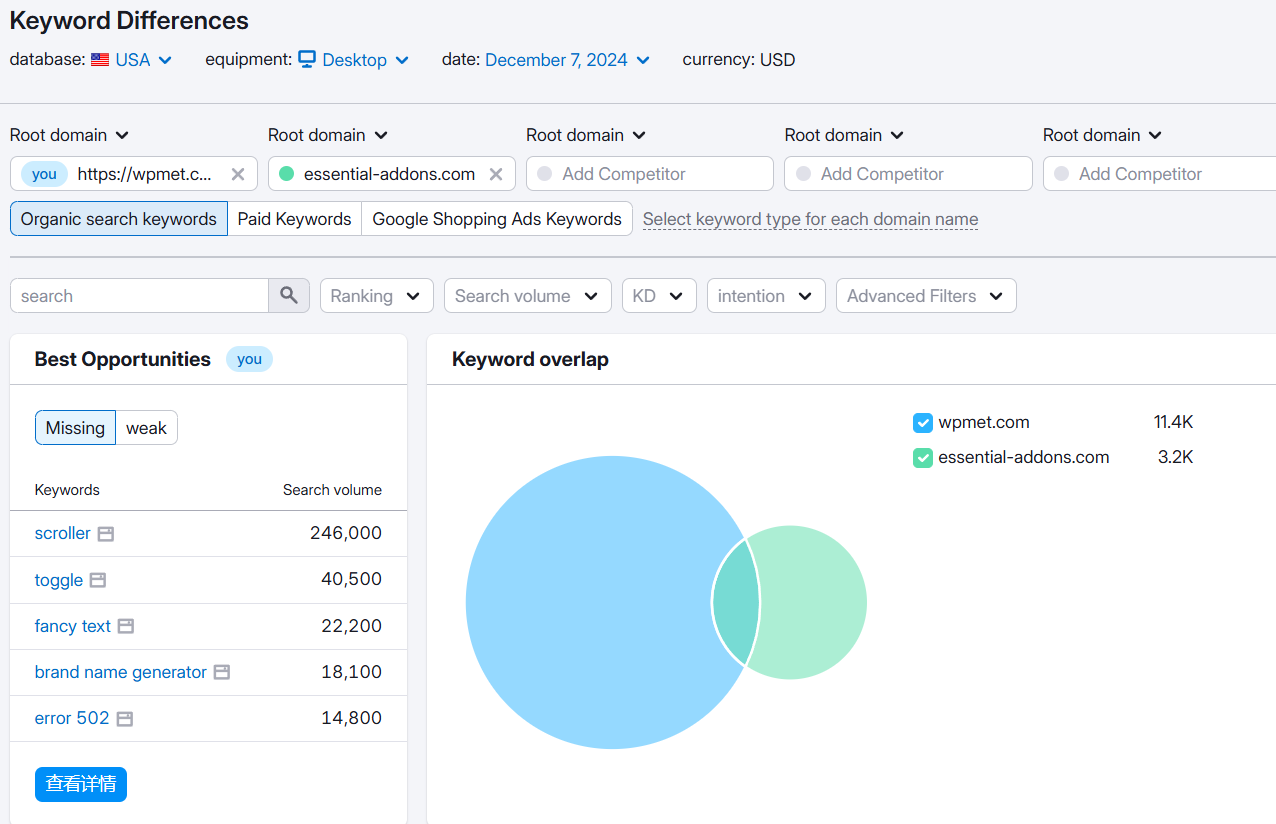
- Keyword differences enable you to determine the number of keywords your competitors rank for as well as the missing keywords that are only present from your competitors.
- Backlinks differences which enable you to identify potential opportunities by comparing your domain to the domain of your competitors.
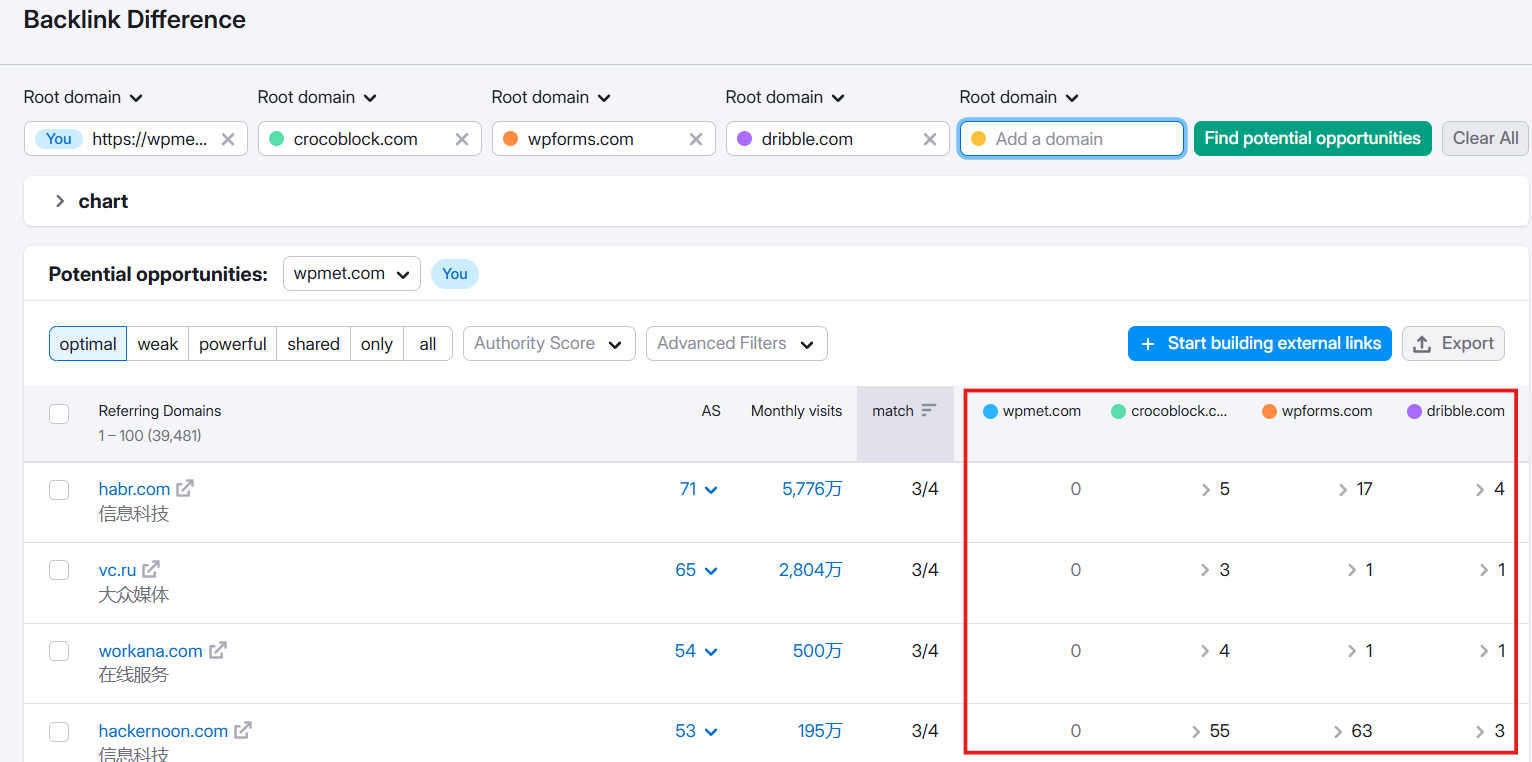
Furthermore, Semrush will help you identify and analyze the various SERP features including:
- Snippets,
- Knowledge panels,
- People also ask boxes, and more
5. WhatsMySerp
Whatsmyserp SERP checker is a straightforward and user-friendly tool primarily designed for analyzing SERPs. It allows you to quickly and easily see the top 100 search results for any given keyword.
WhatsMySerp is also a good option to understand the competition and identify opportunities. You can even view the result in the Google page. This tool is one of the best free SERP checker because its free version enables you to have 20 free searches, which is a very considerate number to try and explore the tool.
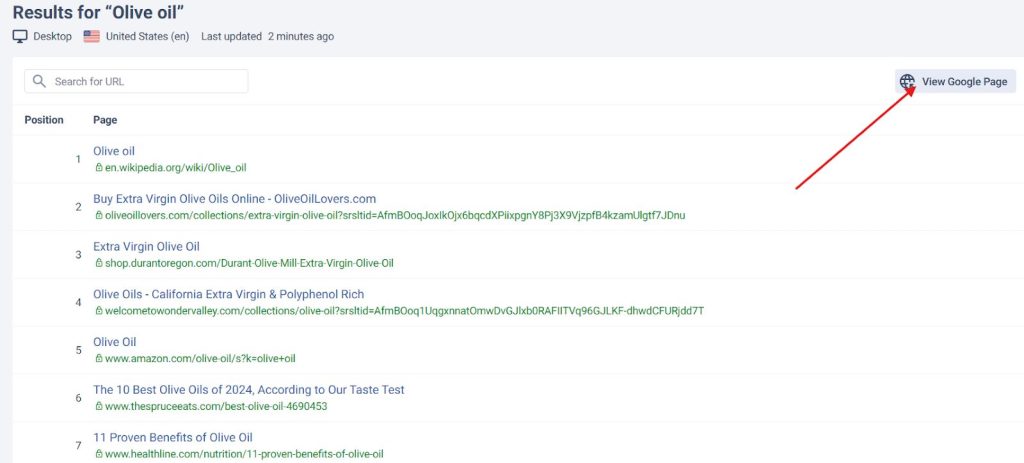
What’s more interesting with this tool is you can also add this as your Chrome extension. This feature will give you the “related keywords with data on search volume, CPC, etc” and the “people also search for” for the top running websites in your target keyword in the Google search engine.
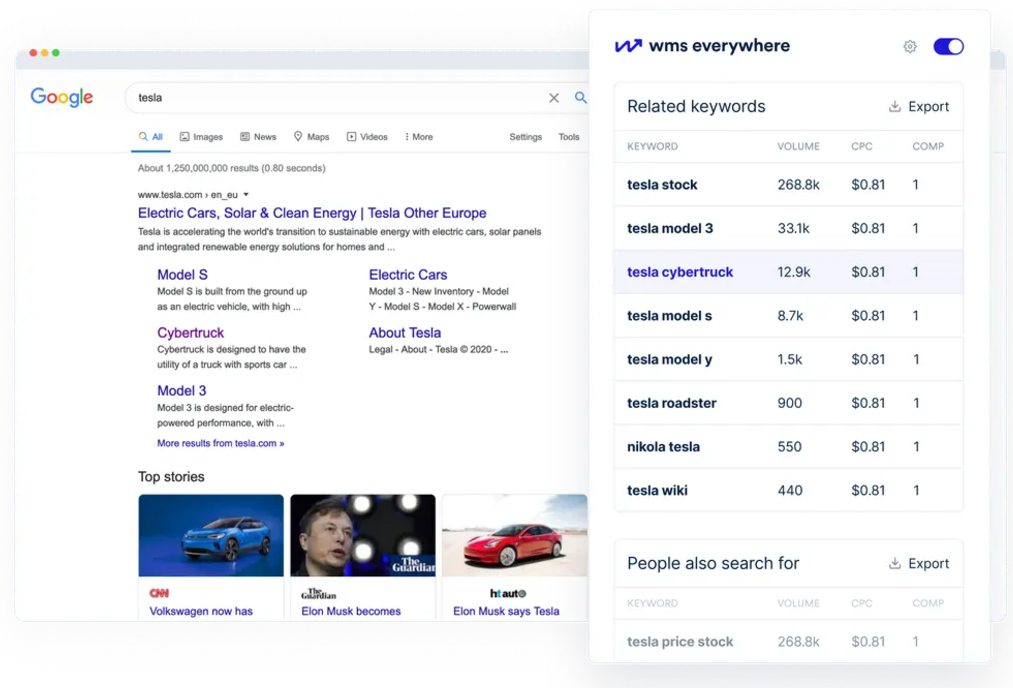
Overall, WhatsMySerp is one of the free SERP tools worth trying.
6. Backlinko
Backlinko offers a SERP analysis feature that allows you to determine the top-ranking websites for your target keyword. It also allows you to determine different key metrics that include:
- Authority Scores
- Referring Domain
- Backlinks
- Search Traffic
- URL Keywords
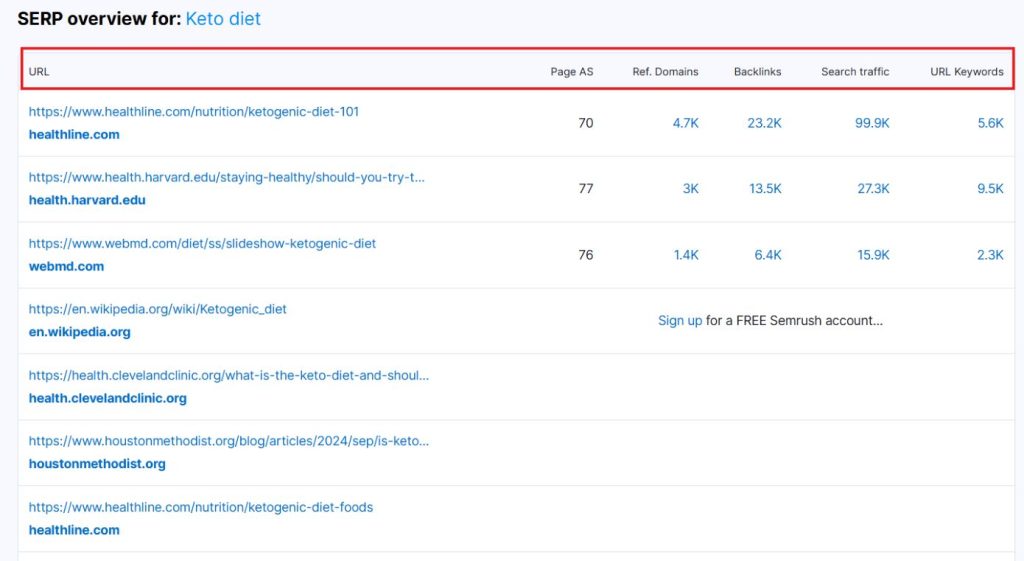
These key metrics help you identify your ranking opportunity. For example, you can click on the value of the first ranked website under the URL keywords column to get a view of all the keywords that are ranked for that website.
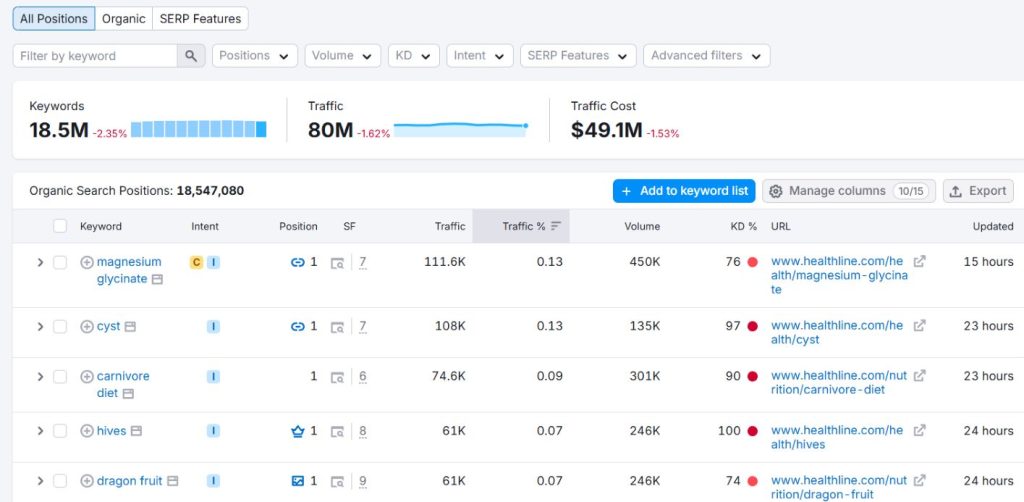
You can compare these keywords with the list of keywords under your website to determine the missing keywords in your website. The same process goes to other metrics if you want to check them one-by-one.
7. SERP Surf
At first glance, the SERP Surf SEO tool might not catch your eye. Its plain design with simple blue boxes feels understated, but don’t let appearances fool you.
The real power of SERP Surf lies in its efficiency. You can utilize its feature by just entering a domain name of the website you wish to check for, selecting the region, and adding the five keywords.
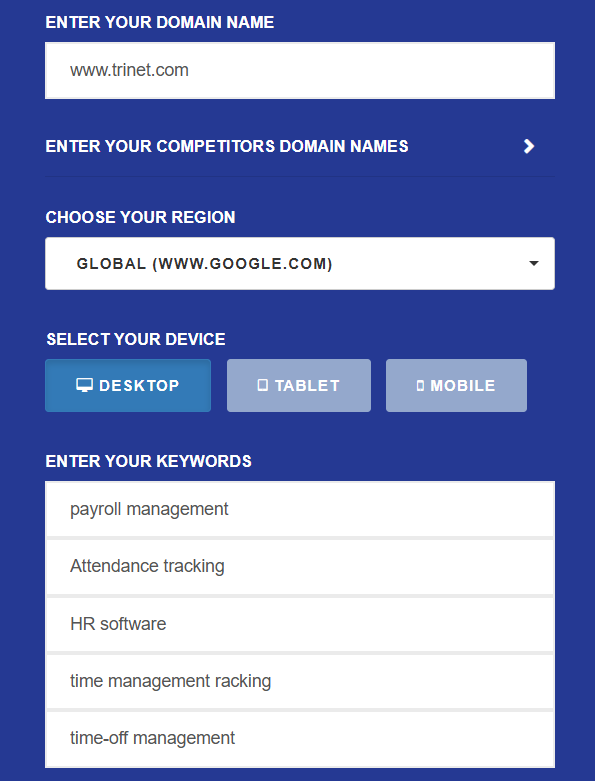
After a few minutes, it swiftly delivers the SERP results you need. You will see the top 10 ranking websites for the keywords you entered.
Wrapping Up
It’s true that doing SERP analysis is a very tough job. It requires a lot of effort to understand everything you need. However, with these 7 best free SERP tools, everything becomes so easy.
These SERP analysis tools have the features you need to monitor and track the performance of your competitors. They can even help you create your own SEO strategy out of the strategies of the ranking competitors.
So, explore these tools and you’ll surely find your gem!
 Danish
  Swedish
  Polish
  Korean