






GetGenie Ai

ACIMA
PARA
45% Poupança

Acabando:

Dias
Horas
Minutos
Segundos
Activate AI Techfest
ObtenhaGenie IA
  • Produtos
    • Kit de Elementos
    • ShopEngine
    • MetForm
    • WP Social
    • Revisão final do Wp
    • Angariação de fundos WP

    SEO Insights

    Track & Analyze WordPress SEO Performance

    Pesquisa de palavras-chave

    Encontre palavras-chave relevantes e inexploradas em segundos

    Análise do Concorrente

    Supere os concorrentes com ideias melhores, analisando-as

    AI FAQ Generator Novo

    Generate FAQs for AI search visibility & SEO rankings alike

    Análise cara a cara

    Competir e analisar em todos os aspectos com o concorrente

    Blog com um clique

    Forneça suas palavras-chave e faça alguns cliques para um blog pronto para SERP

    Escrita Avançada

    Conteúdo personalizado com processo passo a passo

    GBP Post Generator Novo

    Create diverse & catchy Google Business Profile posts in seconds

    GenieChat - AI Chatbot

    Conheça o Chatbot com Personalidades Personalizáveis

    Playground do painel

    Um playground para escrita fácil e SEO, pronto para ir a qualquer lugar

    40+ AI Templates

    Utilize os modelos prontos para gerar redações em segundos.

    Imagem do Gênio

    Create catchy images both inside & outside the WordPress editor

    AI Overview Answer Builder Novo

    Create structured & answer-first content for AI Overviews

    Local Service Copy Generator Novo

    Craft conversion-friendly local service page copies in a flash

  • Integração
    • WordPress
    • Elementor
    • WooCommerce
    • Construtor de oxigênio
    • Construtor de Tijolos
    • Parque infantil
  • Casos de uso

    Marketing de conteúdo

    Effortless content marketing with AI

    Motor de Otimização de Busca

    AI powered SEO with NLP keywords

    WooCommerce SEO

    Otimize a loja WooCommerce para tráfego de pesquisa

    Conteúdo personalizado

    Start writing customized content with AI

    Redação

    Faça copywriting em massa em menos tempo

    Gerenciamento de clientes SEO

    Gerencie sites de clientes com uma assinatura

    Análise SERP

    Execute análises SERP baseadas em IA em segundos

  • Recursos
    • Modelo 40+
    • Comparar
    • Blogue
    • Roteiro
    • Documentação
    • Central de suporte
  • Preços
  • Portuguese
    • English
    • French
    • Spanish
    • German
    • Italian
    • Japanese
  • Conecte-se
  • Comece agora gratuitamente
Conecte-se
Get 45% OFF

How to Efficiently Write Social Media Copies With AI ?

SalmanSalman Updated on: fevereiro 10, 2026 Inteligência artificial Redação 3 Leitura mínima
Social Media Copies With AI

If you want to write social media copies using AI, use AI content writers that generate engaging, brand-consistent, grammatically correct, and valuable copies. Given you provide the right brand and product details. This will make your work efficient and effective.

Visão geral rápida
When you use AI for efficiently generating social copies, make sure the copies:
➡️ Engage the right audience
➡️ Meet platform-specific rules
➡️ Have the right hook
➡️ Close of with a powerful CTA
➡️ Be grammatically correct.
To get the best results, use AI content writers like GetGenie for quick and engaging copies.

Tabela de conteúdo
  1. How to Efficiently Create Social Media Copies with AI?
    • Step 1: Install GetGenie
    • Step 2: Using GetGenie for Social Copy
    • Step 3: Using Social Media Copy Template
    • Step 4: Check and Finalize the Copy
  2. Resumindo

How to Efficiently Create Social Media Copies with AI?

When using AI tools to boost and improve social media copywriting, you must check whether the copies:

  • Appeal to your target audience
  • Follow copywriting best practices of the particular platform
  • Start off with the right attention-grabber
  • Close off with an effective Call-to-Action (CTA)
  • Don’t include embarrassing grammatical errors

GetGenie, a tool which you can use as a WordPress plugin and a SaaS solution, ensures the above factors. And also offers different templates for social media copywriting. One of the templates it offers is Social Media Copy/Post. 

To use GetGenie’s social media copy template for compelling social copies, follow the steps detailed below. 

Step 1: Install GetGenie

You need to download and install GetGenie to get started using it. There are three methods to install and activate the GetGenie plugin on your WordPress site:

  1. From the GetGenie página de preços
  2. From the WordPress Dashboard
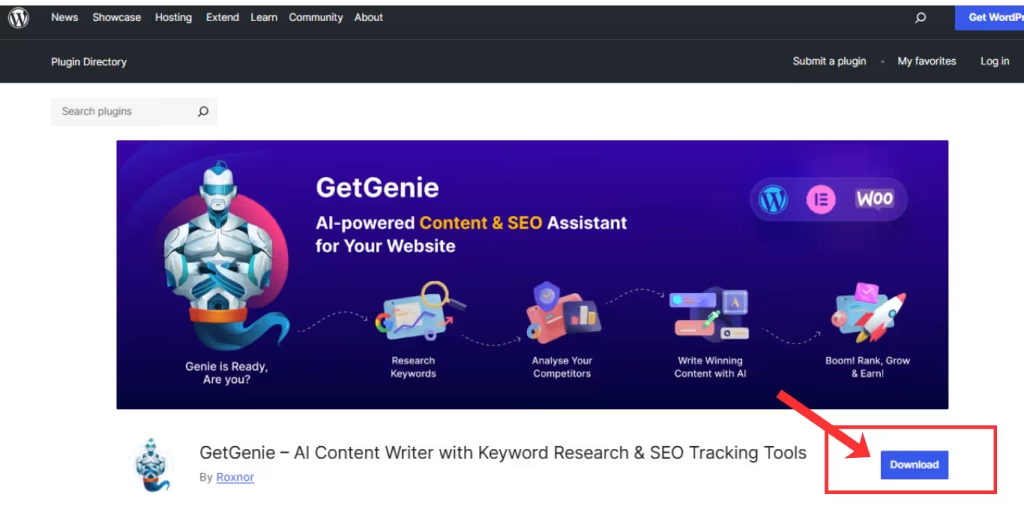
  3. From WordPress.org
GetGenie Download from WordPress Org
Learn how to install and activate GetGenie ➡️ How To Get Started With AI Writing Assistant – GetGenie 

Step 2: Using GetGenie for Social Copy

Once you are at the WordPress Dashboard with GetGenie installed and activated, move over to Dashboard > GetGenie > AI Writing.
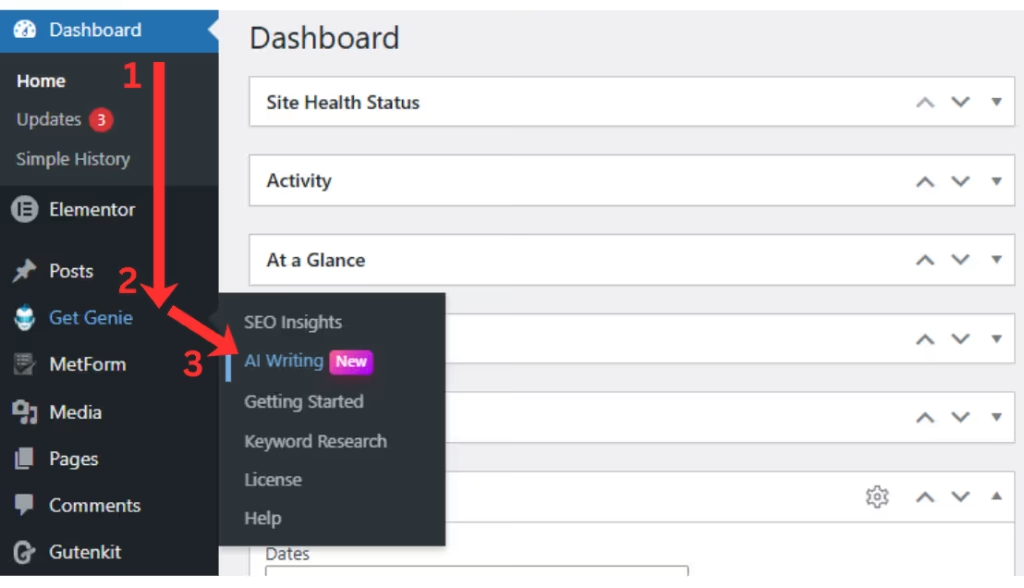
GetGenie WordPress Dashboard

There you will notice over 40 templates, each dedicated for particular content creation tasks. Select the Social Media Post/Copy template from the list.
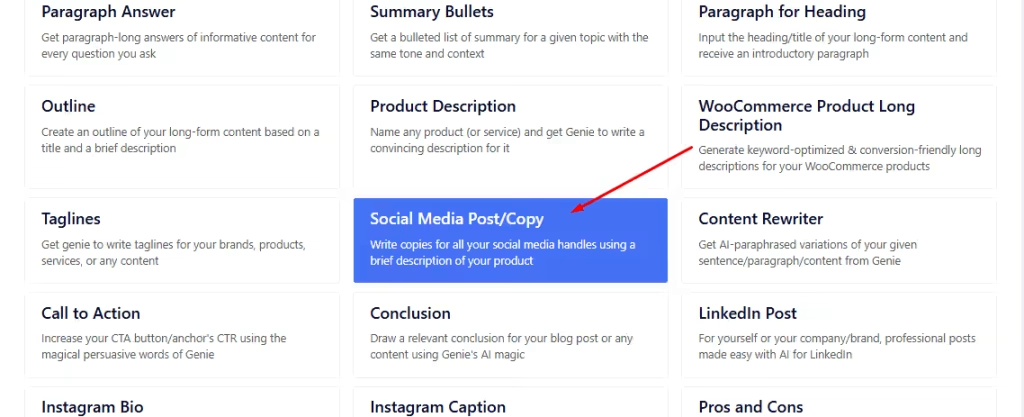
Try Social Media Copy Template Today
Social Media Copy Template

Step 3: Using Social Media Copy Template

Next, the template window will appear from the right of your screen.
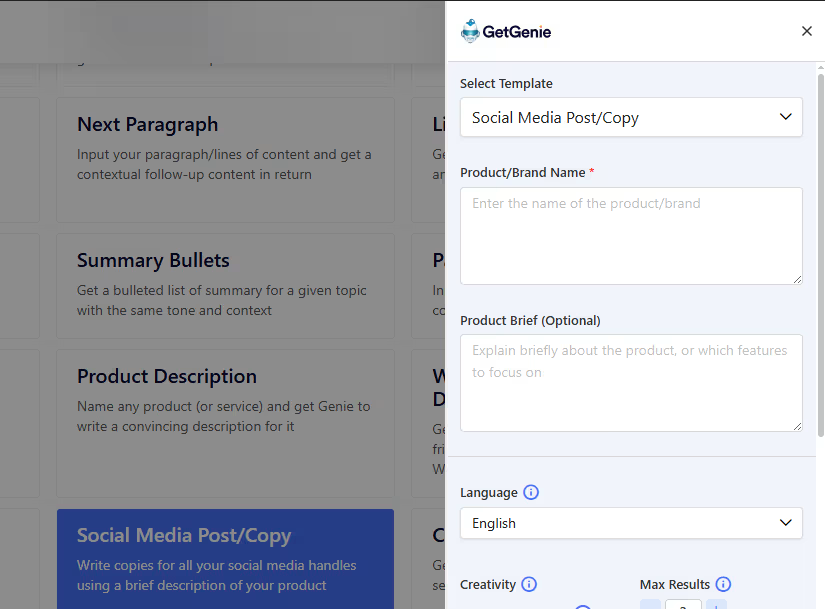
Social Copy Generator Template

There, add the details of your desired social media copy. Like the Brand or Product Name and a brief on the product. The latter is optional but adds more to the context.
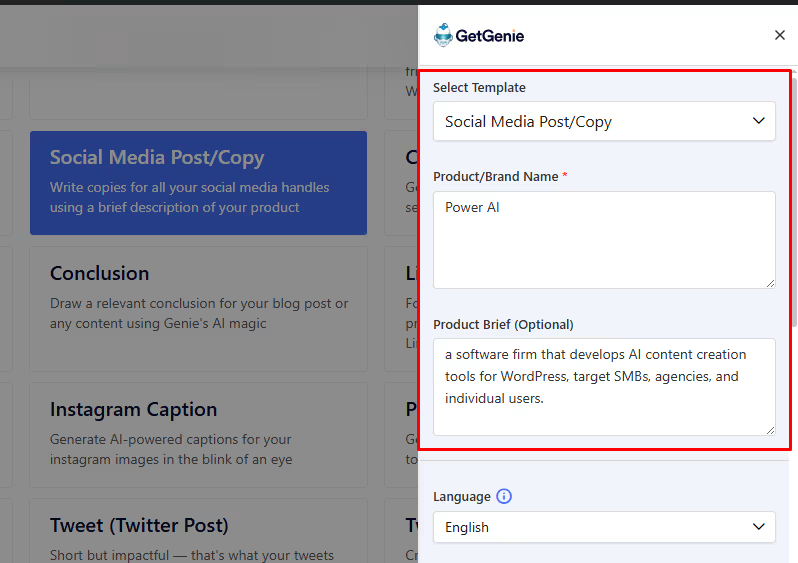
Adding brand name and brief

Once you’ve inserted the details, you can select the level of creativity (1 – 5) and number of results (1 – 6) for your desired output. Along with the language of choice. Finally, click on the Write button to generate the results.
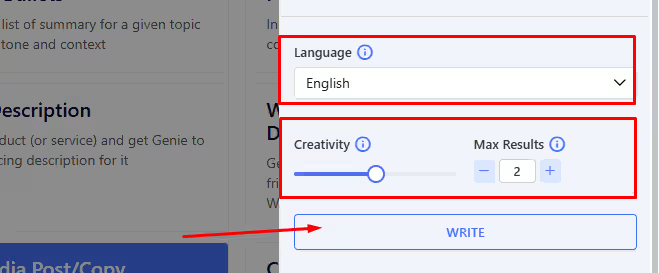
Selecting Language, Creativity and No of Results
Selecting Language, Creativity and No. of Results

Here, we got 2 outputs based on the setting, with creativity of 3, in English.
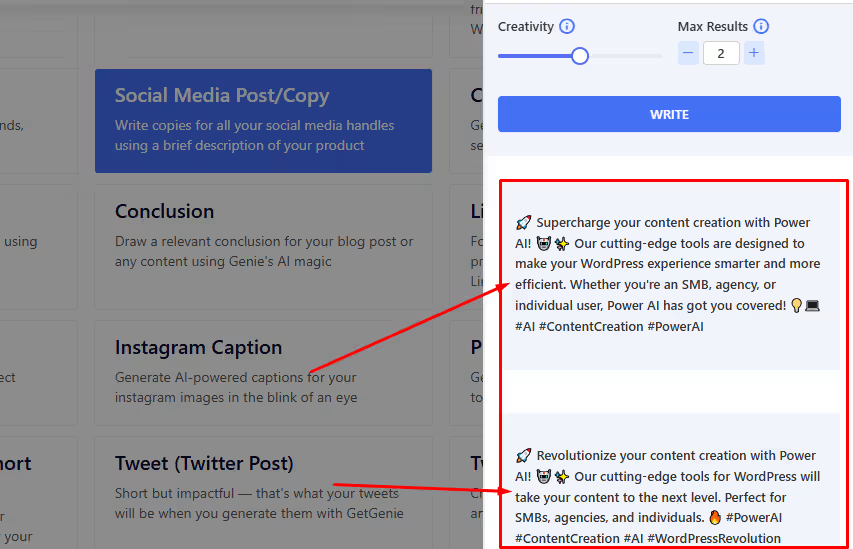
Generated Social Copy options

Two outputs are generated. You can select whichever suits your requirements. 

Step 4: Check and Finalize the Copy

Before using the copy, see if it matches your brand tone and platform-specific requirements. Know more about it by reading about 10 Social Media Copywriting Best Practices. 

And also, get a quick step-by-step look back at using the social media copy template below. 👇
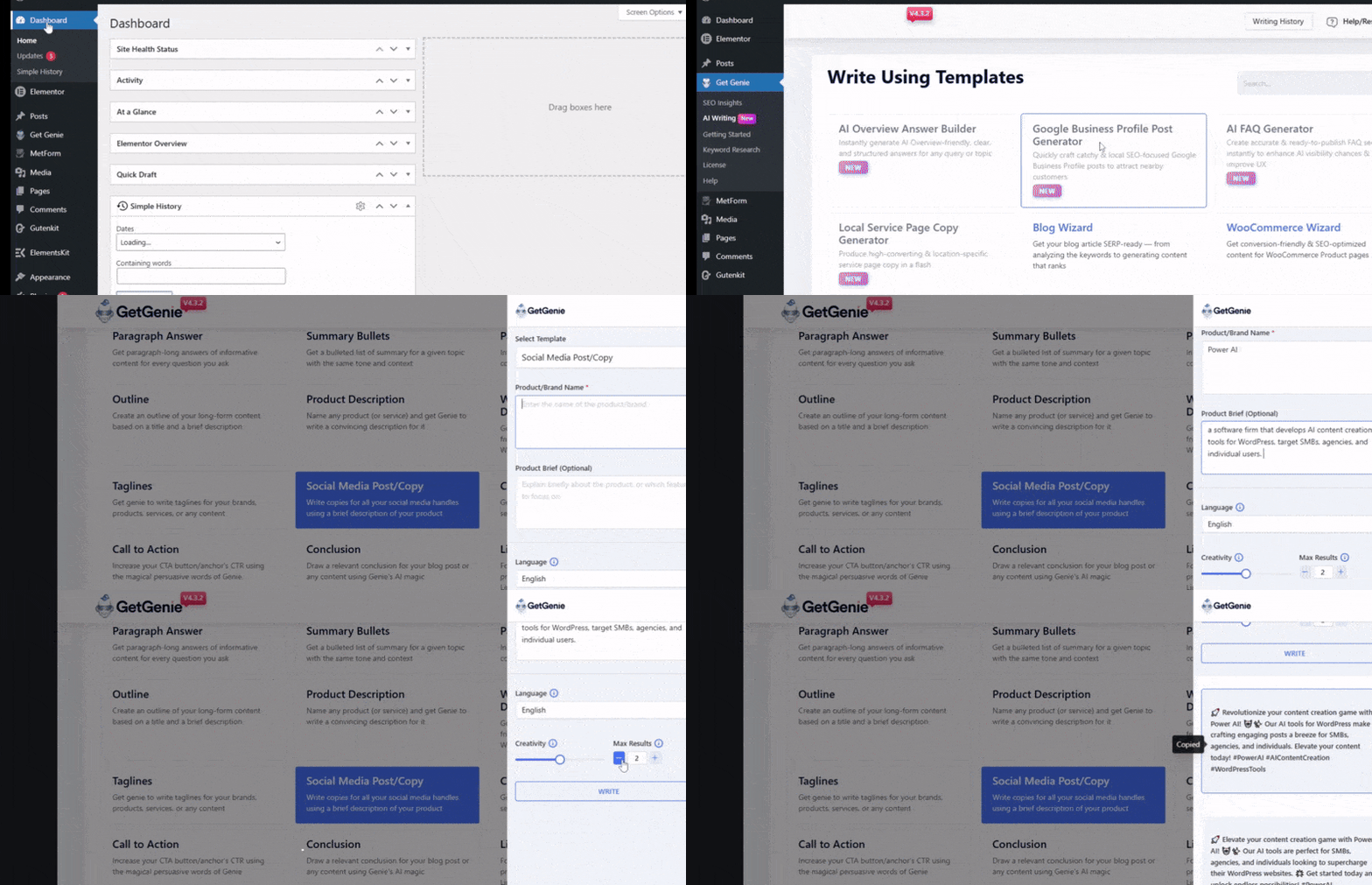
Generating Social Copies with AI Step by Step
What inputs should I prepare before I prompt an AI tool for social copies?

You should keep in mind and check:
1. Objective: awareness vs. clicks vs. signups vs. replies
2. Audience + pain point
3. Offer + proof (numbers, outcomes, testimonials—verified)
4. Brand voice rules (dos/don’ts, words to avoid)
5. Platform + format: caption, thread, carousel text, ad primary text, etc.

How do I keep AI-generated copy consistent with my brand voice?

Add context to the prompts. It will help the tool understand more about your product and brand. Also, create a brand voice checklist that you maintain to align tone, sentence length, emoji rules, prohibited phrases.

Is there any AI tool dedicated for social media copywriting?

Currently, no. But AI content creators like GetGenie offer various templates and features that generate social copies as per your prompts and inputs.

Are there templates or tools specific to certain platforms (e.g., LinkedIn, Twitter, Facebook, etc).

Yes, AI copywriting tools offer options or templates dedicated to writing copies and captions for specific platforms.  For instance, GetGenie offers templates for LinkedIn captions, Instagram Bios, Instagram Captions, and Twitter Posts.

Resumindo

AI tools help you draft powerful and appealing social copies that feed into more viewer engagements, shares, likes, comments, etc. However, you must also check and review the copies for brand tone, context, audience-friendliness, etc. 

Using GetGenie’s social media copy template will let you create engaging copies for social media for the right viewers. These copies are best used as captions of your posts. 

For more specific, platform-based copies and posts, try the following templates as well:

👉 GetGenie LinkedIn Post Generator 
👉 GetGenie Instagram Bio Generator
👉 Gerador de legendas para Instagram GetGenie

  • Compartilhar isso:

How Google AI Overview Selects Content – Algorithm Cues & Signals

Postagem anterior

Deixe uma resposta Cancelar resposta

O seu endereço de e-mail não será publicado. Campos obrigatórios são marcados com *

GetGenie helps write, optimize & track your content while you focus on conversions & growth!

Recursos

  • Sobre
  • Programa de Afiliados
  • Comparar
  • Blogue
  • Roteiro
  • Ofertas por tempo limitado
  • Carreira - Estamos contratando!

Empresa

  • Centro de ajuda
  • Política de afiliados
  • política de Privacidade
  • Politica de reembolso
  • termos e Condições
  • Guide & Tutorials
  • Contato

Comparar

  • GetGenie Ai vs.
  • GetGenie Ai vs.
  • GetGenie Ai vs.
  • GetGenie Ai x Writesonic

Boletim de Notícias

Ao inserir seu e-mail, você concorda com nossos termos e Condições e política de Privacidade.

Ganhar Vida 30% Comissão como Afiliado!

Junte-se hoje

© 2026 ObtenhaGenie. Todos os direitos reservados.

Encontrar-nos no
Ícone Twitter X
We've detected you might be speaking a different language. Do you want to change to:
Alterar o idioma para English English
Alterar o idioma para German German
Alterar o idioma para Spanish Spanish
Alterar o idioma para Italian Italian
Alterar o idioma para French French
Alterar o idioma para Danish Danish
Portuguese
Alterar o idioma para Swedish Swedish
Alterar o idioma para Polish Polish
Alterar o idioma para Korean Korean
Alterar o idioma para Japanese Japanese
Change Language
Close and do not switch language