








Top AI Rank Tracking Tools

The use of AI in rank tracking is boosting SEO many folds. It makes the laborious task of tracking rankings simpler. Its predictive abilities allow tracking rank changes, spotting trends, and taking action when necessary.
AI tools also helps in informed decision-making and competitiveness for businesses. Helping businesses to achieve more with less effort and improved rankings.
Here, we will discuss what is AI rank tracking, how to track your Google ranking using AI tools, why is it important, and list top AI rank trackers with a practical walkthrough of GetGenie’s new feature. Let’s begin!
Top AI Rank Tracking Tools include:
➡️ GetGenie: Track keyword rankings to spot new and lost opportunities inside WordPress.
➡️ SE랭킹: Provides in-depth competitor keyword insights
➡️ ProRankTracker: Specialized for tracking and reporting website rankings
➡️ 윈처: Best for detailed, daily reports on keyword positions
➡️ Semrush: Offers advanced level rank tracking analytics
➡️ 아레프스: All-in-One SEO rank tracking tool
Using AI rank tracking, you can track how well your website performs for particular keywords, faster and more accurately.
Overview of Rank Tracking Using AI
AI rank tracking is the process of utilizing AI to track how well your website performs for particular keywords or search queries. It entails monitoring how these keywords perform over time in search results. This enables you to see how your rankings change and how it affects the number of people visiting your site.
How Does AI Rank Tracking Help SEO?
Using AI tools helps SEO specialists get result fasters. You can also receive predictive analysis based on how well your content or page might rank in the coming days. The tools assist in:
➡️ 키워드 전략 평가
See how well your keyword strategy is working by checking if changes lead to better website rankings. You can also find low-performing pages on your site and improve them by changing content and keywords.
➡️ Checking Competitors
Keep track of what your competitors are doing. This info can help you improve your content marketing strategy by “filling in the gaps”. Either by identifying important keywords you are not ranking for but they are. Or, their content gaps that you can capitalize on.
➡️ Identifying Website Traffic Concerns
웹사이트 트래픽에 문제가 있는지 찾아보세요. 순위가 많이 떨어지면 누군가가 귀하의 웹사이트에 해를 끼치려고 하거나 귀하가 잘못된 SEO 방법을 사용하고 있다는 의미일 수 있습니다.
➡️ Improving Profitability
Increase your earnings by finding pages that make you more money. Focus on finding new money keywords that help you sell more.
What is an AI Rank Tracker?
A rank tracker is a tool or software that monitors and tracks the search engine ranking positions of specific keywords over time. It analyzes the performance of a website’s content and tracks search engine rankings through search engine results pages (SERPs). And tools using AI technology for the process are AI rank trackers.
순위 추적기의 주요 특징 및 기능은 다음과 같습니다.
- 키워드 추적: 선택한 키워드의 순위를 추적하여 해당 특정 용어에 대해 웹사이트의 성과가 얼마나 좋은지 확인합니다.
- 경쟁사 분석: 웹사이트의 키워드 순위를 경쟁업체의 키워드 순위와 비교하여 개선할 수 있는 기회와 영역을 파악할 수 있습니다.
- 유행 분석: 시간에 따른 순위 모니터링을 통해 어떤 키워드의 순위가 상승하고 어떤 키워드가 하락하는지 등의 추세를 파악할 수 있습니다.
- 보고: 쉽게 해석할 수 있도록 차트와 그래프를 포함하여 웹 사이트의 SEO 성능에 대한 통찰력을 제공하는 보고서를 생성합니다.
- 지역 추적: 일부 순위 추적기는 특정 지리적 위치를 기반으로 키워드 순위를 모니터링할 수 있으며 이는 로컬 SEO에 유용합니다.
- 검색 엔진 지원: Google, Bing, Yahoo 등을 포함한 여러 검색 엔진에서 순위를 추적하는 경우가 많습니다.
6 AI Tools to Track Ranking
These six advanced AI-powered rank tracking tools provide insightful analytics, real-time updates, and deep insights into your website’s performance in search results. Let’s explore how these AI tools can elevate your SEO game and help you stay ahead.
1. GetGenie
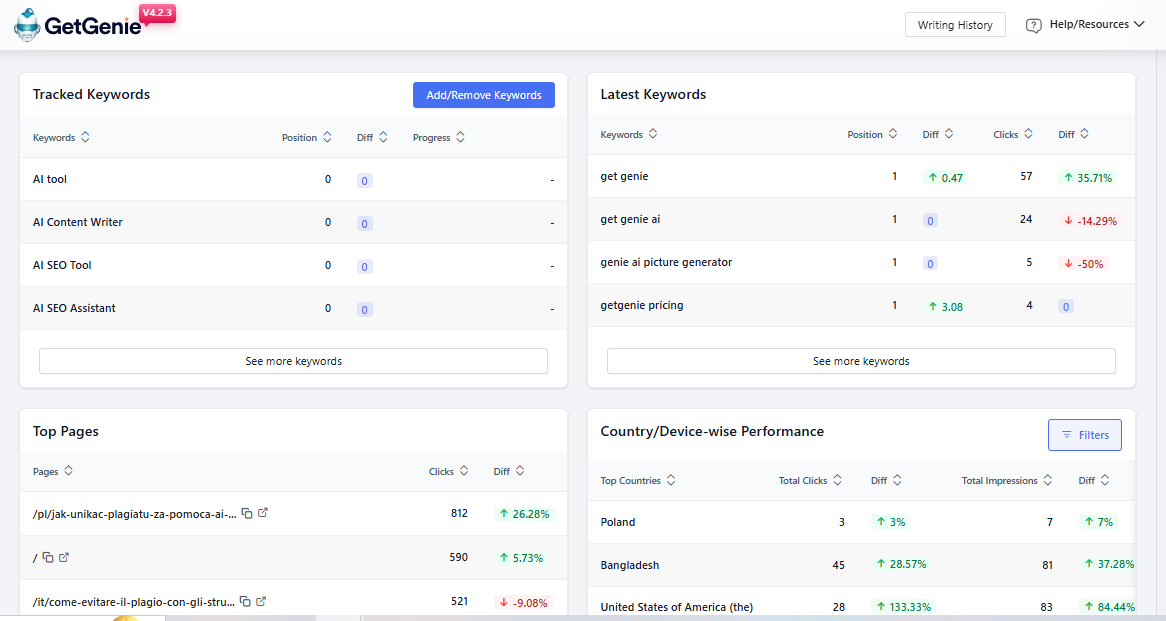
If you are struggling to find out what’s driving traffic to your website or why your rankings suddenly drop, SEO insights by GetGenie is the key. It was built into your WordPress website, eliminating the need to change from tab to tab. This feature of GetGenie gives you a clear, data-backed view of your SEO performance.
You can track keyword rankings to spot new and lost opportunities. You can also find out what pages are ranking and what pages need attention. Whether you’re a blogger, marketer, or business owner, it’s the all-in-one solution to monitor, analyze, and grow your organic search traffic with confidence.
Key Highlights of SEO Insights in GetGenie:
- 키워드 추적
- Monitor how your target keywords are performing in Google Search.
- Check their ranking positions, changes over time, and keyword trends.
- Monitor how your target keywords are performing in Google Search.
- New & Lost Keywords
- Discover new keywords your content is starting to rank for.
- Identify lost keywords where your pages have dropped out of the search results, helping you take quick action.
- Discover new keywords your content is starting to rank for.
- Traffic & Click Data
- See which pages are getting clicks and impressions from Google.
- Analyze CTR (Click-Through Rate) and total traffic metrics to understand what’s working.
- See which pages are getting clicks and impressions from Google.
- Content Performance Overview
- View which blog posts or pages are driving the most SEO value.
- Get clarity on what content to update, optimize, or promote further.
- View which blog posts or pages are driving the most SEO value.
- User-Friendly Dashboard
- Visual graphs and data tables make it easy to track SEO progress without leaving WordPress.
- Syncs with your Google Search Console for accurate insights.
- Visual graphs and data tables make it easy to track SEO progress without leaving WordPress.
와 함께 SEO Insights by GetGenie, you no longer need to switch between multiple tools to measure your site’s SEO health. It’s a convenient, data-driven way to guide your content updates, SEO strategy, and ranking growth.
가격 계획:
- Available in a free trial
- Starter: $6.00 per month
- Writer: $11.40 per month
- Pro: $26.95
2. SE랭킹
SEranking은 웹 사이트의 검색 엔진 순위를 높이고 전반적인 웹 사이트 성능을 향상하며 온라인 입지를 강화하기 위해 세심하게 제작된 포괄적인 SEO 솔루션입니다. 기본적으로 SEranking은 사용자에게 포괄적인 통찰력과 심층적인 보고서를 제공하여 검색 엔진의 동적 영역 내에서 웹 사이트 성능에 대한 명확하고 자세한 보기를 제공합니다.
이 강력한 도구는 사용자가 자신의 성과를 측정할 수 있을 뿐만 아니라 경쟁사를 예의주시하고 전략과 전술에 대한 귀중한 통찰력을 제공함으로써 그 이상을 제공합니다. SEranking은 백링크를 추적하고 품질과 관련성을 면밀히 조사하여 강력한 디지털 발자국을 보장함으로써 전략적 동맹자가 됩니다.
핵심 기능:
- 온페이지 SEO 검사기
SE Ranking’s AI-powered On-Page SEO Checker provides a checklist of actionable steps to enhance a web page’s search engine rankings. It assesses various page elements and metrics. It helps search engines gauge content relevance and user experience. Use this tool to seize every opportunity to enhance your on-page SEO and maintain complete control over your web pages.
- 백링크 검사기
고품질 백링크를 얻는 것은 SEO에 대한 신뢰를 얻는 것과 같습니다. 이는 귀하의 웹사이트와 Google의 신뢰도를 높여 순위를 높여줍니다. 더 많은 링크는 콘텐츠의 가치를 보여주고 유기적인 트래픽을 유도합니다. 백링크 검사기 도구를 사용하여 귀하 또는 경쟁사의 링크를 분석하고 효과적인 전략을 수립하십시오.
- 경쟁사 키워드 검사기
SE Ranking의 경쟁사 키워드 검사기는 라이벌의 키워드, SEO 성과에 대한 주요 통찰력을 제공하고 키워드 경쟁력을 측정하는 데 도움이 됩니다. 검색량 동향, Google Ads 클릭당 비용, 글로벌 키워드 경쟁을 손쉽게 알아보세요.
가격 계획:
- 14일 무료 평가판 – 이용 가능
- 필수 – 월 $55
- 프로 – 월 $109
- 비즈니스 – 월 $239
3. ProRankTracker
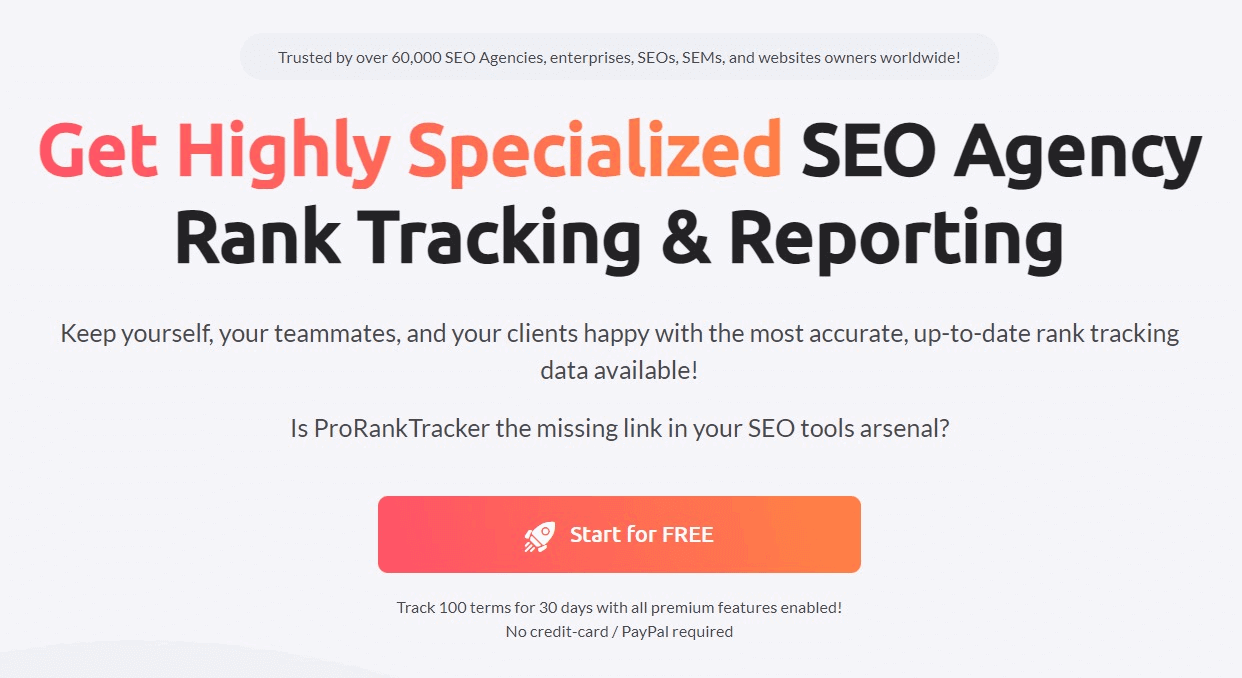
ProRankTracker는 웹사이트 순위를 추적하고 보고하는 전문 도구입니다. 팀과 클라이언트를 최신 상태로 유지하기 위한 분석, 통찰력 및 알림과 함께 정확한 검색 엔진 순위 데이터를 제공합니다. Pro Rank Tracker를 사용하면 인상적인 보고서를 작성 및 공유하여 작업 흐름을 개선할 수 있습니다. 투명성과 신뢰성을 갖춘 이 도구는 순위를 높이고 고객을 유지하기 위해 60,000개 이상의 SEO 대행사가 신뢰하는 귀중한 SEO 도구입니다.
핵심 기능:
- 위치 추적:
Pro Rank Tracker는 과거 데이터에 대한 통찰력을 제공하여 추세를 파악하고 전술을 향상시킵니다. 고객이나 팀 구성원과 공유할 수 있는 사용자 친화적인 보고서를 제공하여 전 세계 SEO 전문가로부터 칭찬을 받습니다. 다양한 검색 엔진, 로케일 및 장치에서 키워드 위치를 감시할 수 있는 강력한 추적 도구를 제공합니다.
- 인스타그램 확인:
ProRankTracker의 Insta-Check 기능은 최신 순위와 원시 데이터로 시스템과 도구를 업데이트하는 간단한 방법입니다. Insta-Check를 사용하면 ProRankTracker 계정의 모든 용어에 대한 순위를 확인할 수 있습니다. 크레딧을 사용하여 단일 URL 순위 또는 특정 키워드에 대한 상위 10/30/100을 확인하는 종량제 서비스입니다.
- 강력한 보고:
ProRankTracker는 다양한 보고서를 제공합니다. 여기에는 현재 순위, 진행 보고서, 고객 및 동료와 공유할 수 있는 실시간 보고서가 포함됩니다. 당사의 화이트 라벨 템플릿 도구를 사용하여 이러한 보고서를 사용자 정의할 수 있으며 다양한 언어로 제공됩니다. 자신의 이메일 주소를 발신자로 사용하여 클라이언트에게 보고서 및 알림을 보낼 수도 있습니다.
가격 계획:
- 무료 플랜 – 월 $0
- 스타터 – 월 $13.5부터 시작
- 프로 – 월 $89부터 시작
- 대행사 – 월 $180부터 시작
4. 윈처
Wincher는 키워드 조사 및 검색 엔진 순위 변경 추적을 위한 SEO 도구입니다. 이는 사용자가 Google 검색 결과에서 특정 타겟 키워드에 대한 페이지 순위를 최신 상태로 유지하는 데 도움이 됩니다. 또한 현재 키워드 위치에 대한 심층 보고서를 매일 제공합니다. 지역 키워드 순위를 주시함으로써 개선이 필요한 영역을 식별하고 지역 SEO 전략을 강화할 수 있습니다.
핵심 기능:
- 경쟁자 순위 업데이트:
경쟁자 추적을 사용하여 경쟁자의 키워드 전략을 모니터링하십시오. 경쟁업체를 추가하면 도구가 귀하의 실적 및 Google 결과와 비교하기 위해 해당 경쟁업체의 트래픽과 키워드를 가져옵니다. 이는 그들의 강점을 드러내고 특정 키워드에서 더 나은 성과를 낼 수 있는 더 강력한 전략을 세우는 데 도움이 됩니다.
- 일일 순위:
Wincher의 일일 순위 기능은 검색 엔진 위치 데이터에 대한 일일 업데이트를 제공합니다. 이는 경쟁사의 순위 변경에도 적용되어 SEO에서 한 발 앞서 나갈 수 있습니다. 이 기능은 예상치 못한 순위 하락을 신속하게 해결하는 데 특히 유용합니다.
- 지역 순위 추적:
지역 검색에서 웹사이트의 성과를 추적하려면 지역 순위 추적기가 필수적입니다. Wincher는 180개국에 걸쳐 10,000개 이상의 위치에서 추적을 가능하게 합니다. 소규모 사업자와 블로거에게 적합합니다. 하나의 위치를 확인해야 하든 여러 위치를 확인해야 하든 상관없이 정확한 데이터를 사용하여 성과를 평가할 수 있습니다.
가격 계획:
- 14일 무료 평가판 – 이용 가능
- 스타터 – 월 $39
- 비즈니스 – 월 $74
- 기업 – 월 $289
5. 셈루쉬
Semrush는 웹 노출을 늘리고 마케팅 동향을 학습하기 위한 포괄적인 도구 모음입니다. 이 원스톱 디지털 마케팅 솔루션은 SEO, 클릭당 지불(PPC), 소셜 미디어 등의 관리를 지원합니다. 이 소프트웨어는 디지털 마케팅에 도움이 필요한 사람들을 위해 만들어졌습니다. SEMrush를 사용하면 경험이나 기술이 거의 없더라도 SEO를 간단하게 이해하고 사용할 수 있습니다.
핵심 기능:
- 순위 추적
귀하 사이트의 현재 키워드 순위를 자세히 설명하는 이 기능이 포함된 보고서를 받게 됩니다. 또한 지역별로 이러한 단어와 문구를 추적할 수도 있습니다. 시간이 지남에 따라 사이트에 대한 추가 정보가 Semrush에 입력됨에 따라 키워드 순위를 높이려는 노력이 발전하는 것을 볼 수 있습니다.
- 백링크 분석
도구의 '백링크 분석' 영역에서 도메인 이름을 입력하고 Semrush가 찾을 수 있는 모든 백링크 목록을 얻을 수 있습니다. 도메인이 백링크를 얻거나 잃은 시기와 링크의 가치를 식별할 수 있습니다. 제공된 정보는 귀하의 SEO 노력을 향상시키거나 경쟁사의 SEO 노력에 대해 더 자세히 알아보는 데 사용될 수 있습니다.
- 셈러쉬 센서
Semrush 센서는 웹사이트의 활동을 추적하는 도구입니다. SEO 성과 및 글로벌 검색 동향. 잠재적인 알고리즘 변경에 대한 Google 결과를 모니터링하여 해당 변경이 순위에 어떤 영향을 미치는지 이해하는 데 도움을 줍니다.
가격 계획:
- 14일 무료 평가판 – 이용 가능
- 프로 – 월 $129.95
- 전문가 – 월 $249.95
- 비즈니스 – 월 $499.95
6. 아레프스
Ahrefs는 디지털 마케팅 담당자, SEO 전문가 및 모든 규모의 조직이 사용하는 강력한 올인원 SEO 툴킷입니다. 키워드 조사, 경쟁 분석, 백링크 추적 등 다양한 도구를 제공합니다. 이러한 도구를 사용하면 사용자는 웹사이트의 검색 엔진 순위를 높일 수 있습니다.
핵심 기능:
- 데스크톱 및 모바일 순위 업데이트
순위 추적기를 사용하면 190개 국가의 데스크톱과 모바일에서 Google 순위를 확인할 수 있습니다. 키워드 목록을 입력하거나 가져오고, 각 구문에 여러 국가를 추가하고, 라이벌의 URL을 제공하세요. Ahrefs는 데이터 수집을 시작하고 자주 업데이트해 드립니다.
- 순위 추적기
Ahrefs의 순위 추적기 사용자는 시간 경과에 따른 웹사이트 위치 및 특정 키워드의 변화를 추적할 수 있습니다. 사용자는 검색 엔진 결과 페이지(SERP)에서 웹사이트의 성능을 추적하고 순위를 높이는 방법을 찾을 수 있습니다.
- 사이트 탐색기
이 기능을 통해 사용자는 모든 웹사이트를 검사하고 해당 웹사이트의 백링크 프로필, 유기적 검색 트래픽, 최고의 페이지 등에 대해 알아볼 수 있습니다. 사용자는 특정 데이터를 더 깊이 파고들어 웹사이트의 장점과 단점에 대해 자세히 알아볼 수 있습니다.
가격 계획:
- 웹마스터 도구 무료 이용 – 이용 가능
- 라이트 – 월 $99부터 시작
- 표준 - 월 $199부터 시작
- 고급 - 월 $399부터 시작
- 엔터프라이즈 – 월 $999부터 시작
How to Track Your Website Ranking with GetGenie SEO Insights
Monitor your live rankings using GetGenie’s newest feature, following these guidelines:
1. Log in to your WordPress website, and in your dashboard, you’ll find GetGenie. Select SEO Insights and you’ll see the performance of your website, including the keywords, pages, and country and device.
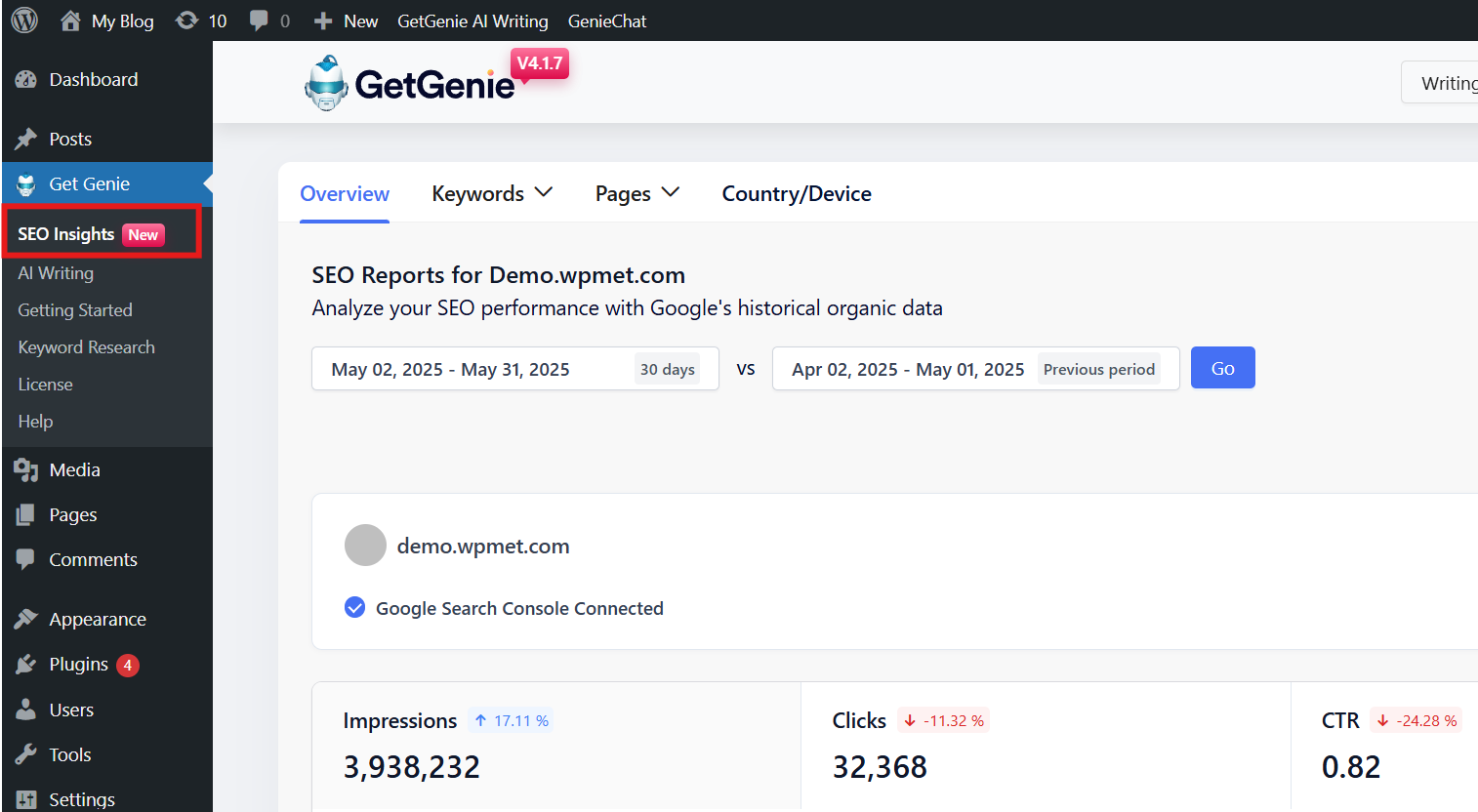
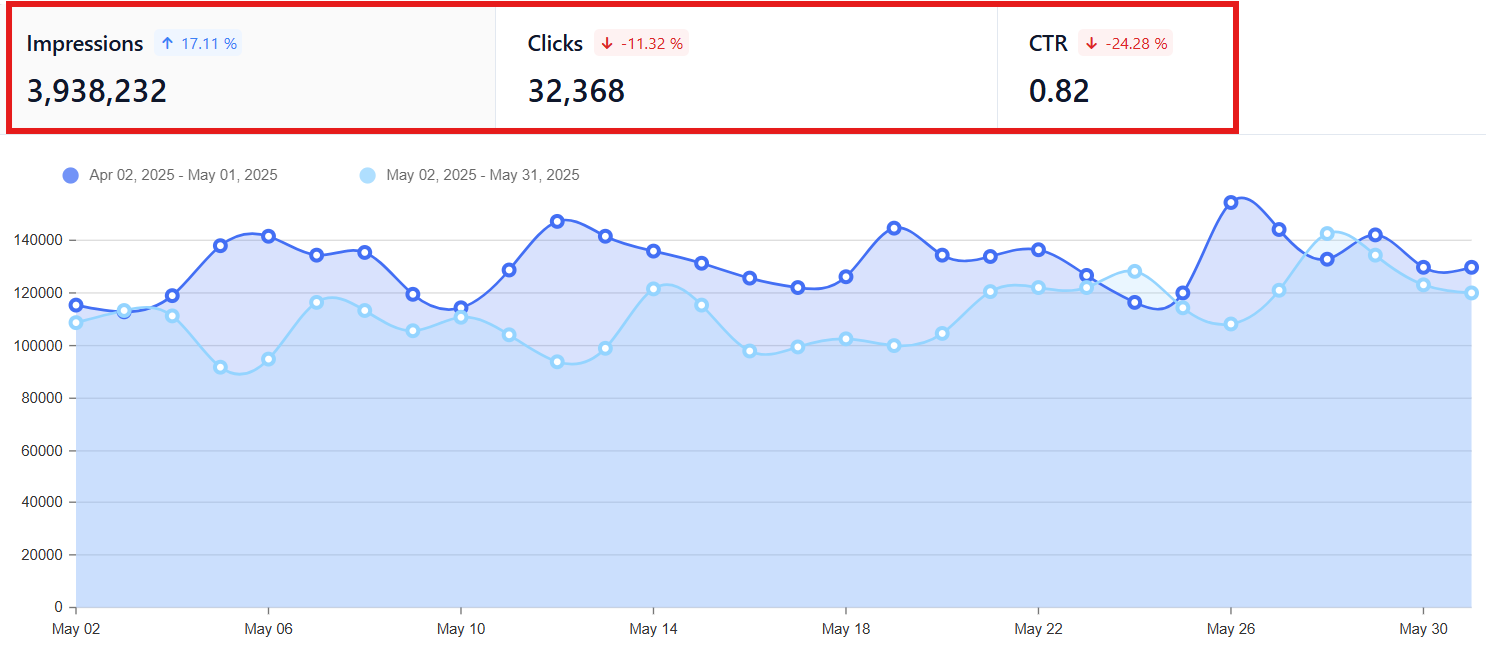
2. The overview section will tell you the total impressions, clicks, and CTR of your website.
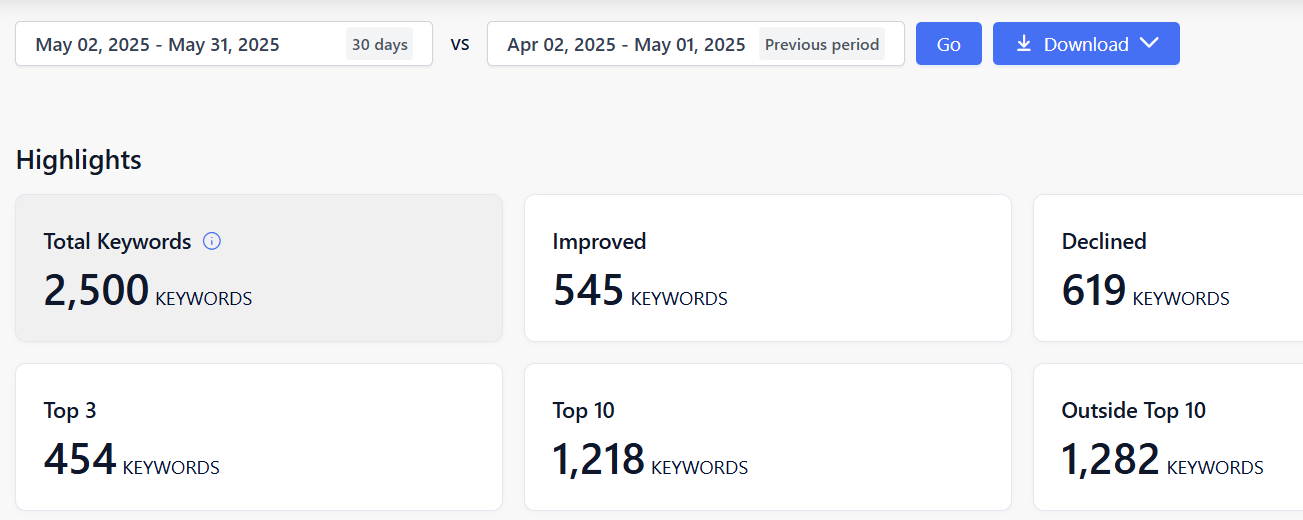
3. To check the performance of your website using the keywords, the keyword section will give you insights into the following:
👉 Keyword latest overview: It will tell you how many keywords your website is ranking for, improved keywords, declined keywords, top 3 and top 10 keywords, and even the keywords outside the top 10.
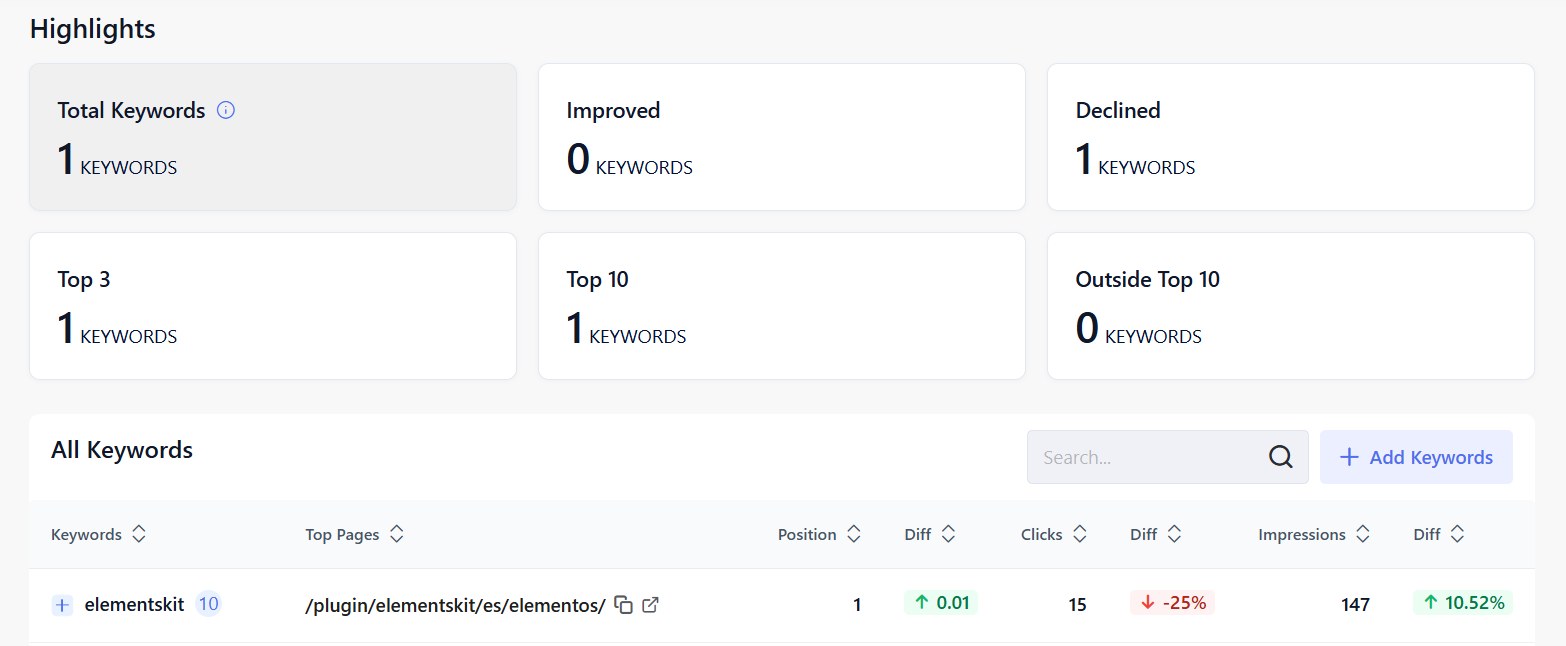
👉 Tracked keywords: It will give you an insight to what specific keywords you monitor to see how well your website or content is ranking in search engine results over time. You can enter up to 300 keywords to track over a specific period.
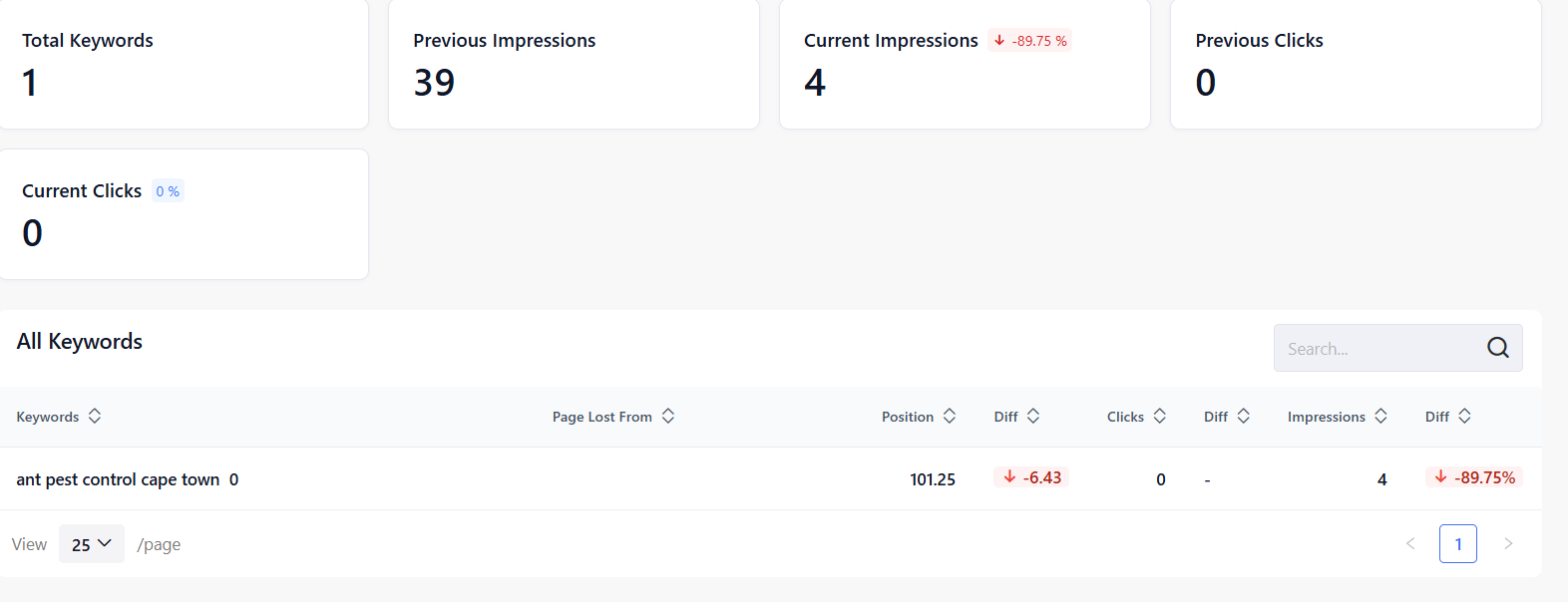
👉 Lost keyword data: These are the keywords your website used to rank for on search engines like Google, but no longer ranks within the top 100 results. Knowing this data will allow you to take action, such as updating your content, improving on-page SEO, etc, to retrieve lost traffic.
👉 New keyword data: These are the keywords your website has recently started ranking for in search engine results that break through within the top 100 positions. You can view each keyword’s position along with the number of impressions and clicks it receives.
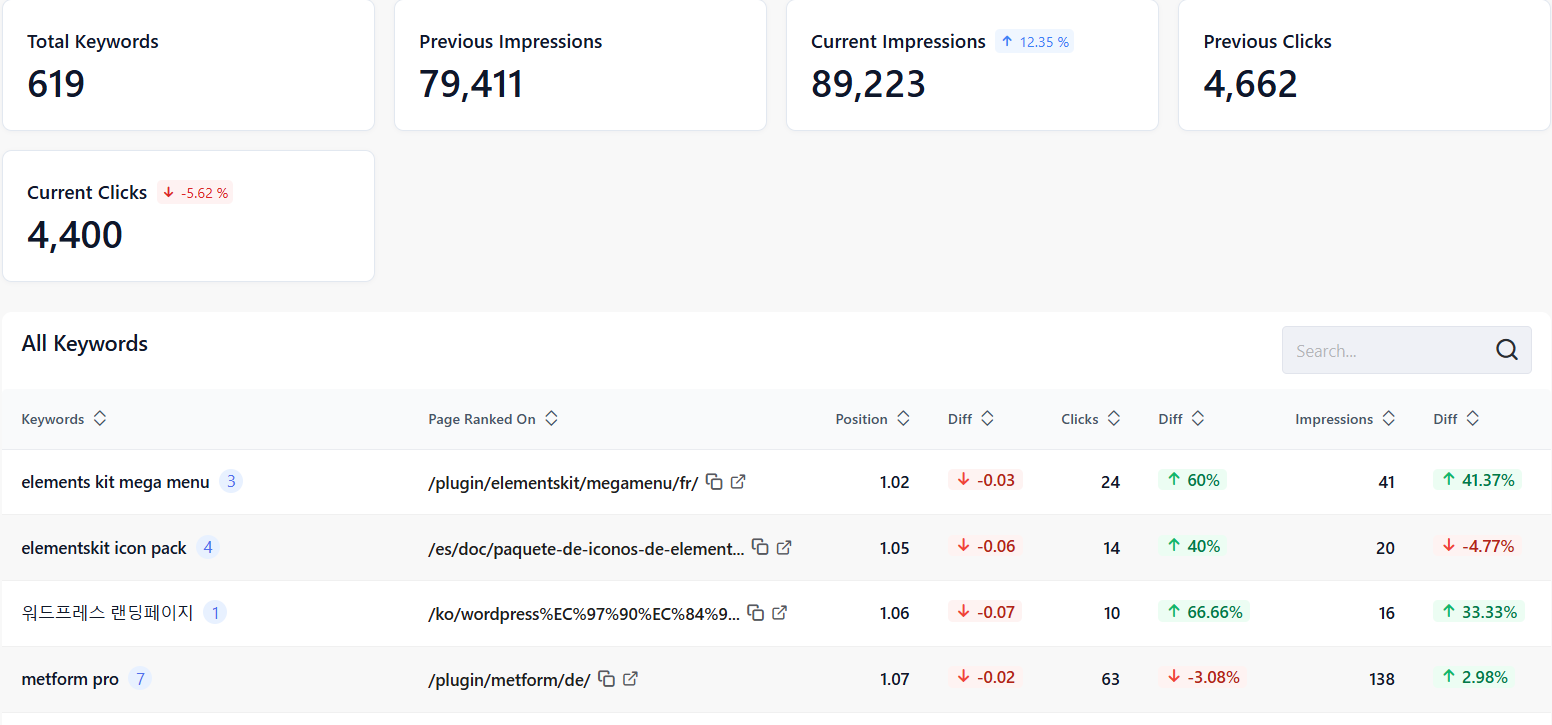
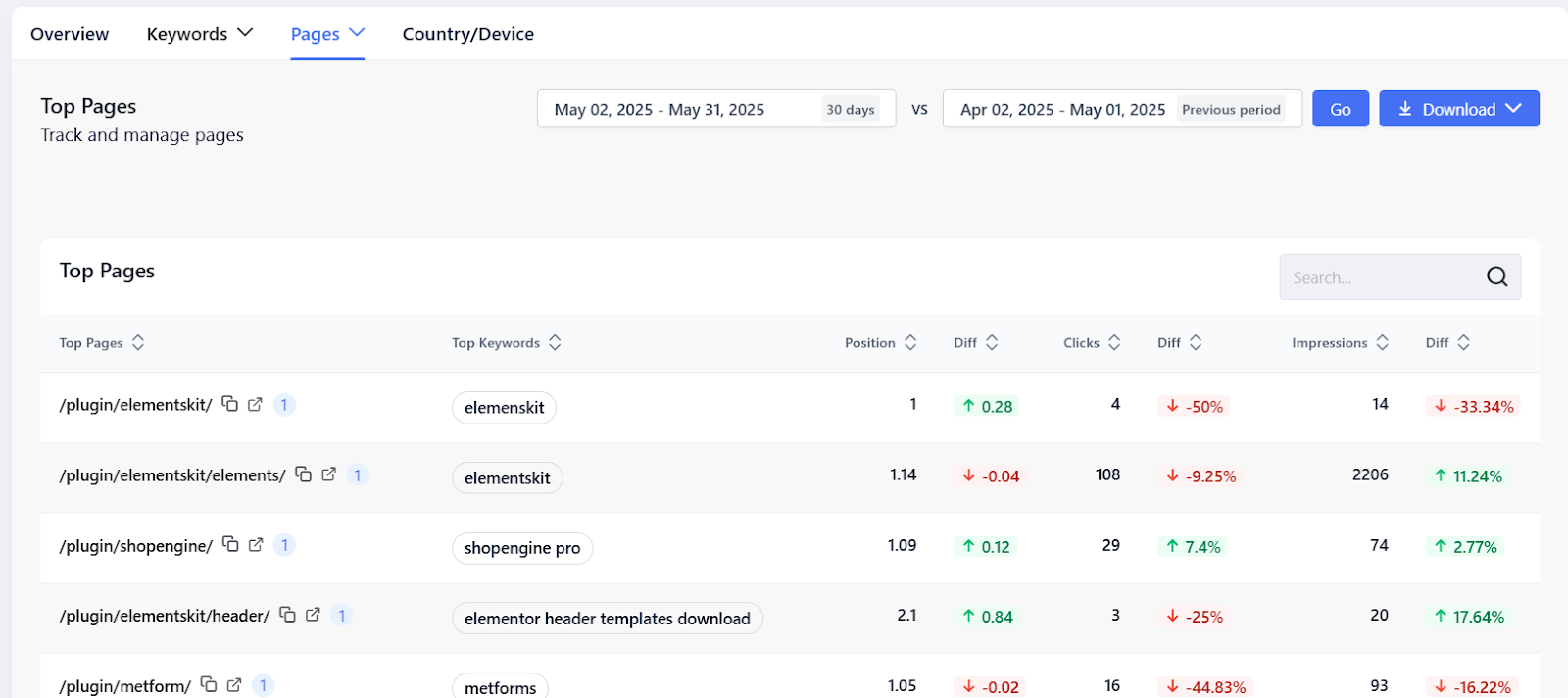
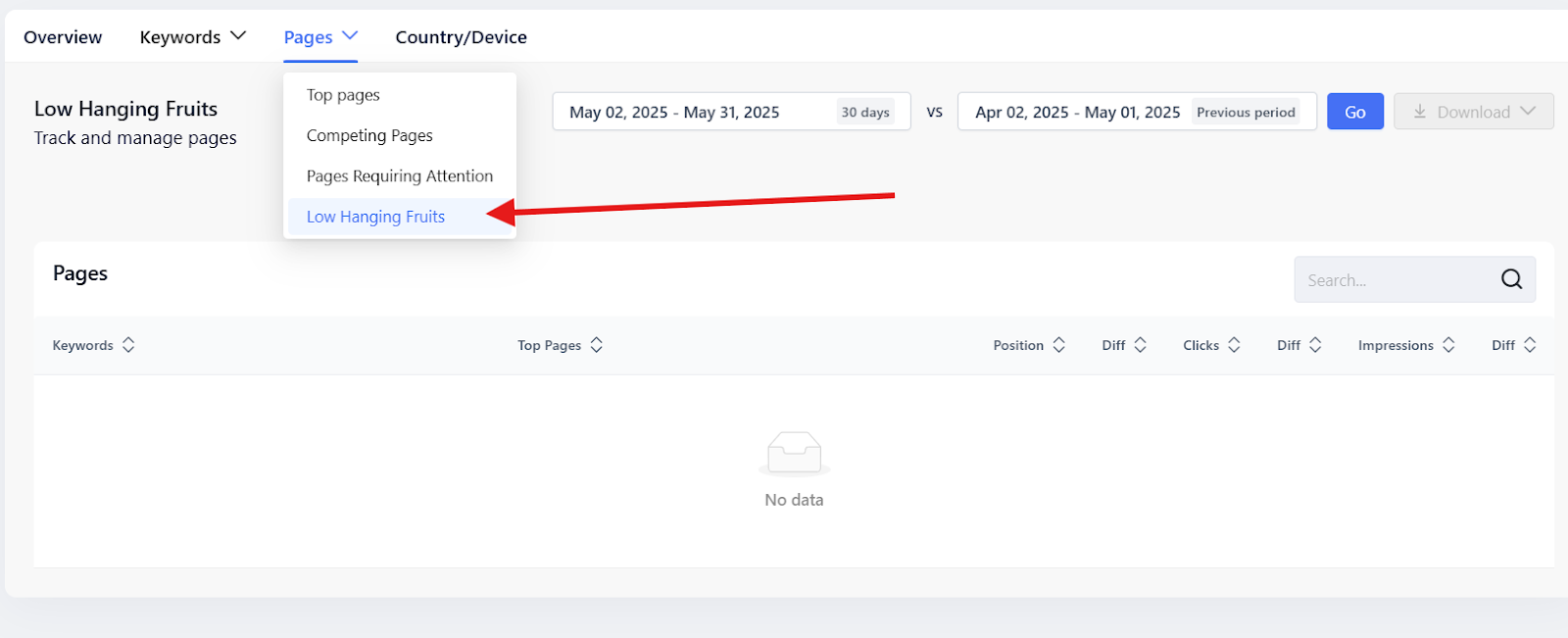
4. GetGenie also allows you to check the performance of the pages on your website. It determines which pages are performing well and which pages need your attention. Under the Pages tab, you will see the following:
👉 Top pages: The Top Pages section shows you which pages on your site are performing best. It provides data on each top page, including the number of clicks and impressions. You’ll also see the keywords each page ranks for, along with their positions.
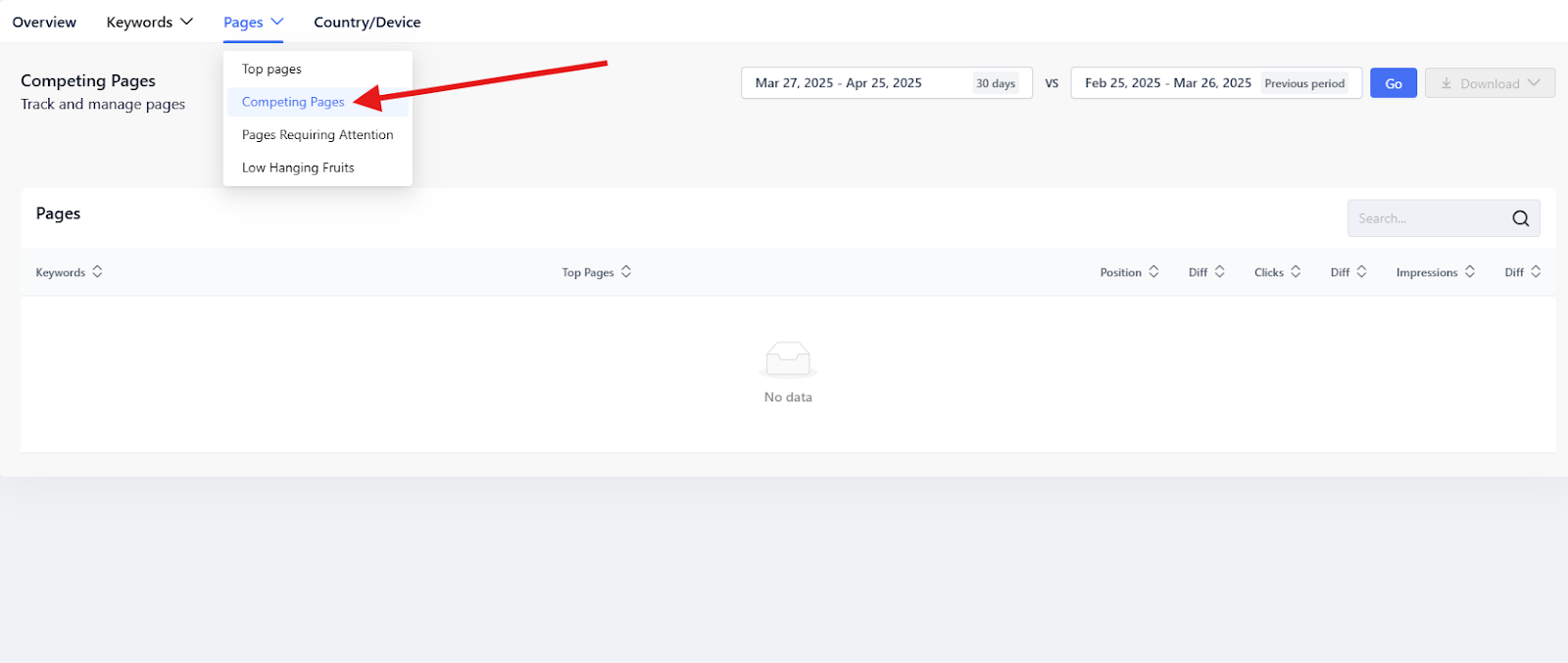
👉 Competing pages: Targeting the same primary keyword on multiple pages is a major SEO mistake. It can confuse search engines like Google and cause the wrong page to rank. Fortunately, GetGenie helps you identify pages on your site that are competing for the same keyword.
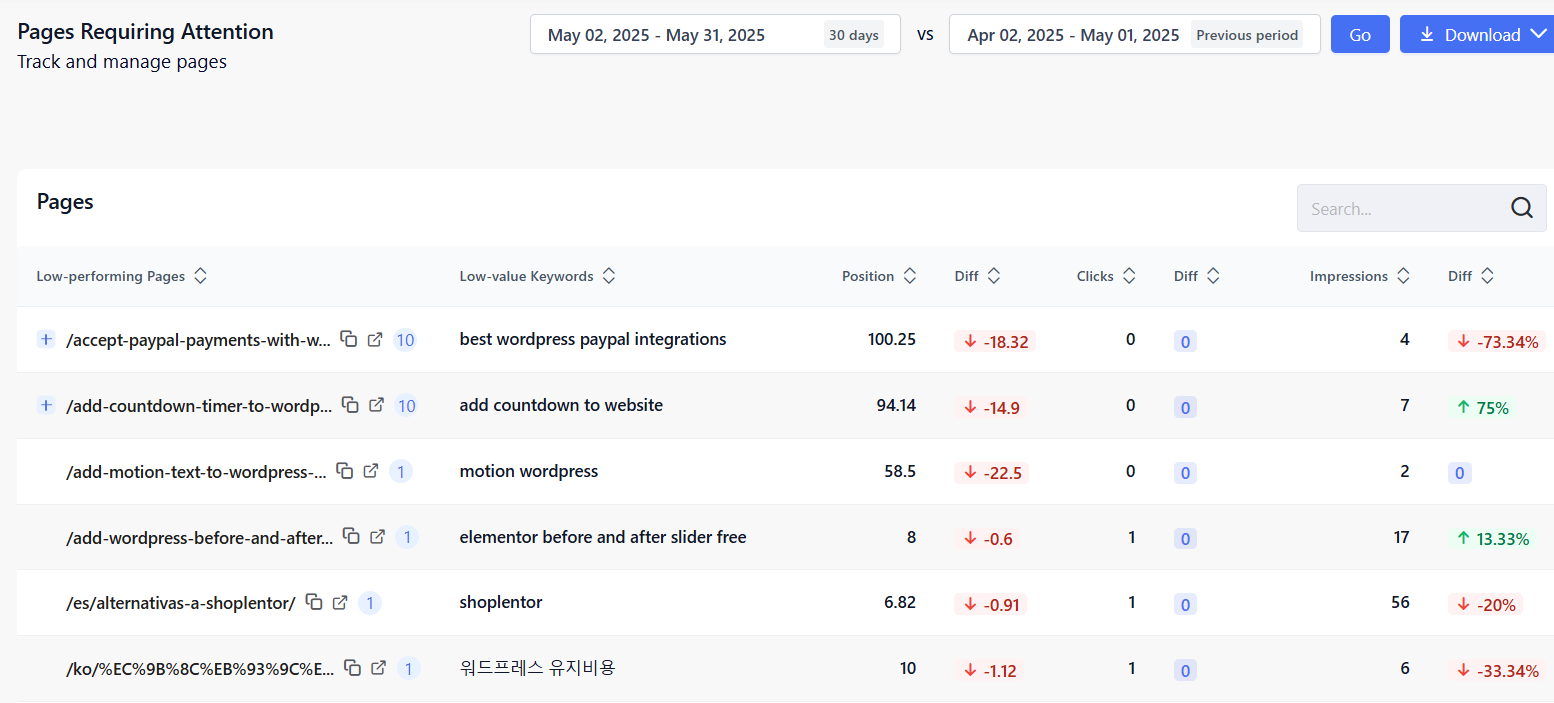
👉 Pages requiring attention: These are the pages on your website that show signs of declining performance or potential SEO issues. Their performance could be due to a drop in keyword rankings, lost impressions or clicks, outdated or unoptimized content, poor engagement, or technical issues.
👉 Low-hanging fruits: This refers to keywords your website is already ranking for, but not yet in top positions. They are usually positioned between 11 and 30 on Google or closer to the first page of search results.
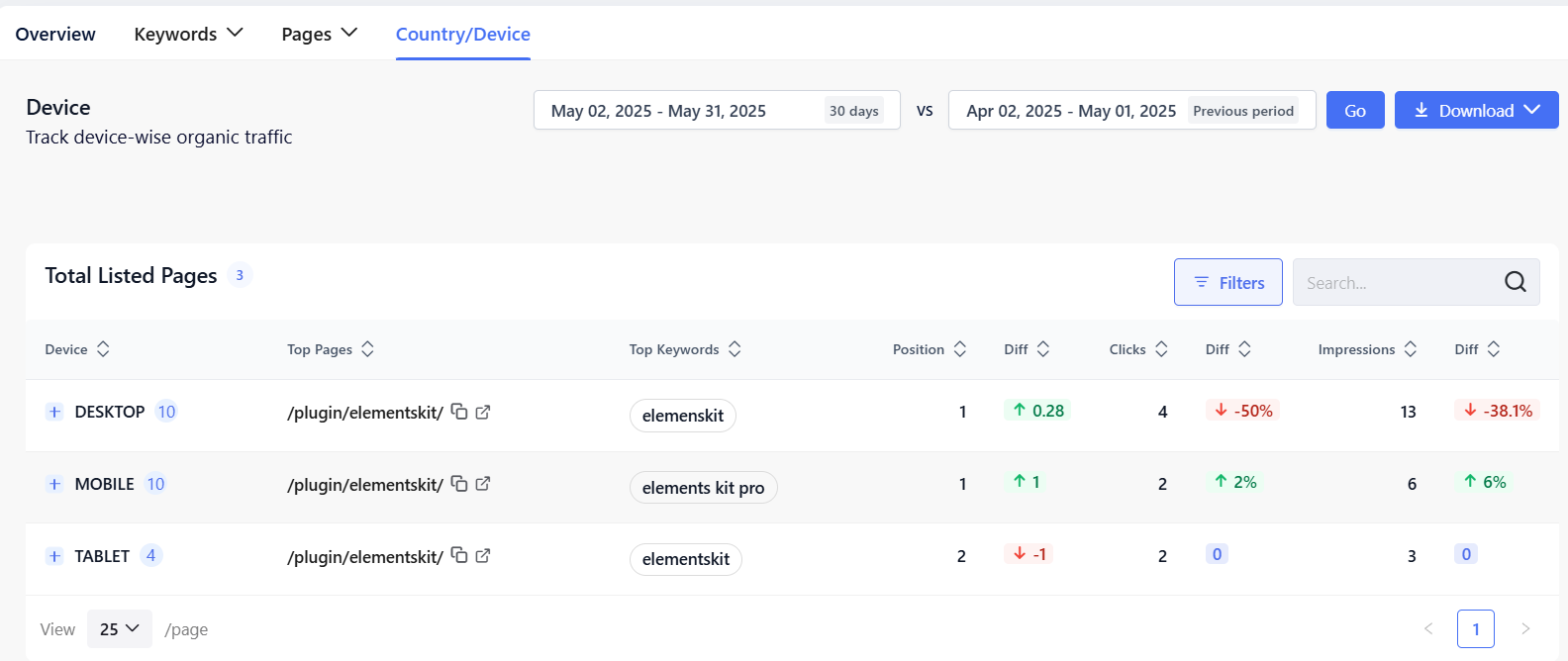
5. Determining which type of device and geographical location your organic traffic is coming from is very easy with GetGenie. The country and device tab will give you full details on which pages and keywords are ranking in each type of device and location.
✅ WordPress SEO 마스터하기
✅ Mastering AI-Powered Keyword Research
✅ 콘텐츠 최적화를 위한 10가지 전략적 단계
✅ 경쟁사보다 높은 순위를 차지하기 위한 콘텐츠 격차 분석
자주 묻는 질문
최종 메모
Indeed, AI rank tracking is revolutionizing SEO. It simplifies tracking website rankings and boosting online visibility. It keeps you ahead, adapts to trends, and guides data-based decisions for effective website optimization.
In this journey, we’ve introduced six top AI tools: GetGenie, SERanking, ProRankTracker, Wincher, Semrush, and Ahrefs.
SEO에 최적화된 출력을 보장하는 글쓰기 도우미를 찾고 있다면, GetGenie 선도하고 있습니다. 치열한 순위 경쟁을 이겨내는 데 도움이 될 수 있습니다.

 Danish
  Swedish
  Polish