







SkaffaGenie Ai

UPP
TILL
45% Besparingar

Slutar i:

dagar
Timmar
Mins
Sek
Activate AI Techfest
GetGenie AI
  • Produkter
    • ElementsKit
    • ShopEngine
    • MetForm
    • WP Social
    • Wp Ultimate Review
    • WP Fundraising

    SEO Insights

    Track & Analyze WordPress SEO Performance

    Sökordsforskning

    Hitta relevanta och outnyttjade sökord på några sekunder

    Konkurrentanalys

    Överträffa konkurrenter med bättre idéer genom att analysera dem

    AI FAQ Generator Ny

    Generate FAQs for AI search visibility & SEO rankings alike

    Head to Head-analys

    Tävla och analysera i alla aspekter med konkurrenten

    Blogg med ett klick

    Ge dina sökord och utför några klick för en SERP-klar blogg

    Avancerat skrivande

    Skräddarsytt innehåll med steg-för-steg-process

    GBP Post Generator Ny

    Create diverse & catchy Google Business Profile posts in seconds

    GenieChat - AI Chatbot

    Möt chatboten med anpassningsbara personligheter

    Dashboard Lekplats

    En lekplats för enkelt skrivande och SEO, redo att gå överallt

    40+ AI Templates

    Använd de färdiga mallarna för att generera uppskrivningar på några sekunder.

    Genie bild

    Create catchy images both inside & outside the WordPress editor

    AI Overview Answer Builder Ny

    Create structured & answer-first content for AI Overviews

    Local Service Copy Generator Ny

    Craft conversion-friendly local service page copies in a flash

  • Integration
    • WordPress
    • Elementor
    • WooCommerce
    • Oxygen Builder
    • Tegelbyggare
    • Lekplats
  • Användningsfall

    Innehållsmarknadsföring

    Effortless content marketing with AI

    sökmotoroptimering

    AI powered SEO with NLP keywords

    WooCommerce SEO

    Optimera WooCommerce-butiken för söktrafik

    Anpassat innehåll

    Start writing customized content with AI

    Copywriting

    Gör copywriting i bulk på kortare tid

    SEO klienthantering

    Hantera kunders webbplatser med ett abonnemang

    SERP analys

    Utför Ai-baserad SERP-analys på några sekunder

  • Resurser
    • Mall 40+
    • Jämföra
    • Blogg
    • Färdkarta
    • Dokumentation
    • Support Desk
  • Prissättning
  • Swedish
    • English
    • French
    • Spanish
    • German
    • Portuguese
    • Italian
    • Japanese
  • Logga in
  • Börja nu gratis
Logga in
Get 45% OFF

How to Efficiently Write Social Media Copies With AI ?

SalmanSalman Updated on: februari 10, 2026 Artificiell intelligens Copywriting 3 Min läsning
Social Media Copies With AI

If you want to write social media copies using AI, use AI content writers that generate engaging, brand-consistent, grammatically correct, and valuable copies. Given you provide the right brand and product details. This will make your work efficient and effective.

snabb överblick
When you use AI for efficiently generating social copies, make sure the copies:
➡️ Engage the right audience
➡️ Meet platform-specific rules
➡️ Have the right hook
➡️ Close of with a powerful CTA
➡️ Be grammatically correct.
To get the best results, use AI content writers like GetGenie for quick and engaging copies.

Innehållsförteckning
  1. How to Efficiently Create Social Media Copies with AI?
    • Step 1: Install GetGenie
    • Step 2: Using GetGenie for Social Copy
    • Step 3: Using Social Media Copy Template
    • Step 4: Check and Finalize the Copy
  2. För att sammanfatta

How to Efficiently Create Social Media Copies with AI?

When using AI tools to boost and improve social media copywriting, you must check whether the copies:

  • Appeal to your target audience
  • Follow copywriting best practices of the particular platform
  • Start off with the right attention-grabber
  • Close off with an effective Call-to-Action (CTA)
  • Don’t include embarrassing grammatical errors

GetGenie, a tool which you can use as a WordPress plugin and a SaaS solution, ensures the above factors. And also offers different templates for social media copywriting. One of the templates it offers is Social Media Copy/Post. 

To use GetGenie’s social media copy template for compelling social copies, follow the steps detailed below. 

Step 1: Install GetGenie

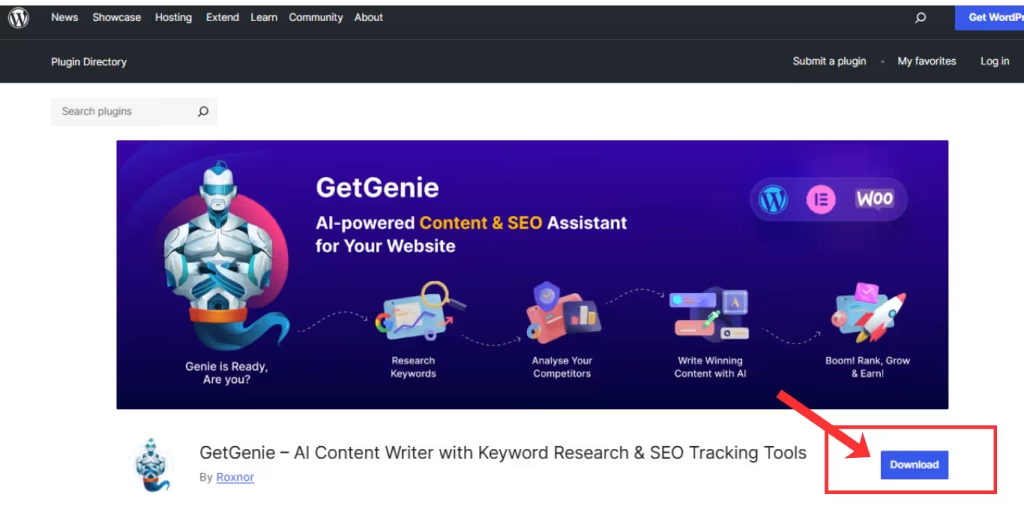
You need to download and install GetGenie to get started using it. There are three methods to install and activate the GetGenie plugin on your WordPress site:

  1. From the GetGenie prissida
  2. From the WordPress Dashboard
  3. From WordPress.org
GetGenie Download from WordPress Org
Learn how to install and activate GetGenie ➡️ How To Get Started With AI Writing Assistant – GetGenie 

Step 2: Using GetGenie for Social Copy

Once you are at the WordPress Dashboard with GetGenie installed and activated, move over to Dashboard > GetGenie > AI Writing.
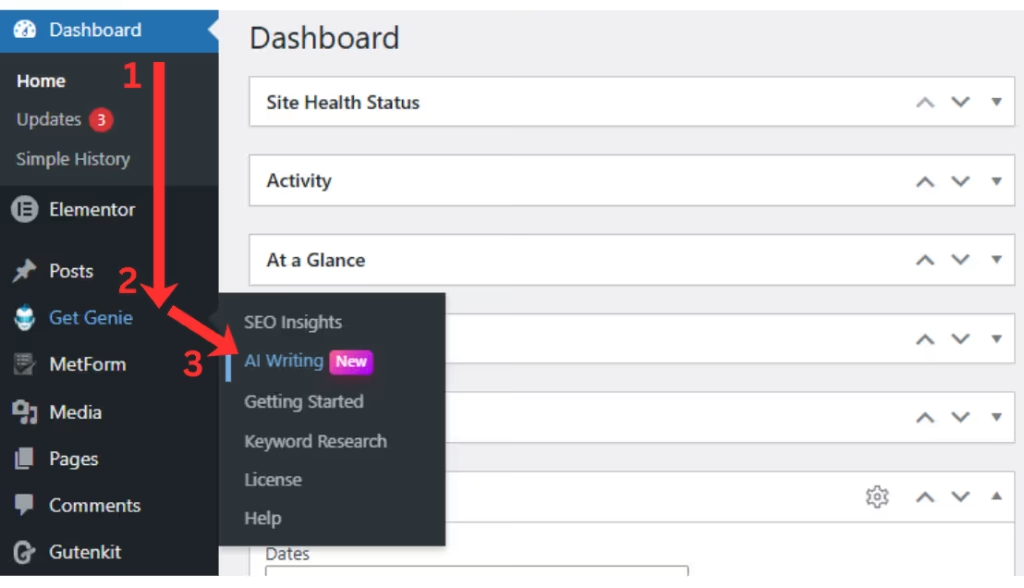
GetGenie WordPress Dashboard

There you will notice over 40 templates, each dedicated for particular content creation tasks. Select the Social Media Post/Copy template from the list.
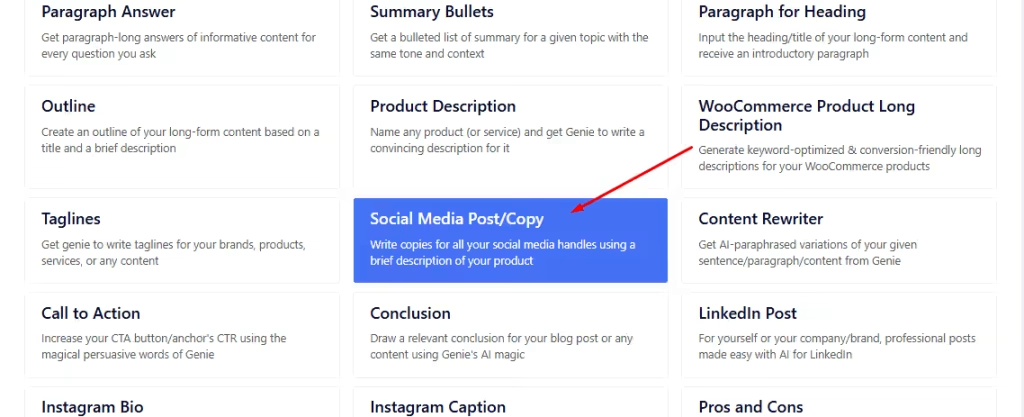
Try Social Media Copy Template Today
Social Media Copy Template

Step 3: Using Social Media Copy Template

Next, the template window will appear from the right of your screen.
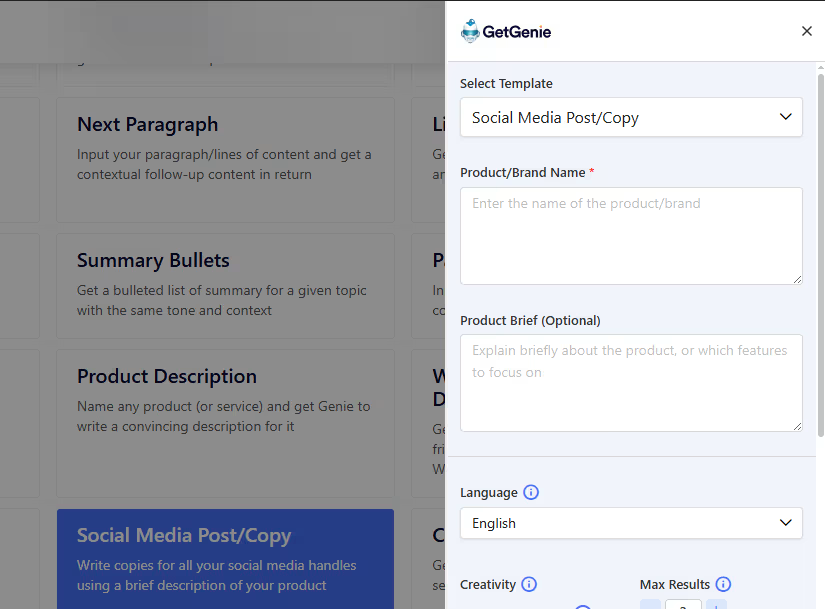
Social Copy Generator Template

There, add the details of your desired social media copy. Like the Brand or Product Name and a brief on the product. The latter is optional but adds more to the context.
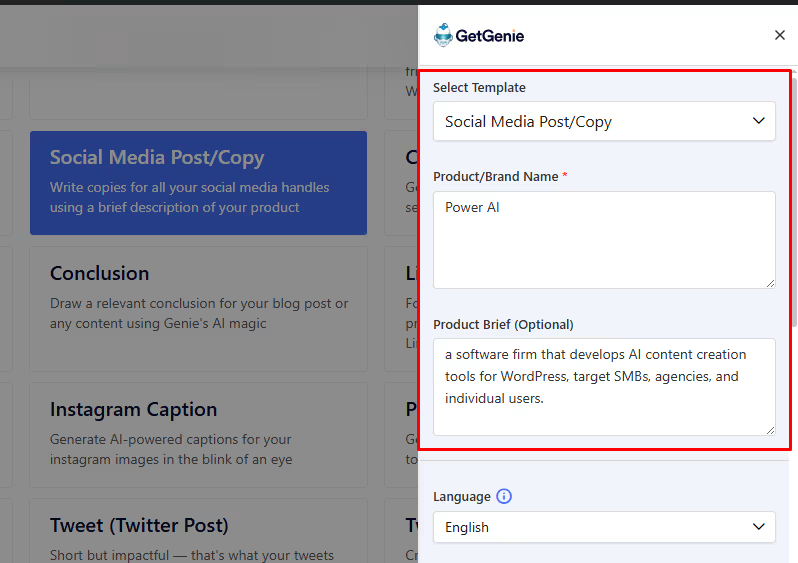
Adding brand name and brief

Once you’ve inserted the details, you can select the level of creativity (1 – 5) and number of results (1 – 6) for your desired output. Along with the language of choice. Finally, click on the Write button to generate the results.
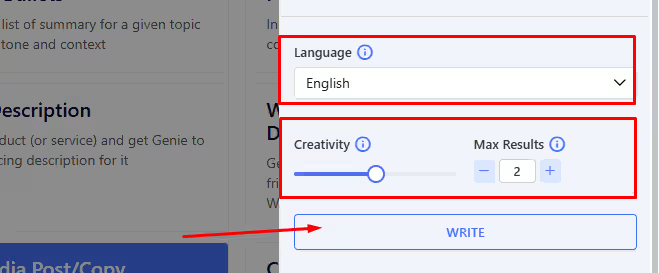
Selecting Language, Creativity and No of Results
Selecting Language, Creativity and No. of Results

Here, we got 2 outputs based on the setting, with creativity of 3, in English.
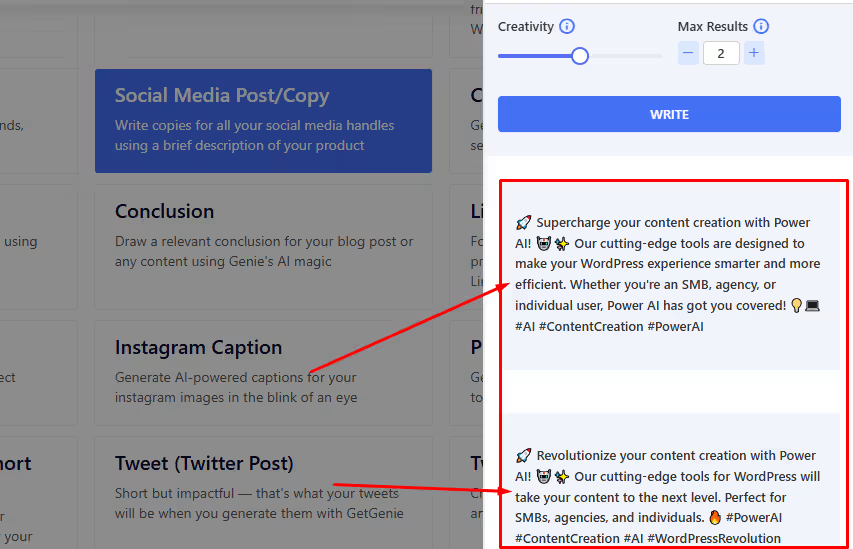
Generated Social Copy options

Two outputs are generated. You can select whichever suits your requirements. 

Step 4: Check and Finalize the Copy

Before using the copy, see if it matches your brand tone and platform-specific requirements. Know more about it by reading about 10 Social Media Copywriting Best Practices. 

And also, get a quick step-by-step look back at using the social media copy template below. 👇
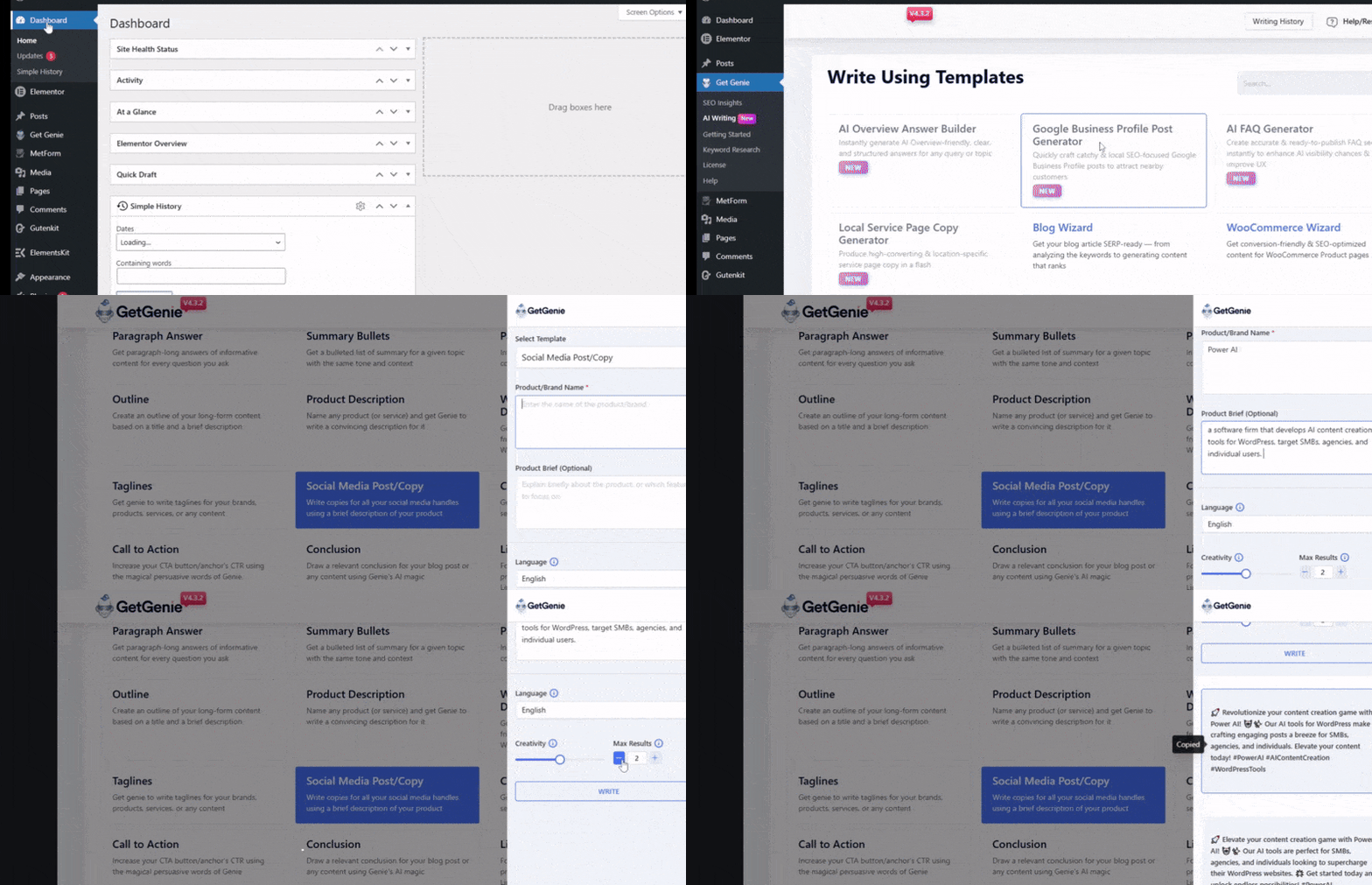
Generating Social Copies with AI Step by Step
What inputs should I prepare before I prompt an AI tool for social copies?

You should keep in mind and check:
1. Objective: awareness vs. clicks vs. signups vs. replies
2. Audience + pain point
3. Offer + proof (numbers, outcomes, testimonials—verified)
4. Brand voice rules (dos/don’ts, words to avoid)
5. Platform + format: caption, thread, carousel text, ad primary text, etc.

How do I keep AI-generated copy consistent with my brand voice?

Add context to the prompts. It will help the tool understand more about your product and brand. Also, create a brand voice checklist that you maintain to align tone, sentence length, emoji rules, prohibited phrases.

Is there any AI tool dedicated for social media copywriting?

Currently, no. But AI content creators like GetGenie offer various templates and features that generate social copies as per your prompts and inputs.

Are there templates or tools specific to certain platforms (e.g., LinkedIn, Twitter, Facebook, etc).

Yes, AI copywriting tools offer options or templates dedicated to writing copies and captions for specific platforms.  For instance, GetGenie offers templates for LinkedIn captions, Instagram Bios, Instagram Captions, and Twitter Posts.

För att sammanfatta

AI tools help you draft powerful and appealing social copies that feed into more viewer engagements, shares, likes, comments, etc. However, you must also check and review the copies for brand tone, context, audience-friendliness, etc. 

Using GetGenie’s social media copy template will let you create engaging copies for social media for the right viewers. These copies are best used as captions of your posts. 

For more specific, platform-based copies and posts, try the following templates as well:

👉 GetGenie LinkedIn Post Generator 
👉 GetGenie Instagram Bio Generator
👉 GetGenie Instagram Caption Generator

  • Dela detta:

How Google AI Overview Selects Content – Algorithm Cues & Signals

Tidigare inlägg

Lämna ett svar Avbryt svar

Din e-postadress kommer inte publiceras. Obligatoriska fält är märkta *

GetGenie helps write, optimize & track your content while you focus on conversions & growth!

Resurser

  • Handla om
  • Affiliate-program
  • Jämföra
  • Blogg
  • Färdkarta
  • Tidsbegränsade erbjudanden
  • Karriär - Vi anställer!

Företag

  • Hjälpcenter
  • Affiliatepolicy
  • Integritetspolicy
  • Återbetalningspolicy
  • Allmänna Villkor
  • Guide & Tutorials
  • Kontakt

Jämföra

  • GetGenie Ai vs. Jasper
  • GetGenie Ai vs. Copy.AI
  • GetGenie Ai vs. Rytr
  • GetGenie Ai vs Writesonic

Nyhetsbrev

Genom att ange din e-postadress godkänner du vår Allmänna Villkor och Integritetspolicy.

Tjäna 30% Livstid Kommission som affiliate!

Gå med idag

© 2026 GetGenie. Alla rättigheter förbehållna.

Hitta oss på
Ikon Twitter X
We've detected you might be speaking a different language. Do you want to change to:
Change language to English English
Change language to German German
Change language to Spanish Spanish
Change language to Italian Italian
Change language to French French
Change language to Danish Danish
Change language to Portuguese Portuguese
Swedish
Change language to Polish Polish
Change language to Korean Korean
Change language to Japanese Japanese
Change Language
Close and do not switch language