









How to Create AI-Optimized FAQs for Search Visibility


FAQs have become a primary source for extracting concise and authoritative information. It helps search engines understand intent, context, and relevance.
Creating AI-optimized FAQs is no longer just a best practice. It’s now a necessity for search visibility.
Begin with real user questions and lead with concise and direct answers. Use clear headings and scannable lists, enrich responses with relevant context and semantic keywords, and implement FAQ schema markup. Cite credible sources in your FAQ section to strengthen authority and E-E-A-T.
So, if you want to be selected for featured snippets, voice search responses, and AI-generated summaries, this guide is right for you. It talks about how to create AI-optimized FAQS for a higher search visibility.
Szybki przegląd:
AI-optimized FAQs are frequently asked questions written and structured to be easily understood by search engines and AI systems.
Creating AI-optimized FAQs involves:
➡️ Identification of real frequently asked questions
➡️ A well-structured FAQ
➡️ Writing FAQ naturally for AI and SEO
➡️ Focus on a clear, concise, and complete answer
➡️ Adding an FAQ search feature and ensuring it is search-friendly for both AI and search engines
➡️ Regular review and update
➡️ Use of effective AI tools to create AI-optimized FAQs
- Why AI-Optimized FAQs Matter for Search Visibility
- Tricks and Tips on How to Create AI-Optimized FAQs
- 1. Identify real frequently asked questions
- 2. Structure FAQ
- 3. Write FAQ naturally for AI and SEO
- 4. Give a clear, concise, and complete answer
- 5. Add an FAQ search feature and ensure it is search-friendly for both AI and search engines
- 6. Review and update regularly
- 7. Use effective AI tools to create AI-optimized FAQs
- Często zadawane pytania
- Końcowe przemyślenia
Why AI-Optimized FAQs Matter for Search Visibility
Search behavior has now changed. Instead of typing short keywords, users now ask full questions. Then AI systems aim to deliver direct and conversational answers.
That is why you need to optimize your FAQ for AI because they:
- Increase chances of featured snippets and “Ludzie pytają także” results on Google.
- Improve voice search visibility used by Google Assistant, Alexa, and Siri.
- Help AI search engines understand your content contextually.
- Boost topical authority by answering related questions comprehensively.
- Reduce bounce rates by delivering quick and relevant answers.
For example, Google frequently pulls FAQ answers directly into SERPs when the content is clearly structured and concise.
Tricks and Tips on How to Create AI-Optimized FAQs
Creating effective FAQs is not about listing random questions. It’s always about intent, clarity, and structure.
1. Identify real frequently asked questions
The foundation of a strong FAQ section is real user intent. Do not make assumptions about what the users might ask.
Create an FAQ section based on different intents, like informational, navigational, or transactional. You can use different channels to find the real questions, including:
- Google autocomplete and “People Also Ask”
- Search Console queries
- Customer support tickets and chat logs
- Community forums (Reddit, Quora)
- Sales and onboarding questions
- Voice search-style queries (“How do I…”, “What is…”, “Can I…”)
2. Structure FAQ
Organize your FAQ in a way that avoids repetitive questions. If you have roughly 8-10 questions, evaluate them and group related questions into clear categories or sections. Common categories might include Product Usage, Troubleshooting, or Account and Billing.
The way you organize your FAQ page plays a major role in how helpful it is.
Additionally, display questions prominently so they stand out. You can use H3 or bold text in your questions, and keep the answers in regular text right after each question. Use bullet points in your answers when necessary to keep them organized.
Follow a logical flow in your FAQ, from general to specific. Then place your FAQ on relevant pages, like product, service, blog, or dedicated FAQ pages.
Below is an example of a well-structured FAQ:
H2: FAQs
H3: What is an AI-optimized FAQ?
H3: How do FAQs improve SEO?
Here are the best practices to keep your FAQ well-structured and favorable for AI comprehension:
- Use proper heading hierarchy (H2 for FAQ section, H3 for questions).
- One question per heading.
- Place the answer immediately below the question using normal text while making important texts bold.
- Keep related questions grouped to avoid confusion for human and AI comprehension.
- Use bullet points and a numbered list in your FAQ section.
- Avoid burying FAQs deep in paragraphs.
This clean and simple structure will help AI-powered search engines extract answers for snippets and AI summaries.
3. Write FAQ naturally for AI and SEO
Once you have all the questions for your FAQ section or page, examine them and phrase them exactly as users would ask them. Use a natural, conversational tone and the same language your customers use in real interactions. This would help AI systems accurately match user queries to the right answers.
Do not use highly technical terminology. Your goal is to reflect your audience’s voice and level of familiarity.
The examples below are the common format we tend to use without considering the user’s tone and AI preference:
- What is the purpose of this platform?
- Who is this solution designed for?
- How can users authenticate their accounts?
- Can account details be modified by the user?
But if we consider the user’s tone and what AI prefers, these questions would be clearly and simply written as:
- What does this platform do?
- Who should use this product?
- How do I log in to my account?
- How do I update my account information?
You see the difference between the 2 sets of questions. The first set sounds so confusing and somewhat technical. While the second set is simple and clear. The second approach aligns with how AI models like ChatGPT and Google’s Search Generative Experience interpret content.
4. Give a clear, concise, and complete answer
Users want quick answers. So, make sure your FAQ answer is clear, brief, and complete on its own. This is because AI-powered search engines prefer answers that are easy to understand.
Start with a direct response in the first sentence and add a short explanation in the next sentence. You can use bullet points in your answer if the question is asking for steps.
Do not use marketing language, a long introduction, or an unwanted background. They will just annoy AI, as it only prefers short but complete answers. Stay within 40–120 words when possible and link your answer to deeper content.
Each answer should stand on its own, even if it appears in search results or is pulled into an AI response. One effective technique is to repeat part of the question in the answer so the context is never lost.
Here’s an example of an unclear answer:
“Is my subscription active?” → “Yes, it is.”
If you write the answer based on AI preference, the answer would look like this:
“Yes, your subscription is active if your account shows a current billing date and no payment issues in the Billing section.”
Now, if an answer involves steps or multiple actions, use bullet points or numbered lists to improve readability.
Here’s a sample numbered list answer:
How do I change my email address?
You can change your email address by following these steps:
1. Log in to your account
2. Go to Account Settings
3. Select “Edit Email” and save your changes
Maintain a friendly, professional tone that sounds like a helpful support agent rather than a technical manual. A consistent tone builds trust and ensures AI-generated answers remain clear and reliable.
Do not use a tone in your answer that sounds like a technical manual. Your answer should sound like a friendly support agent. For example, if the answer to the user’s query is negative, be direct, but suggest an alternative.
Przykład:
Can I pause my subscription?
“No, you can’t pause your subscription at this time. However, you can cancel it at any point and restart it later.”
Clear, concise answers reduce confusion, prevent unnecessary follow-up questions, and help both users and AI systems interpret the context.
5. Add an FAQ search feature and ensure it is search-friendly for both AI and search engines
Many users prefer to search directly for what they need, especially when the page contains many questions. Now, adding a simple search box to your FAQ section is very helpful. Instead of scrolling, users can just key in the keywords and instantly see the relevant answers. There are website builders that offer a built-in FAQ search tool.
It’s equally important that your FAQs are optimized for search engines and AI algorithms. You can write questions using the same wording people use when searching online.
For example, instead of a generic heading like „Subscription Details,” use a specific question such as „How do I upgrade or downgrade my subscription?” This mirrors real search behavior and improves your chances of ranking in search results. You can also add a link to each question or add FAQ schema markup. This would help search engines recognize and display your Q&A content directly on the results page.
Make your FAQs easy to search, easy to index, and written in the language your users actually use. An SEO-friendly FAQ means AI-friendly. Clear formatting, simple terminology, and text-based answers allow both search engines and AI assistants to easily read and extract information. Do not hide answers in images or complex scripts to ensure proper indexing.
6. Review and update regularly
Your FAQ must be useful, and it needs regular updates. Products, services, or policy changes, and so your FAQs should be updated. This would help users and AI tools get accurate information.
You can conduct a quarterly review to update outdated answers and add new questions that are helpful. You can ask for feedback from your support team to check if there are new questions raised by the users. Google Search Console can also identify new queries, declining impressions, and opportunities for expansion.
You may need to shorten long answers, add missing details, or reword content to reduce confusion.
7. Use effective AI tools to create AI-optimized FAQs
AI tools can speed up the process and save you a lot of time and effort. But these tools should only assist, and not replace humans.
One AI tool that I can recommend to generate FAQ content is GetGenie. It has an AI FAQ Generator template to create an accurate and ready-to-publish FAQ section.

Dlaczego?
- FAQs are generated based on user intent and common user queries.
- It uses advanced AI to produce context-aware, relevant, and meaningful answers.
- You can easily edit, refine, and expand the generated FAQ to match your brand.
- Works for multiple use cases, such as product pages, services pages, blogs, landing pages, and documentation.
Here’s how GetGenie works:
Open GetGenie in your WordPress dashboard and find the AI FAQ Generator template. Enter your primary keyword, add a context if you want, select the number of questions, or let AI decide. Select your language, define the creativity level, and the maximum results you want AI to generate.
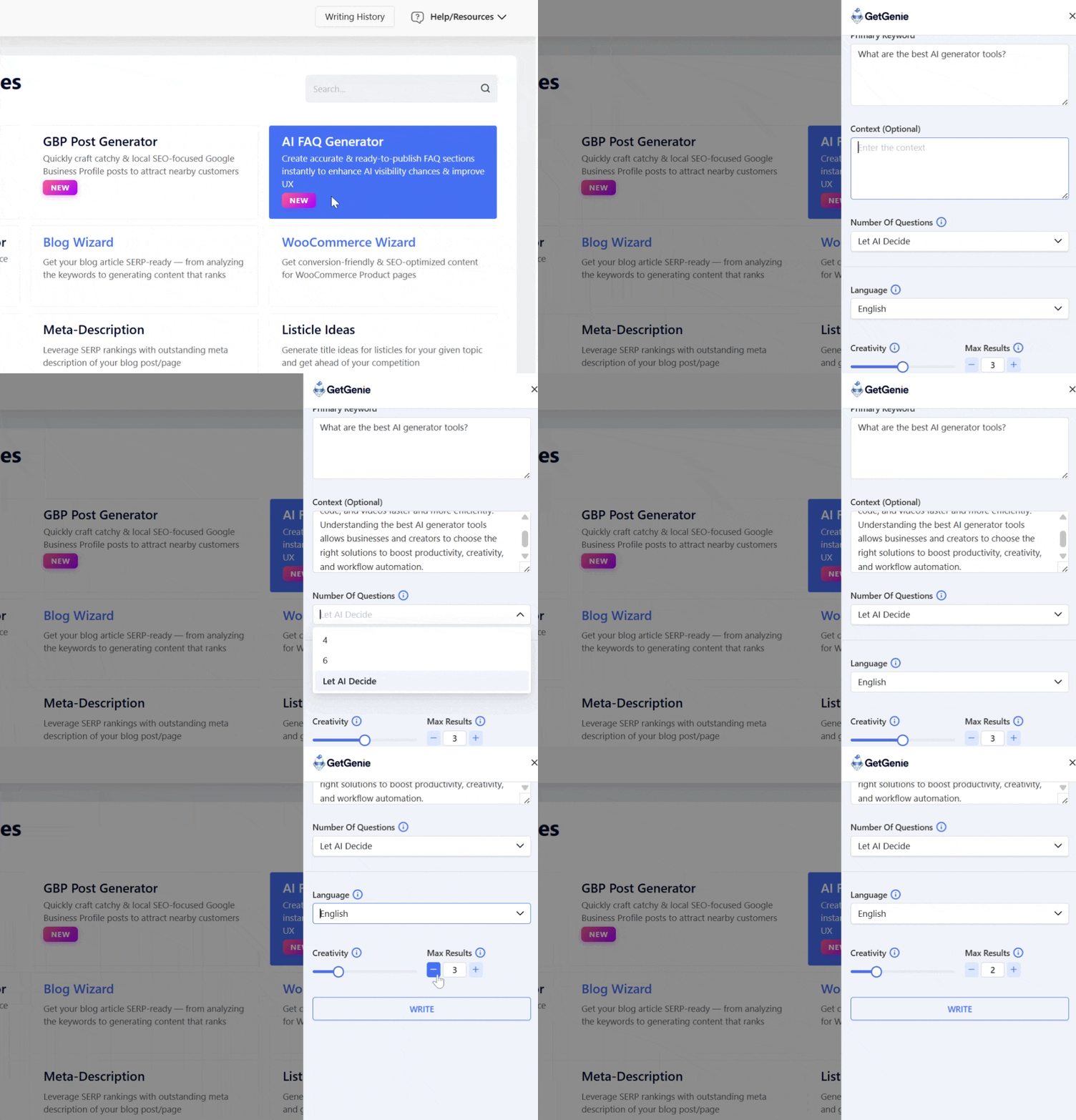
After you set all the parameters, let GetGenie generate your FAQ.
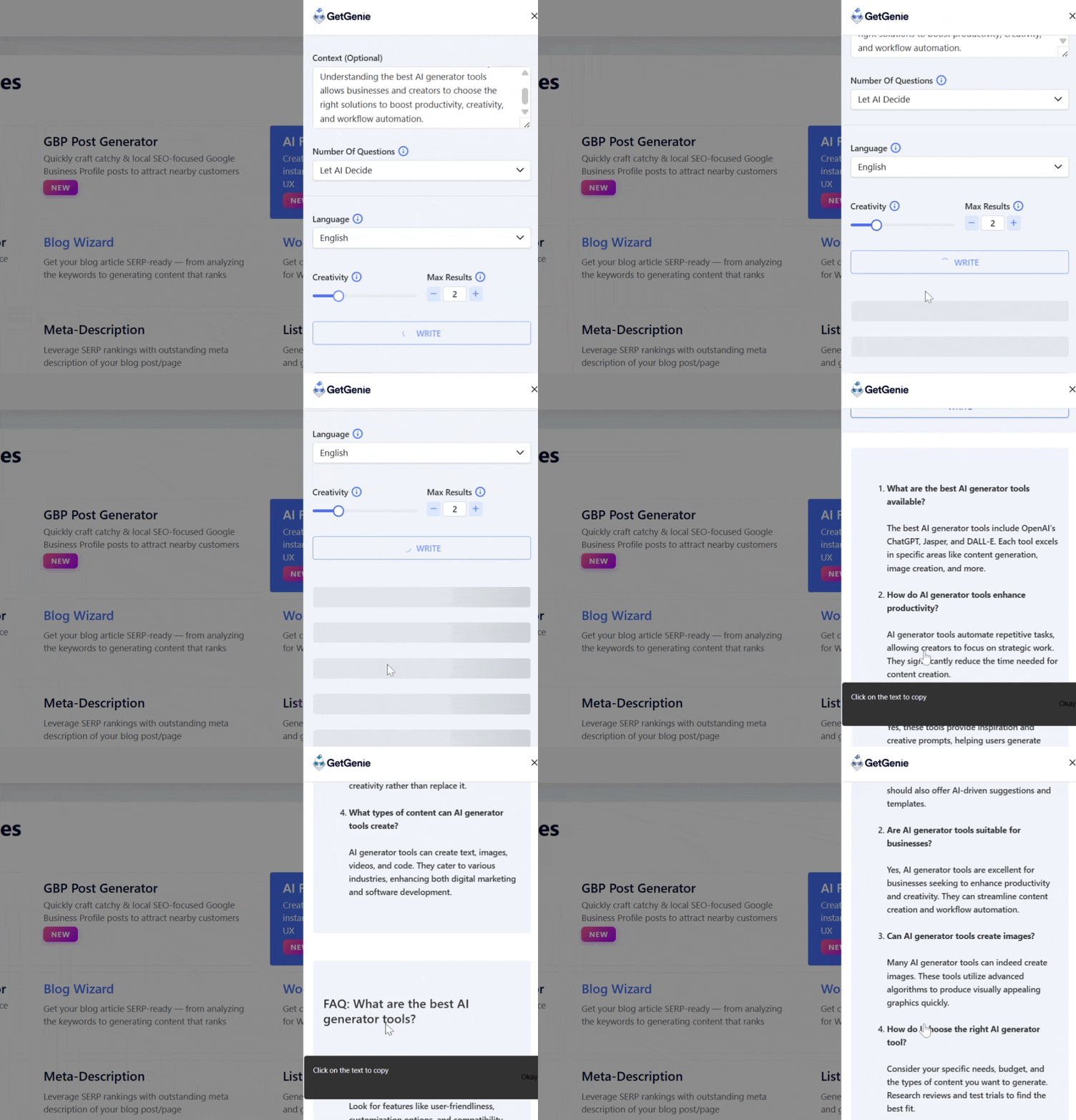
Często zadawane pytania
1. What are AI-optimized FAQs?
AI-optimized FAQs are question-and-answer sections designed to be easily understood by search engines, AI tools, and users by using natural language, structured formatting, and SEO best practices.
2. Do FAQs really help with SEO?
Yes. FAQs can improve keyword coverage, increase time on page, earn featured snippets, and help your content rank for long-tail search queries.
3. How long should an FAQ answer be?
Ideally, between 40 and 120 words, long enough to fully answer the question but short enough for AI extraction and quick user consumption.
4. Should I use schema markup for FAQs?
Yes. The FAQ schema helps search engines understand your content and can lead to rich results in search listings.
5. Can AI-generated FAQs rank on Google?
They can, as long as they are accurate, helpful, original, and reviewed by a human for quality and relevance.
Końcowe przemyślenia
AI-optimized FAQs are no longer optional. They are a strategic asset for modern SEO and search visibility.
Combine clear structure, natural language, concise answers, and regular updates so that you can create FAQ content that serves users, search engines, and AI tools. Use an FAQ generator like GetGenie to speed up the process and create an AI-optimized FAQ.
When done right, FAQs don’t just answer questions, they build authority, drive traffic, and future-proof your content in an AI-driven search.
 Danish
  Swedish
  Korean