









7 Best AI Answer Generator Tools [Top Picks in 2026]

Have you ever spent hours searching for an answer online, only to find an incomplete and outdated answer? That’s so frustrating!
Maybe because you are not using a reliable AI answer generator. What you really need is an AI that could give you precise answers in just a few seconds.
A good AI answer tool uses advanced natural language processing (NLP) and large language models. This combination works to create accurate, context-based responses for questions, content tasks, and research.
In this guide, you’ll learn how AI answer generators work, what features matter most, and which tools are worth using, both free and paid.
szybki przegląd
Best AI answer generator tools include GenieChat, Claude AI, Perplexity AI, iAsk Pro, and so on. These tools create accurate, context-based responses for questions, content tasks, and research.
7 top AI answer generator tools for 2026:
GetGenie – GenieChat: AI writing assistant and chatbot with SEO-focused content and 22+ personalities.
Perplexity AI: Research-oriented answer engine providing sourced, conversational results.
IAsk Pro: Educational AI assistant offering deep reasoning, tutoring, and document analysis.
YouChat: Conversational AI integrated with search for quick, source-backed answers.
Writesonic AI Answer Generator: Content creation tool with templates, summaries, and SEO support.
NoteGPT: Academic and learning assistant that summarizes videos, PDFs, and notes.
Claude AI: LLM focusing on nuanced reasoning, long-form answers, and context-aware responses.
The tips for choosing the best AI answer generator tools include:
👍 Define your needs
👍 Evaluate the quality of the output
👍 Consider the speed and reliability of the tool
👍 Check all the features based on your needs
👍 Examine the customization and control options
👍 Inspect the privacy and security
👍 Check the pricing and scalability of the tool
👍 Look into their support and community
👍 Check for integration capabilities
How to Choose a Suitable AI Answer Generator Tool
To choose the best AI generator tool, take note of these important considerations:
1. Define your needs
Before comparing tools, know what you want to do:
- General Q&A: getting quick answers to questions
- Content creation: writing articles, marketing copy, scripts
- Coding help: generating or debugging code
- Customer support: automated replies for users
- Research and summaries: condensing long texts
- Education: explanations, examples, study help
2. Evaluate the quality of output
Accuracy and relevance are very important when selecting your AI answer generator. Test the tool and evaluate its output using these guidelines:
- Are answers factually correct?
- Is the output clear and coherent?
- Does the tool offer context-aware responses?
- Can it handle follow-up questions?
3. Speed and Reliability
To check for speed and reliability, check for:
- Response time: How fast are replies?
- Uptime and stability: Does it stall or crash?
- Concurrency: Can multiple requests be handled at once (important for apps)?
4. Feature Bundles
More features make an AI answer generator more flexible. Look for a tool that offers exactly what you need, such as:
- Long-form generation
- Context retention (conversation history)
- Wsparcie wielojęzyczne
- Code generation
- API access
- Custom training or fine-tuning
- Templates and workflows
5. Customization and Control
A tool that has high customization and control options allows you to:
- Adjustable creativity/tone
- Industry-specific knowledge tuning
- User-controlled output preferences
- Safety filters or moderation tools
6. Privacy and Security
Important, especially for businesses and sensitive data:
- Does the tool store user input?
- Can you control data retention?
- Are enterprise-grade security practices in place?
- Is the tool compliant with GDPR, CCPA, or other regulations?
Check the provider’s privacy policy and terms.
7. Pricing and Scalability
Determine your budget and how usage may scale over time. Check the following:
- Free vs paid plans
- Monthly or usage-based fees
- Enterprise contracts
- API call costs
8. Support and Community
Good support matters:
- Live chat, email, or dedicated account managers
- Documentation quality
- Developer community and examples
- Tutorials and SDKs
9. Integration Capabilities
Easy integration with other tools means versatility. Check whether the tool can connect with your systems:
- APIs
- Plugins for platforms like Slack, Notion, WordPress
- SDKs for Python, JavaScript, etc.
Quick Comparison of the 7 Best AI Answer Generator Tools
Here’s a clear comparison table of the AI answer-generator or question-answering tools. Parameters include core features, typical use-cases, pricing, and what they’re best for.
| Narzędzie | Type / Primary Function | Kluczowe cechy | Pricing / Access | Najlepszy dla |
|---|---|---|---|---|
| GetGenie – GenieChat | AI writing assistant + chatbot | * Conversational AI with 22+ personalities * SEO-focused content generation * Integrates with WordPress * Consists of various writing templates | Freemium with tiered word limits and SEO tools; paid plans from ~$9.99+ monthly | Content creation + conversational Q&A in one tool |
| Perplexity AI | AI-powered research & answer engine | * Provides answers synthesizing real-time web results with citations * Powered by multiple LLMs * Conversational search interface | Freemium (free version with limits); Pro offers advanced search and deeper research | Fact-based Q&A, research, summaries |
| iAsk Pro | AI answer engine & advanced search AI | * Natural language Q&A with deep reasoning * Document analyzer * Live video tutor * Companion AI * Image generation | Free with basic features; Pro ~$9.95/month with enhanced capabilities | Learning, detailed answers, and educational support |
| YouChat | AI chat + search assistant | * Chatbot built into You.com that answers questions, summarizes, writes text, and provides search results * Include tables/images alongside text | Typically free with search engine access | Quick conversational answers with live results |
| Writesonic AI Answer Generator | AI writing/content creation tool | Large set of templates, factual chat (Chatsonic), content creation, and SEO support | Free plan available; paid plans from ~$15–$19+/mo | Marketing, blogging, SEO optimized answers and content |
| NoteGPT | Academic/learning assistant | * Summarizes PDFs, videos, articles * Extracts key ideas * Visual note tools * Chat about study material | Freemium with subscription tiers | Students, researchers, educators needing summaries and study help |
| Claude | Large language model / conversational AI | * Alternative to ChatGPT, focusing on careful reasoning and longer contexts * Good at nuanced instructions and writing (per general comparisons) | Free tier with limits + Pro tier ~$20/mo (varies by model & tier) | General Q&A, writing, long-form reasoning |
7 Best AI Answer Generator Tools
Below are the 7 most reliable and popular AI answer generator tools picked to cater for different use cases.
1. GetGenie – GenieChat
GenieChat is an AI-powered assistant designed to provide instant answers and content ideas while maintaining SEO-focused responses. It works perfectly well with WordPress and SaaS platforms. If you are using WordPress, you can easily install it and utilize its features within the WordPress ecosystem.
If you are non-WordPress users, you can still use GenieChat in the SaaS ecosystem. GenieChat is a chatbot that uses przetwarzanie języka naturalnego (NLP) I large language models (LLMs) to understand intent and generative informative responses in conversational style.
GenieChat works by providing prompts and analyzing them to produce an answer. For WordPress, it works by opening a post so that you can enable the GenieChat. Select the personality and define the size of the content.
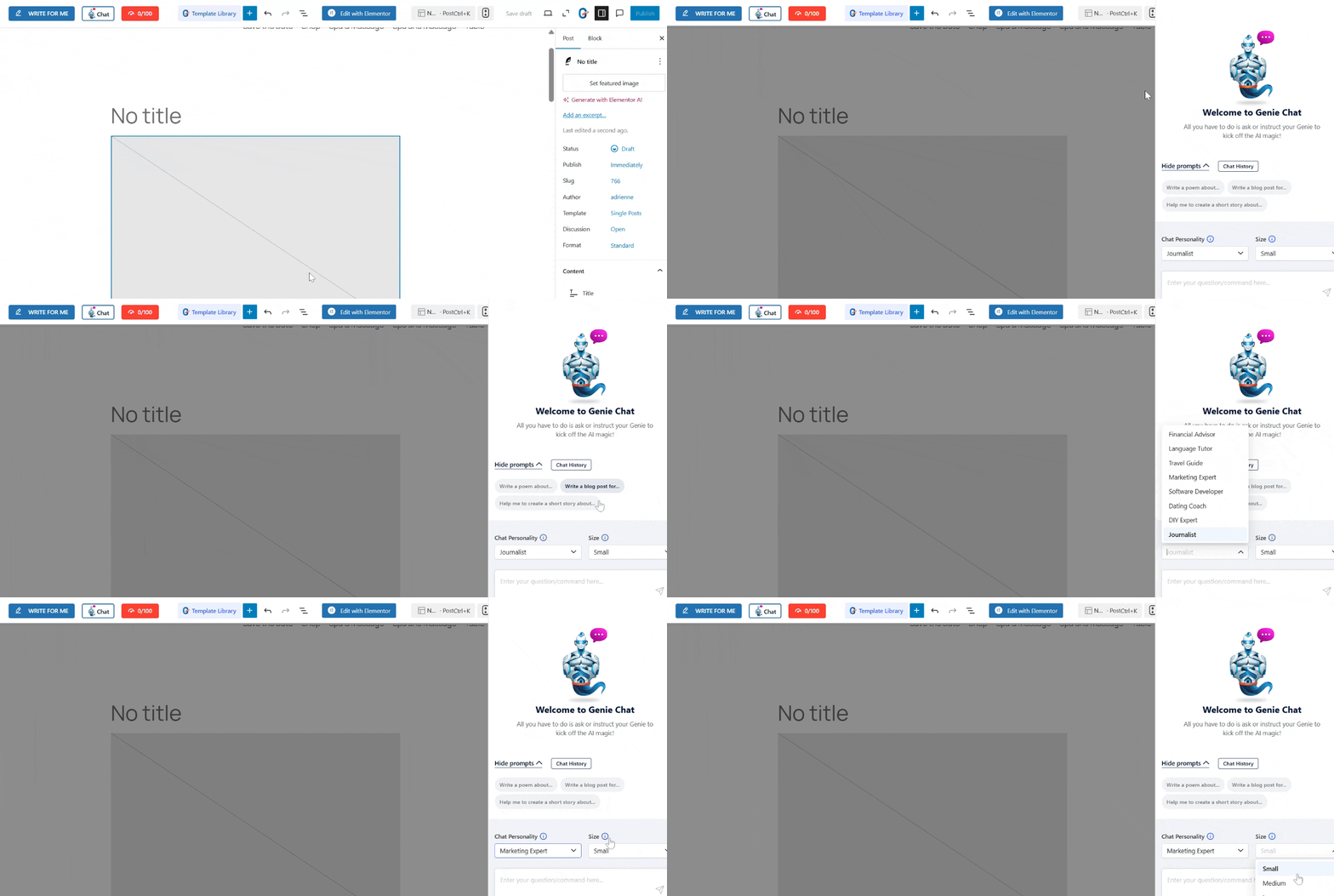
Na przykład:
- Personality – Marketing Expert
- Size – Medium
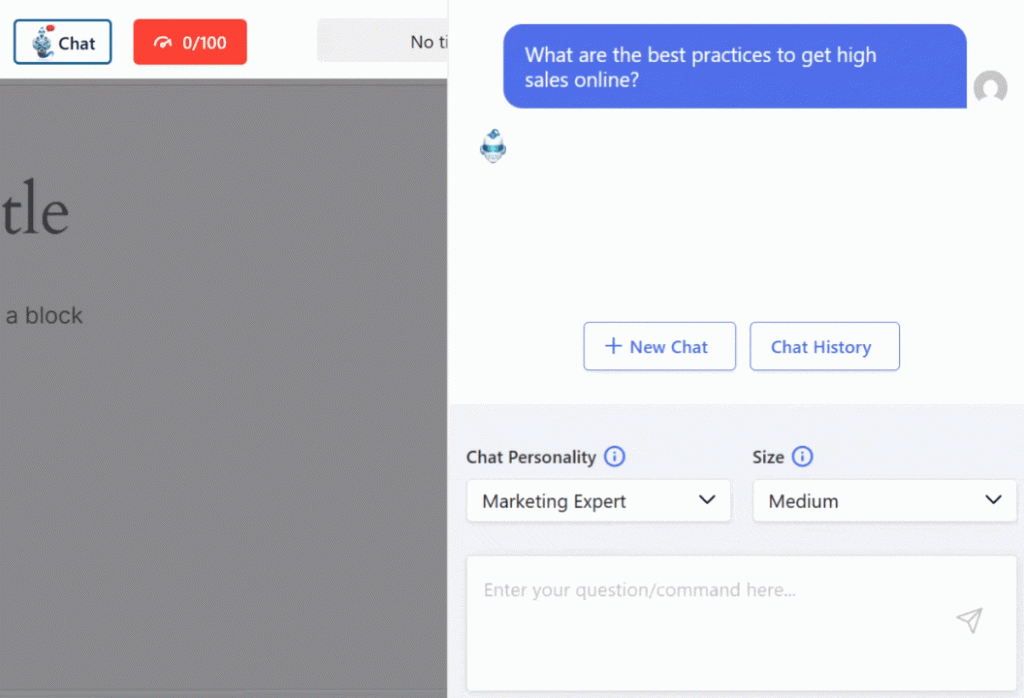
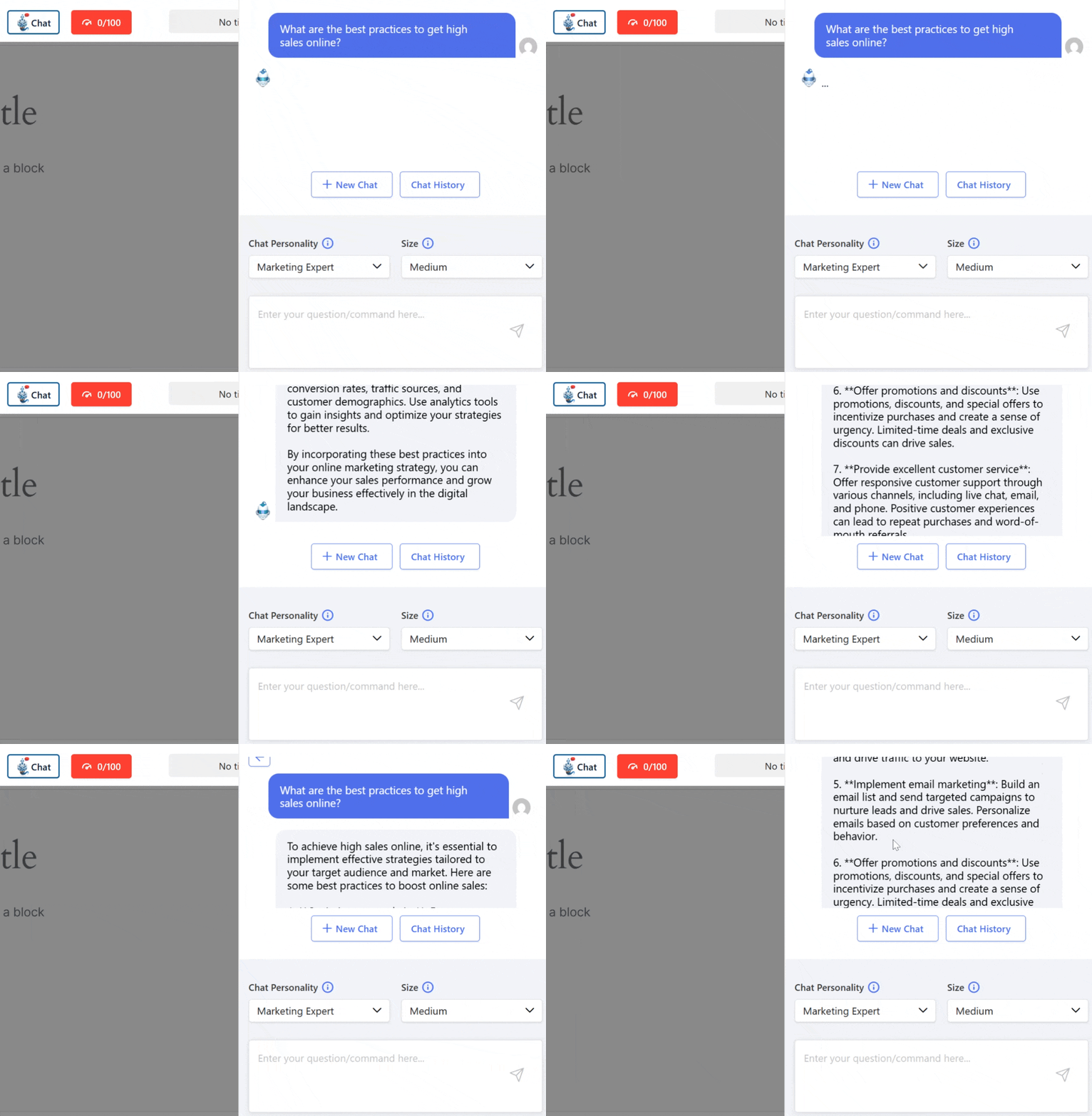
- Prompt – What are the best practices to get high sales online?
Enter the prompt and let GenieChat generate an answer in just a few seconds.
Kluczowe cechy:
- 22+ AI personalities (e.g., travel advisor, career counselor, software engineer).
- Adjustable response length (short, medium, long).
- Tracks Conversation history for smooth continuation.
- Regenerate answers or edit prompts for refinement.
- Real-time AI chat for questions and explanations.

2. Perplexity AI
Perplexity AI acts like a conversational search engine. It provides concise answers along with verifiable sources, making it ideal for academic and professional use.
Perplexity AI combines advanced large language models with real-time web search. This combination works to generate direct and conversational answers to questions, unlike the traditional search engine, which shows only a list of links.
Perplexity AI works by providing a prompt. Then it searches the internet in real-time, finds relevant, authoritative information, and summarizes it into a clear answer.
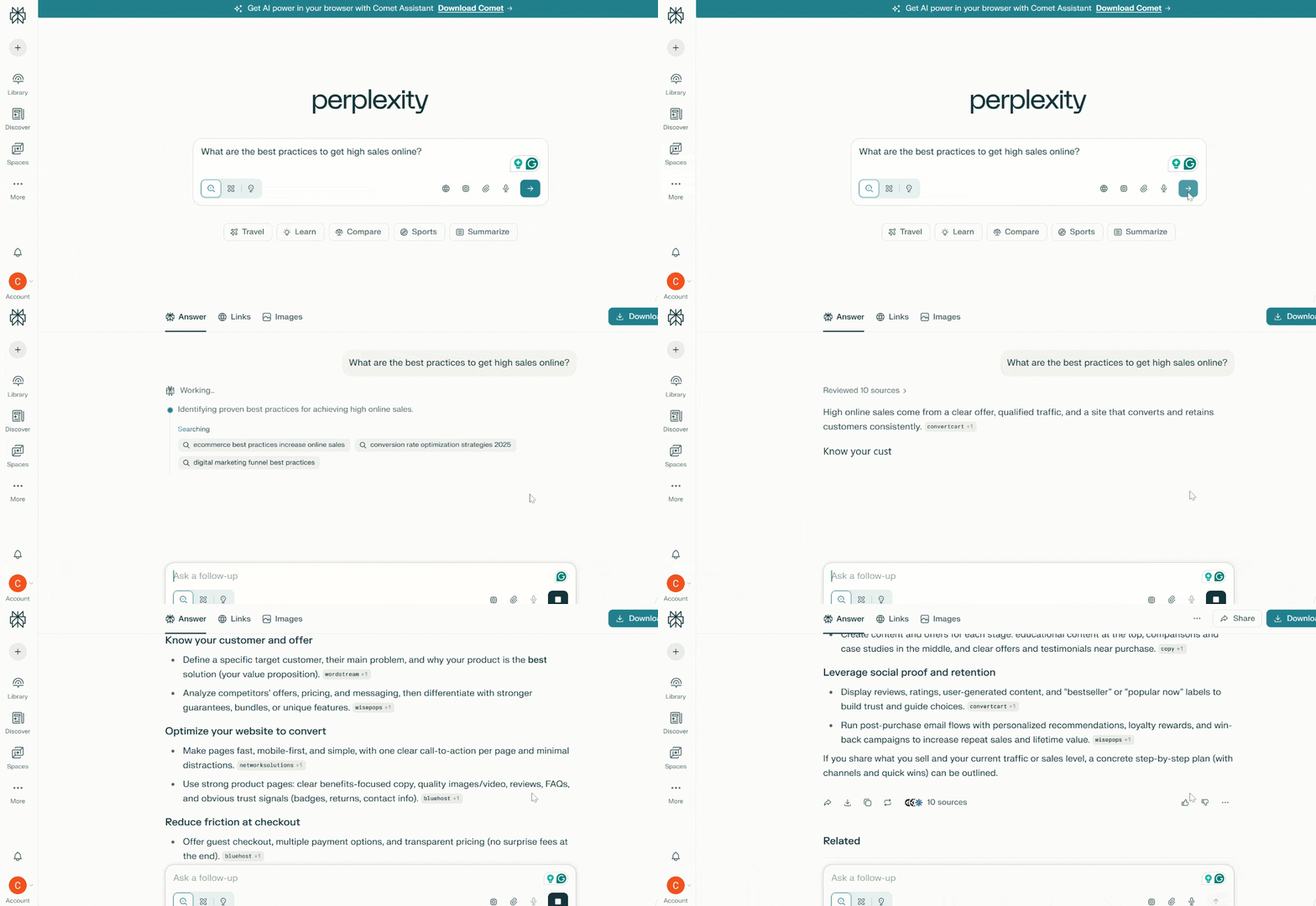
The AI answer generated by Perplexity AI includes sources so you can verify the answer online. It also supports follow-up questions that make it like a real assistant rather than a static search bot. Additionally, it provides related topics so that you can expand your searches.
Kluczowe cechy:
- Perplexity pulls fresh information from the web.
- Every answer includes sources or citations.
- You can refine or expand on a topic with follow-up questions and explore related topics.
3. IAsk Pro
IAsk Pro focuses on delivering direct and research-style answers. It’s especially useful for students, educators, and professionals who want clear explanations without fluff. When using IAsk Pro, it feels like asking an AI tutor.
IAsk Pro is built on large language AIs like MMLU-Pro and GPQA. These AI models help enhance the understanding and reasoning for complex questions.
This AI answer generator tool works by providing the prompt. Then the chatbot interprets the request and retrieves relevant information. The chatbot will summarize the facts from data sources and apply reasoning to give context-aware answers.
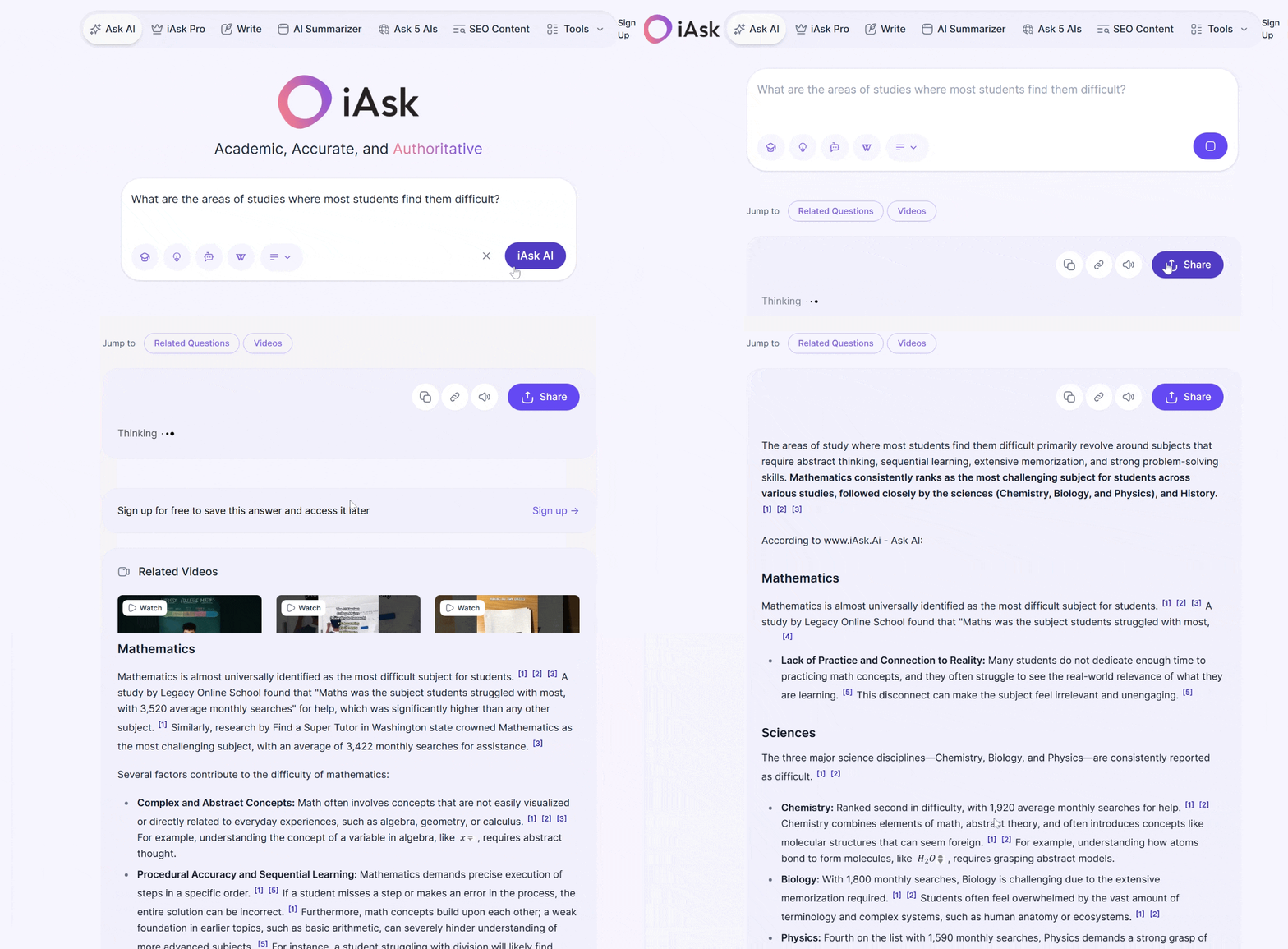
Podstawowe cechy:
- IAskPro can analyze documents, generate an image from text, and sometimes do live tutoring.
- It’s built from 5 big AIs like Claude, Gemini, OpenAI, Grok, and Deepseek, that interpret queries and generate an answer.
- This chatbot can help students with their homework, concept explanation, and research support.
- A professional can quickly access facts, summaries, and detailed explanations related to work.
- IAsk Pro can be added as a Chrome extension, making it more accessible when needed.
- It offers a free AI grammar checker.
4. YouChat
YouChat is integrated into the You.com search engine and combines AI answers with search results. It’s a solid alternative to traditional search engines.
YouChat blends web search with natural language AI so you can ask questions and get direct and conversational answers. The chatbot often include citation, unlike the traditional search engine that only provides links.
YouChat works by providing a prompt. You can select your AI agents, like research, ARI, create, compute, etc. Then let YouChat generate its answer. You will be asked clarifying questions for more accurate answers.
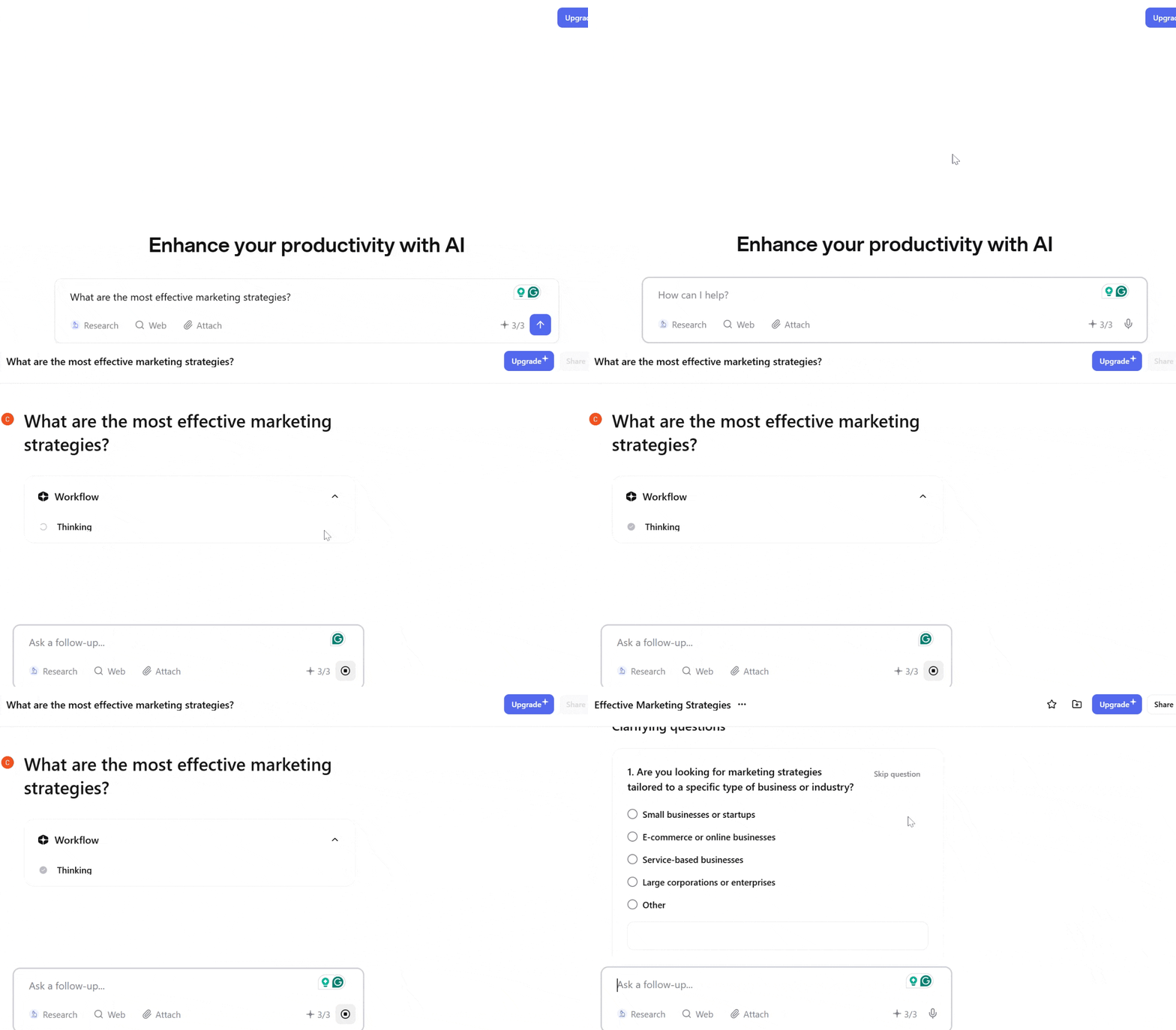
Kluczowe cechy:
- It remembers context in conversation for follow-up questions.
- Responses are backed by source links for verification.
- Helps with writing, summarizing, translation, coding help, etc.
- Includes advanced filtering options.
- Custom offers 20+ AI models and agents.
- You can add files and trusted web sources for tailored search results.
5. Writesonic AI Answer Generator
Writesonic offers a free AI answer generator feature. It excels at generating clear, brand-aligned answers for customer queries and content needs.
Writesonic has advanced large language models to interpret and understand prompts, instructions, and questions, and generate outputs. You can adjust tone, length, style, or focus to suit your audience or purpose.
Start by selecting your template. You can select Chatsonic for chat or search queries, and select the AI models from Claude or GPT.
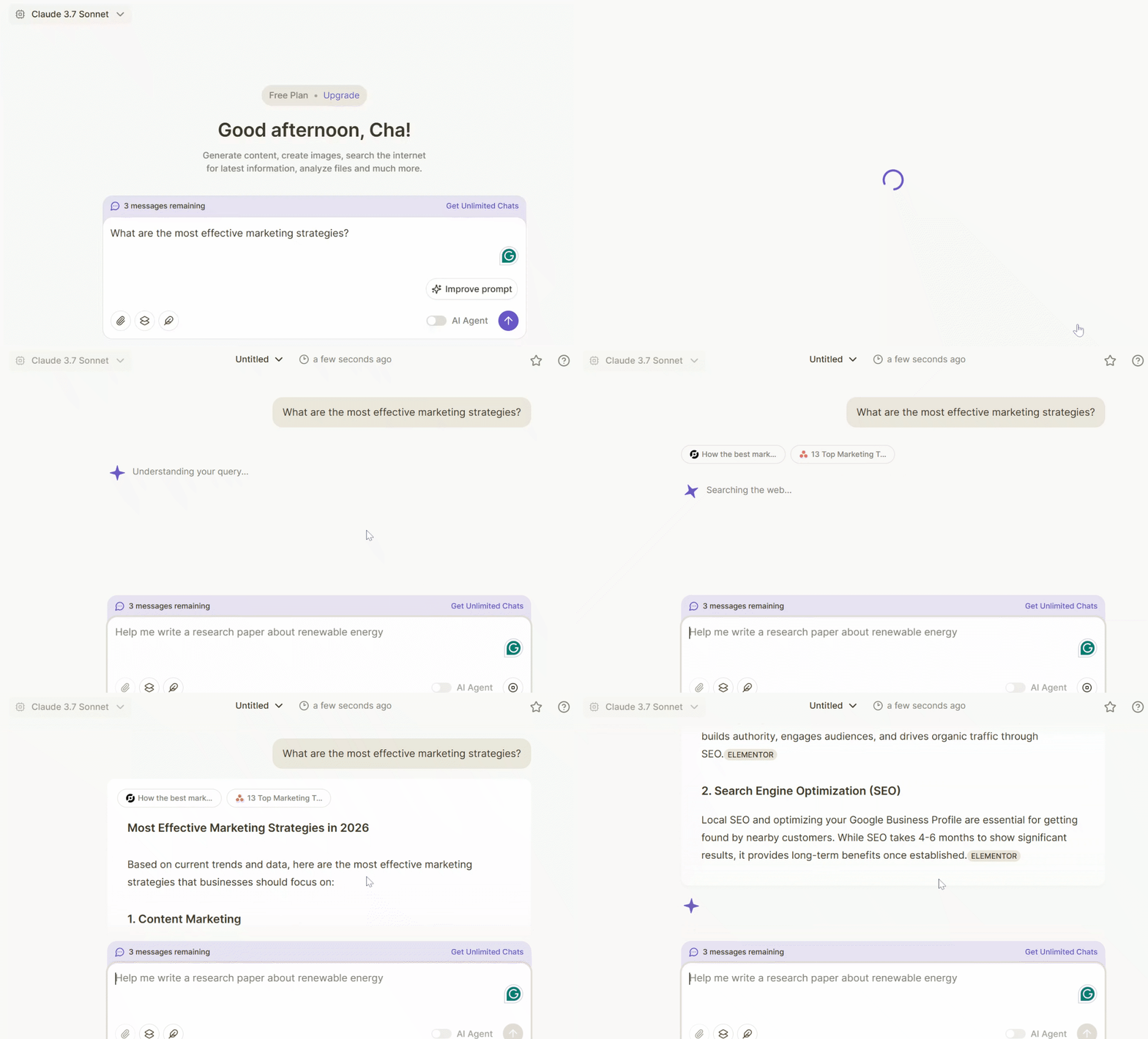
However, you can enable the AI agent if you want an AI-specialized workflow that plans, analyzes, and executes tasks based on your purpose.
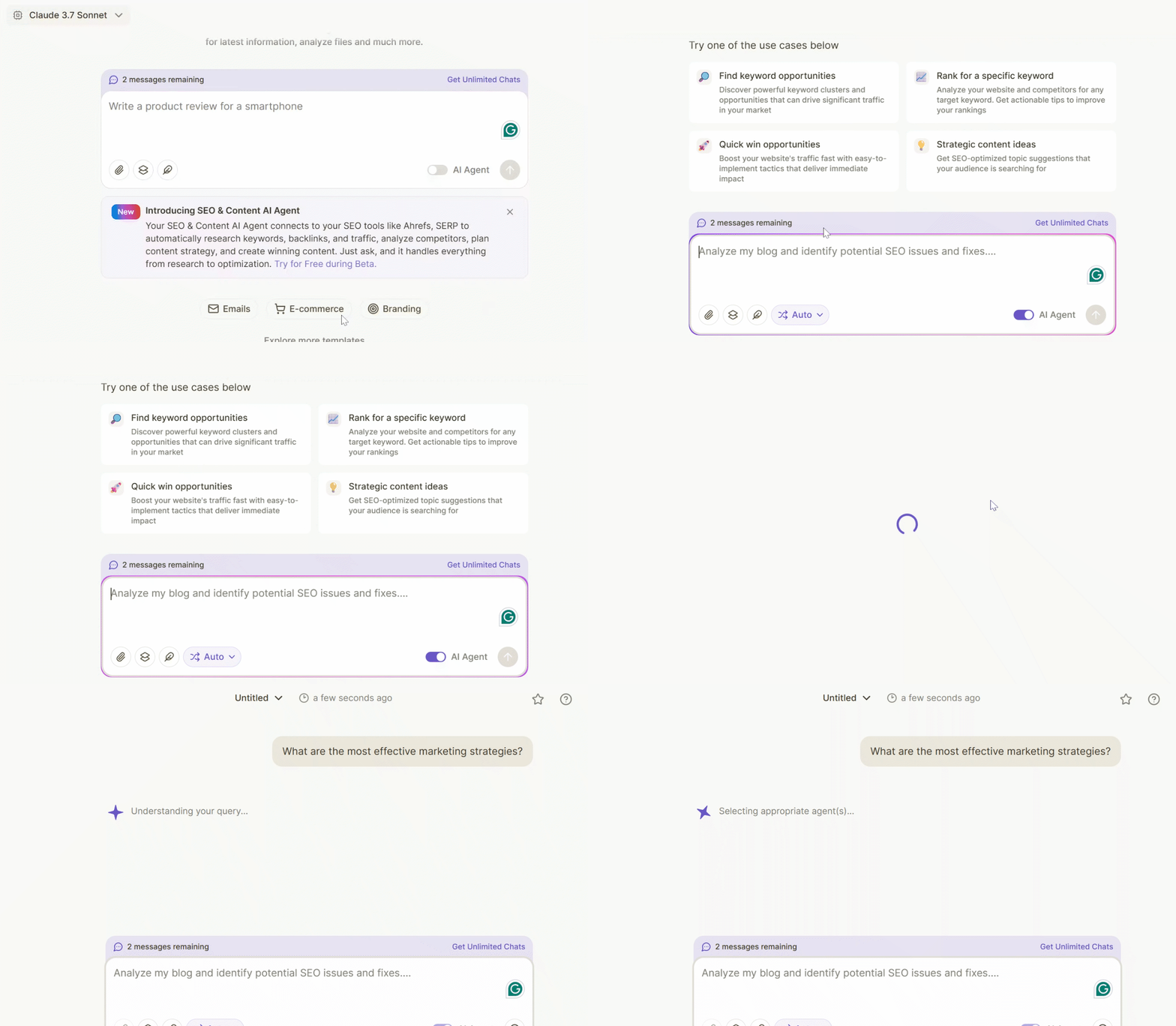
Additionally, Writesonic offers different prompt templates based on your goal.
Kluczowe cechy:
- Offers predefined templates to structure different kinds of responses.
- Quickly generate explanatory answers, summaries, or informational text in response to queries.
- The output can be optimized for search engines (especially if you’re using the tool within content workflows), helping with visibility on Q&A sites or blogs.
6. NoteGPT
NoteGPT specializes in answering questions from documents, PDFs, videos, and notes. It can process many types of content and turn them into clear summaries, nites, and interactive answers using AI.
NoteGPT is popular with students, educators, researchers, professionals, and content creators. It’s a great tool for summarizing lectures and study materials.
This answer generator works by providing a document, like a learning material, and adding inquiry about the attached learning material.
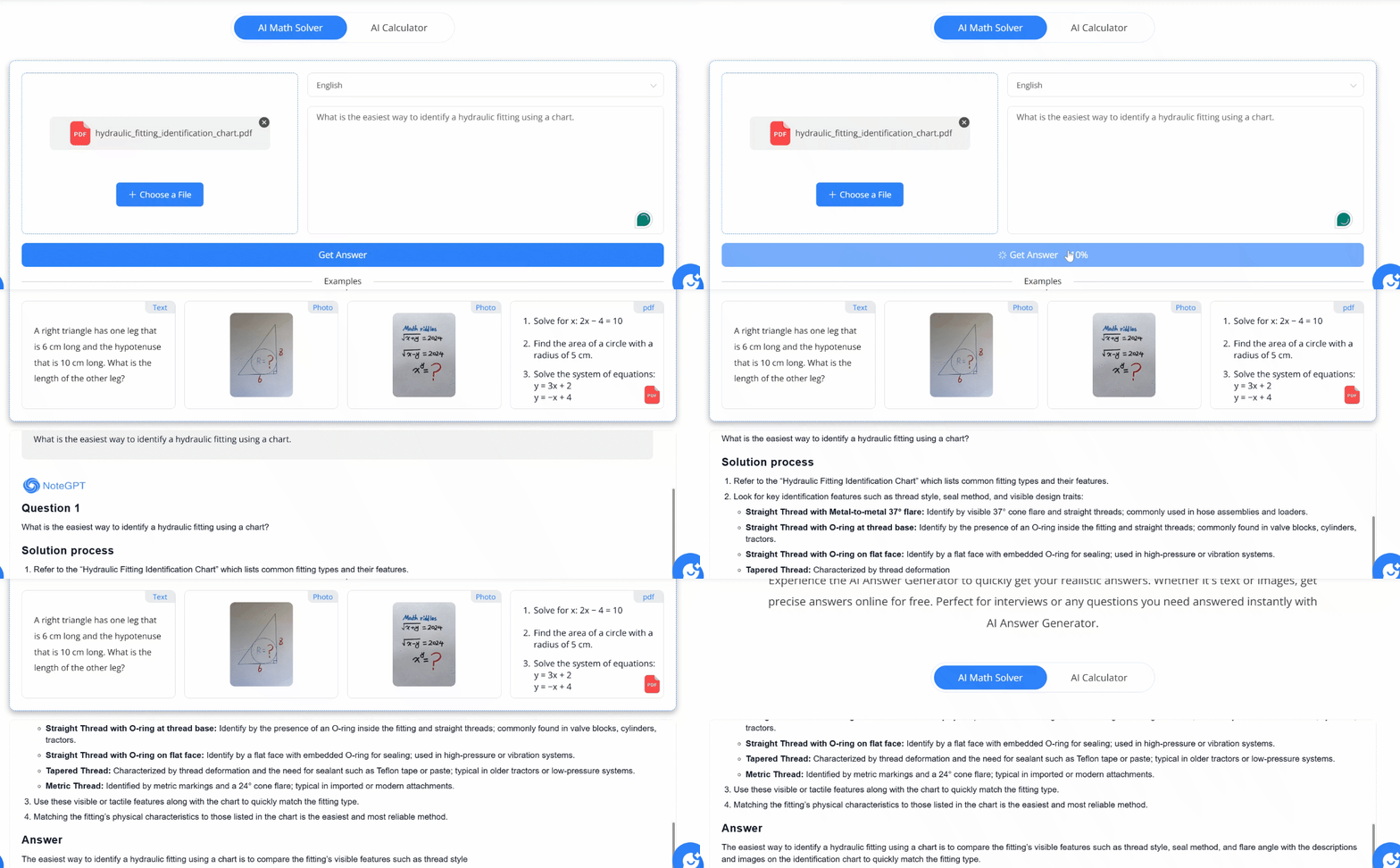
Kluczowe cechy:
- Convert long videos, PDFs, articles, or lectures into concise summaries.
- Turn audio or video into text so you can read or study it later.
- Help with writing tasks like essays, reports, or slides by generating structured content from prompts.
- Works with YouTube videos, documents (PDF/Word), presentations, web content, and more.
7. Claude AI
Claude AI is a large language model (LLM) that understands natural language input and generates useful and coherent answers and tasks. It follows a set of principles focused on helpfulness, honesty, and safety.
Claude AI is trained on a vast amount of text data, like books, articles, websites, and licensed courses. However, this AI answer generator does not memorize personal data or browse the internet in real-time unless connected to other tools.
Additionally, Claude AI follows this simple workflow:
Input → Understanding → Reasoning → Safety Check → Natural Language Output
This means that Claude AI converts your prompts into tokens, then analyzes the meaning, context, and intent of the prompts. Next, the tool generates the answers to your query and explains concepts step-by-step. It could even generate code, summarize, or analyze content.
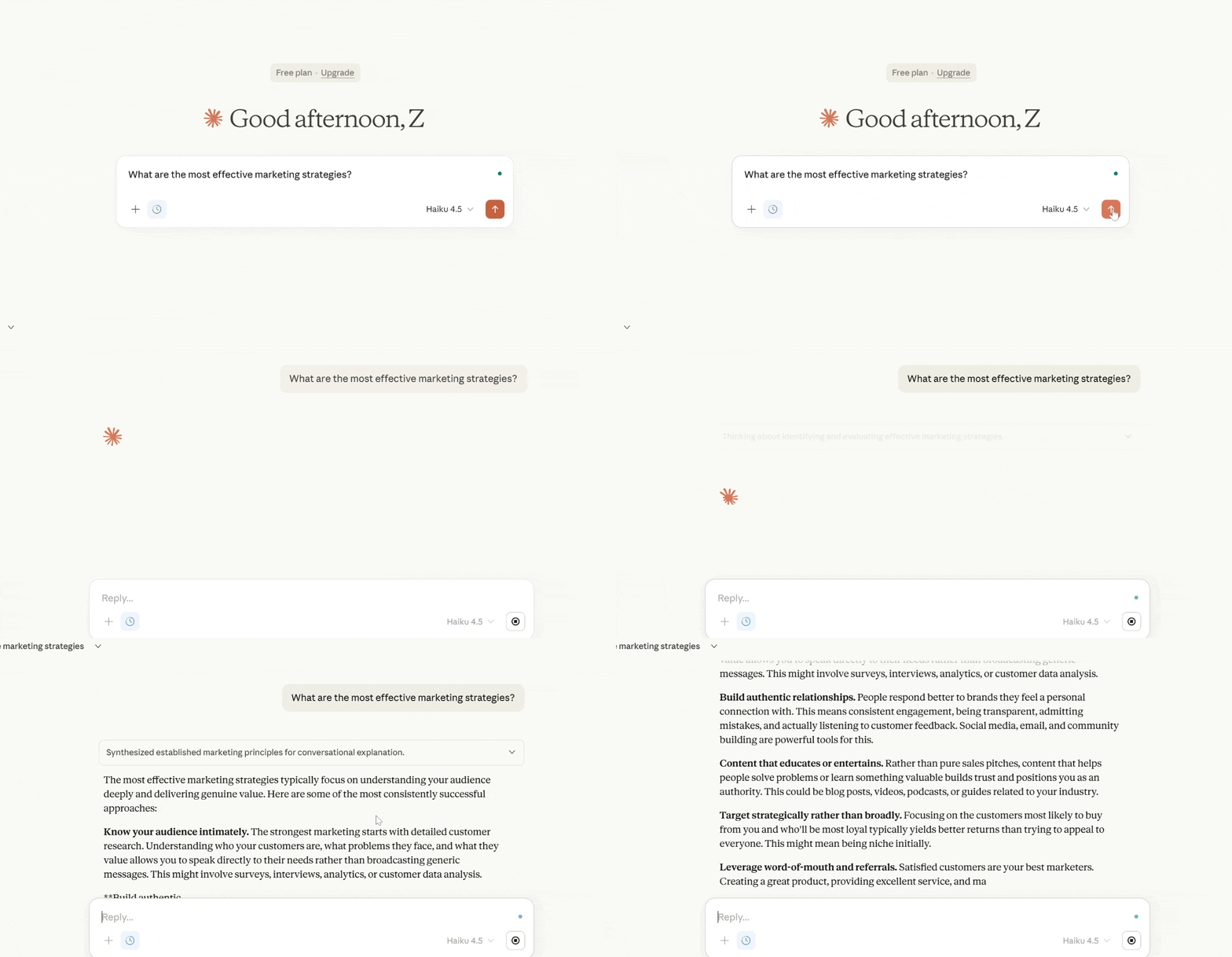
Though Claude AI does not think like a human, it’s still a good AI answer generator because it not only understands what you ask, but also why and how you ask it.
Kluczowe cechy:
- It considers the conversation history to maintain context for follow-up questions.
- It explains limitations instead of guessing or providing misleading concepts.
- Read and analyze very long documents, data, and images, and answer questions naturally.
Practical Tips for Getting Better Answers
1. Ask QuestionsClearly and Specifically
Do not use vague questions. Instead of asking “Tell me about marketing,” ask “What are 5 digital marketing strategies for a small e-commerce clothing brand?”
The more details you provide, the more targeted the answer will be.
2. Provide Context
AI performs better when it understands your situation. Context helps shape tone, depth, and relevance.
Instead of using this prompt, “Write an email.”
Try this prompt, instead:
Write a professional email to a client apologizing for a delayed shipment. The tone should be polite and reassuring.
3. Define the Output Format
If you want a specific structure, you can include it in your prompt. For example:
- “Provide a bullet-point list.”
- “Write in 200 words.”
- “Create a step-by-step guide.”
- “Summarize in simple language.”
Defining the output format in your prompt prevents unnecessary revisions.
4. Set the Tone or Style
Tell the AI how you want it to sound. For example, you can tell AI to act as:
- Profesjonalny
- Casual
- Persuasive
- Academic
- Beginner-friendly
- Technical
5. Break Complex Requests into Steps
Large or complicated requests work better when divided.
Instead of asking the tool to create a full business plan as an example, try to ask these things:
- Help me define my target audience.
- Now outline revenue streams.
- Now create a marketing strategy.
This approach can improve accuracy.
6. Ask for Examples
Examples can make answers clearer and more actionable.
For instance, you can ask the tool to explain SEO and include 4 real-world examples.
7. Use Follow-Up Questions
The best approach is not to ask everything in one prompt. You can ask follow-up questions to create a whole context. In this way, you get better and more concrete results.
8. Set Constraints
Asking the tool to limit the result improves precision. It guides AI toward your expected results. Here are some examples of prompts that set limits:
- Limit to 5 bullet points.
- Use only beginner-level language.
- Do not use jargon.
- Keep it under 150 words.
9. Share Your Goal
Explain what you’re trying to achieve for a more accurate result. Here are some examples of the prompts with goals:
For example, you can include this text in your prompt:
I want to improve my Facebook profile to attract followers.
10. Review and Refine
Do not fully trust AI responses, especially if you are looking for factual answers. AI does not replace as a source of facts. Always perform these steps:
- Fact-check important information.
- Adjust wording to match your voice.
- Ask for revisions when needed.
Często zadawane pytania
What is the best free AI answer generator?
GenieChat, Perplexity AI, YouChat, and Gemini offer powerful free versions with accurate answers.
Are AI answer generators reliable?
They are highly reliable for general knowledge and explanations, but critical or technical information should always be verified with trusted sources.
Can AI answer generators replace search engines?
They complement search engines by providing direct answers, but search engines are still better for deep research and browsing.
Do AI answer generators work in real time?
Some tools, like GenieChat, Perplexity AI, and Gemini, use real-time web data, while others rely on trained knowledge.
Time to Take Action
AI answer generator tools are transforming how we search, learn, and make decisions. Whether you need quick explanations, research-backed answers, or content-ready responses, there’s a tool on this list for you.
We recommend GenieChat as your best choice for your question and answer needs. It works perfectly with WordPress and the playground web app.
Start by trying a free version, identify what fits your workflow, and upgrade only if you need advanced features.
The right AI answer generator can save you hours and dramatically improve how you access information, starting today.
 Danish
  Swedish
  Korean