







겟지니 AI

위로
에게
45% 절약

종료 날짜:

날
시간
분
초
Activate AI Techfest
GetGenie AI
  • 제품
    • ElementsKit
    • ShopEngine
    • MetForm
    • WP 소셜
    • Wp 궁극적인 검토
    • WP 모금 활동

    SEO Insights

    Track & Analyze WordPress SEO Performance

    키워드 연구

    몇 초 만에 관련성이 높고 아직 활용되지 않은 키워드를 찾아보세요

    경쟁사 분석

    더 나은 아이디어를 분석하여 경쟁사를 능가하세요.

    AI FAQ Generator 새로운

    Generate FAQs for AI search visibility & SEO rankings alike

    정면 분석

    경쟁사와 모든 측면에서 경쟁하고 분석합니다.

    원클릭 블로그

    키워드를 제공하고 몇 번의 클릭만으로 SERP 준비 블로그를 만들 수 있습니다.

    고급 글쓰기

    단계별 프로세스를 통한 맞춤형 맞춤형 콘텐츠

    GBP Post Generator 새로운

    Create diverse & catchy Google Business Profile posts in seconds

    GenieChat - AI Chatbot

    맞춤형 개성을 지닌 챗봇을 만나보세요

    대시보드 놀이터

    어디든 갈 준비가 되어 있는 쉬운 글쓰기와 SEO를 위한 놀이터

    40+ AI Templates

    준비된 템플릿을 활용하여 몇 초 만에 글을 작성하세요.

    지니 이미지

    Create catchy images both inside & outside the WordPress editor

    AI Overview Answer Builder 새로운

    Create structured & answer-first content for AI Overviews

    Local Service Copy Generator 새로운

    Craft conversion-friendly local service page copies in a flash

  • 완성
    • 워드프레스
    • 엘레멘터
    • 우커머스
    • 산소 빌더
    • 벽돌 빌더
    • 운동장
  • 사용 사례

    콘텐츠 마케팅

    Effortless content marketing with AI

    검색 엔진 최적화

    AI powered SEO with NLP keywords

    우커머스 SEO

    검색 트래픽을 위해 WooCommerce 스토어 최적화

    맞춤형 콘텐츠

    Start writing customized content with AI

    카피 라이팅

    더 짧은 시간에 대량 카피라이팅을 수행하세요.

    SEO 클라이언트 관리

    한 번의 구독으로 고객 사이트 관리

    SERP 분석

    몇 초 만에 Ai 기반 SERP 분석 수행

  • 자원
    • 주형 40+
    • 비교하다
    • 블로그
    • 로드맵
    • 선적 서류 비치
    • 지원 데스크
  • 가격
  • Korean
    • English
    • French
    • Spanish
    • German
    • Portuguese
    • Italian
    • Japanese
  • 로그인
  • 지금 무료로 시작하세요
로그인
Get 45% OFF

How to Efficiently Write Social Media Copies With AI ?

살만살만 Updated on: 2월 10, 2026 인공지능 카피 라이팅 3 최소 읽기
Social Media Copies With AI

If you want to write social media copies using AI, use AI content writers that generate engaging, brand-consistent, grammatically correct, and valuable copies. Given you provide the right brand and product details. This will make your work efficient and effective.

빠른 개요
When you use AI for efficiently generating social copies, make sure the copies:
➡️ Engage the right audience
➡️ Meet platform-specific rules
➡️ Have the right hook
➡️ Close of with a powerful CTA
➡️ Be grammatically correct.
To get the best results, use AI content writers like GetGenie for quick and engaging copies.

목차테이블
  1. How to Efficiently Create Social Media Copies with AI?
    • Step 1: Install GetGenie
    • Step 2: Using GetGenie for Social Copy
    • Step 3: Using Social Media Copy Template
    • Step 4: Check and Finalize the Copy
  2. 요약하자면

How to Efficiently Create Social Media Copies with AI?

When using AI tools to boost and improve social media copywriting, you must check whether the copies:

  • Appeal to your target audience
  • Follow copywriting best practices of the particular platform
  • Start off with the right attention-grabber
  • Close off with an effective Call-to-Action (CTA)
  • Don’t include embarrassing grammatical errors

GetGenie, a tool which you can use as a WordPress plugin and a SaaS solution, ensures the above factors. And also offers different templates for social media copywriting. One of the templates it offers is Social Media Copy/Post. 

To use GetGenie’s social media copy template for compelling social copies, follow the steps detailed below. 

Step 1: Install GetGenie

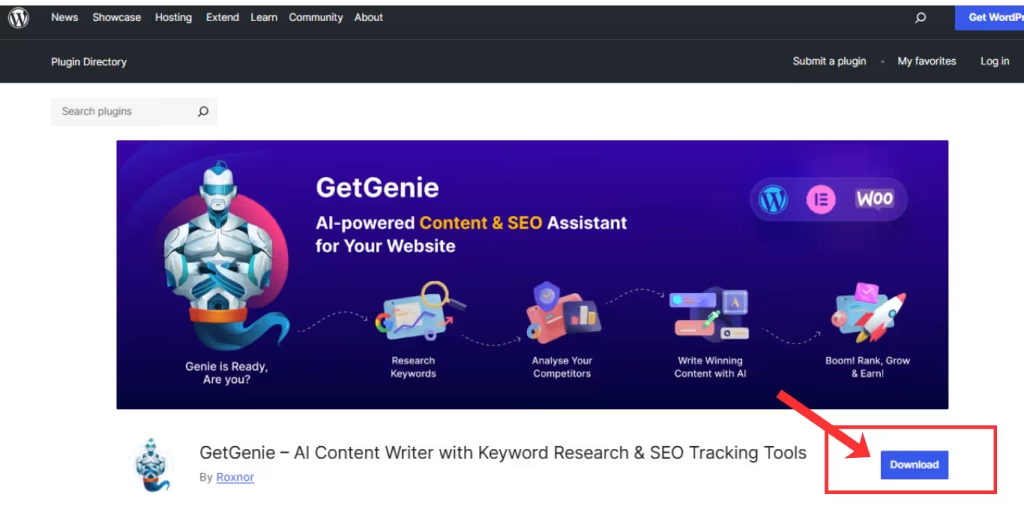
You need to download and install GetGenie to get started using it. There are three methods to install and activate the GetGenie plugin on your WordPress site:

  1. From the GetGenie 가격 페이지
  2. From the WordPress Dashboard
  3. From WordPress.org
GetGenie Download from WordPress Org
Learn how to install and activate GetGenie ➡️ How To Get Started With AI Writing Assistant – GetGenie 

Step 2: Using GetGenie for Social Copy

Once you are at the WordPress Dashboard with GetGenie installed and activated, move over to Dashboard > GetGenie > AI Writing.
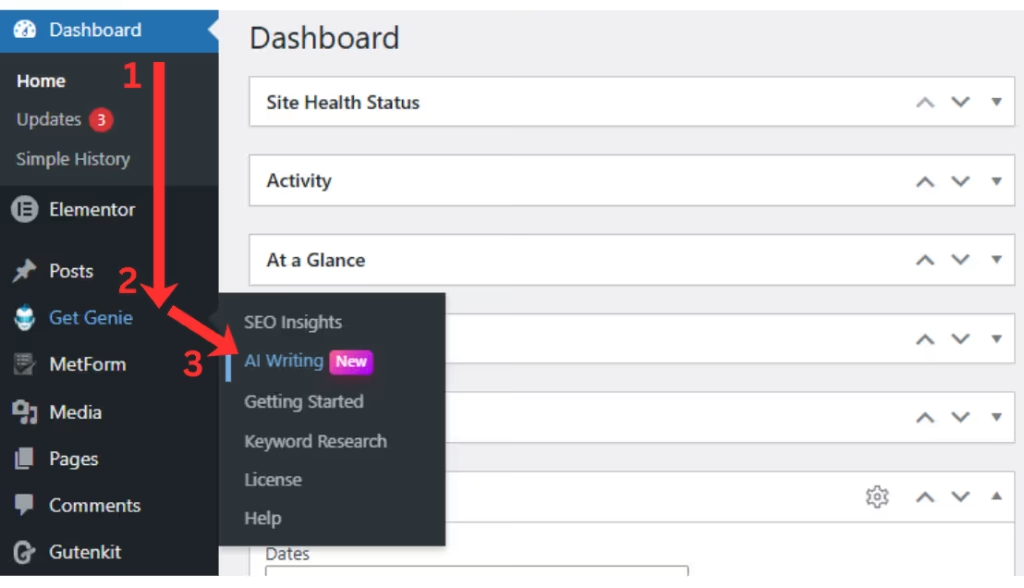
GetGenie WordPress Dashboard

There you will notice over 40 templates, each dedicated for particular content creation tasks. Select the Social Media Post/Copy template from the list.
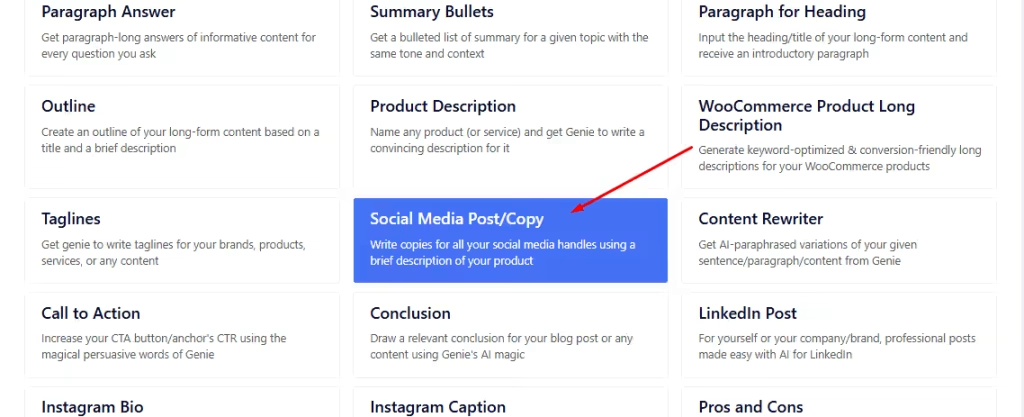
Try Social Media Copy Template Today
Social Media Copy Template

Step 3: Using Social Media Copy Template

Next, the template window will appear from the right of your screen.
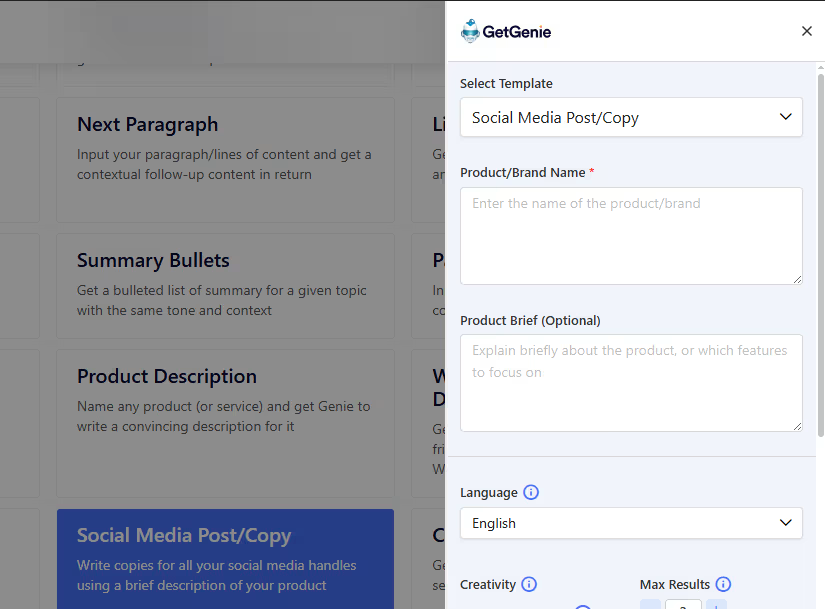
Social Copy Generator Template

There, add the details of your desired social media copy. Like the Brand or Product Name and a brief on the product. The latter is optional but adds more to the context.
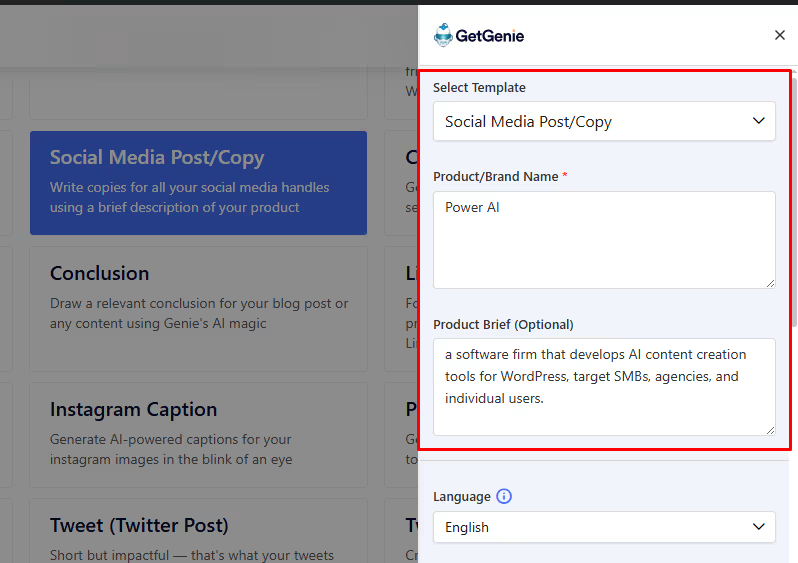
Adding brand name and brief

Once you’ve inserted the details, you can select the level of creativity (1 – 5) and number of results (1 – 6) for your desired output. Along with the language of choice. Finally, click on the Write button to generate the results.
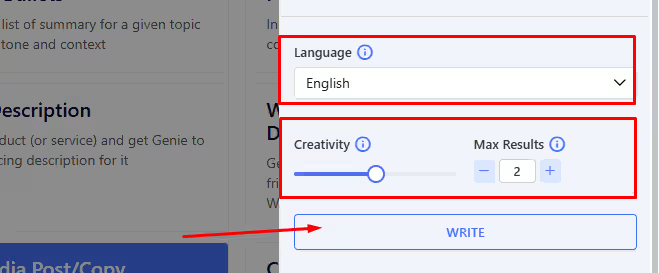
Selecting Language, Creativity and No of Results
Selecting Language, Creativity and No. of Results

Here, we got 2 outputs based on the setting, with creativity of 3, in English.
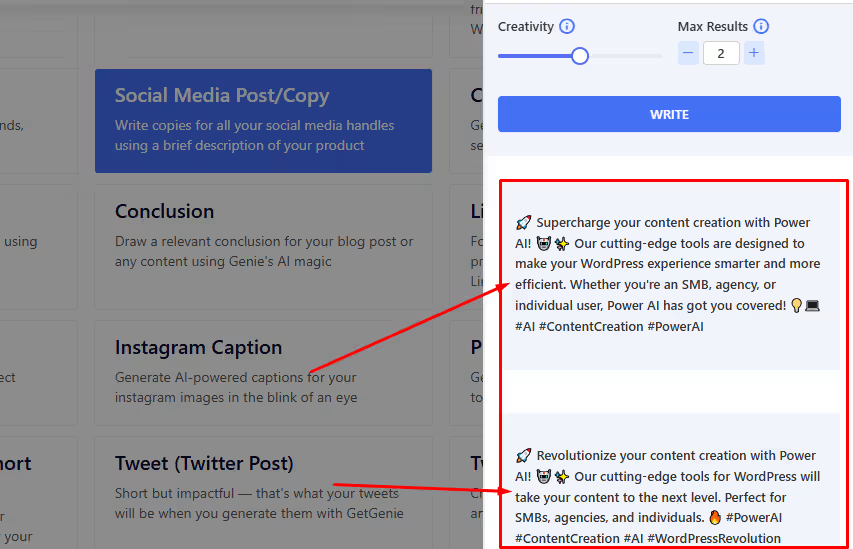
Generated Social Copy options

Two outputs are generated. You can select whichever suits your requirements. 

Step 4: Check and Finalize the Copy

Before using the copy, see if it matches your brand tone and platform-specific requirements. Know more about it by reading about 10 Social Media Copywriting Best Practices. 

And also, get a quick step-by-step look back at using the social media copy template below. 👇
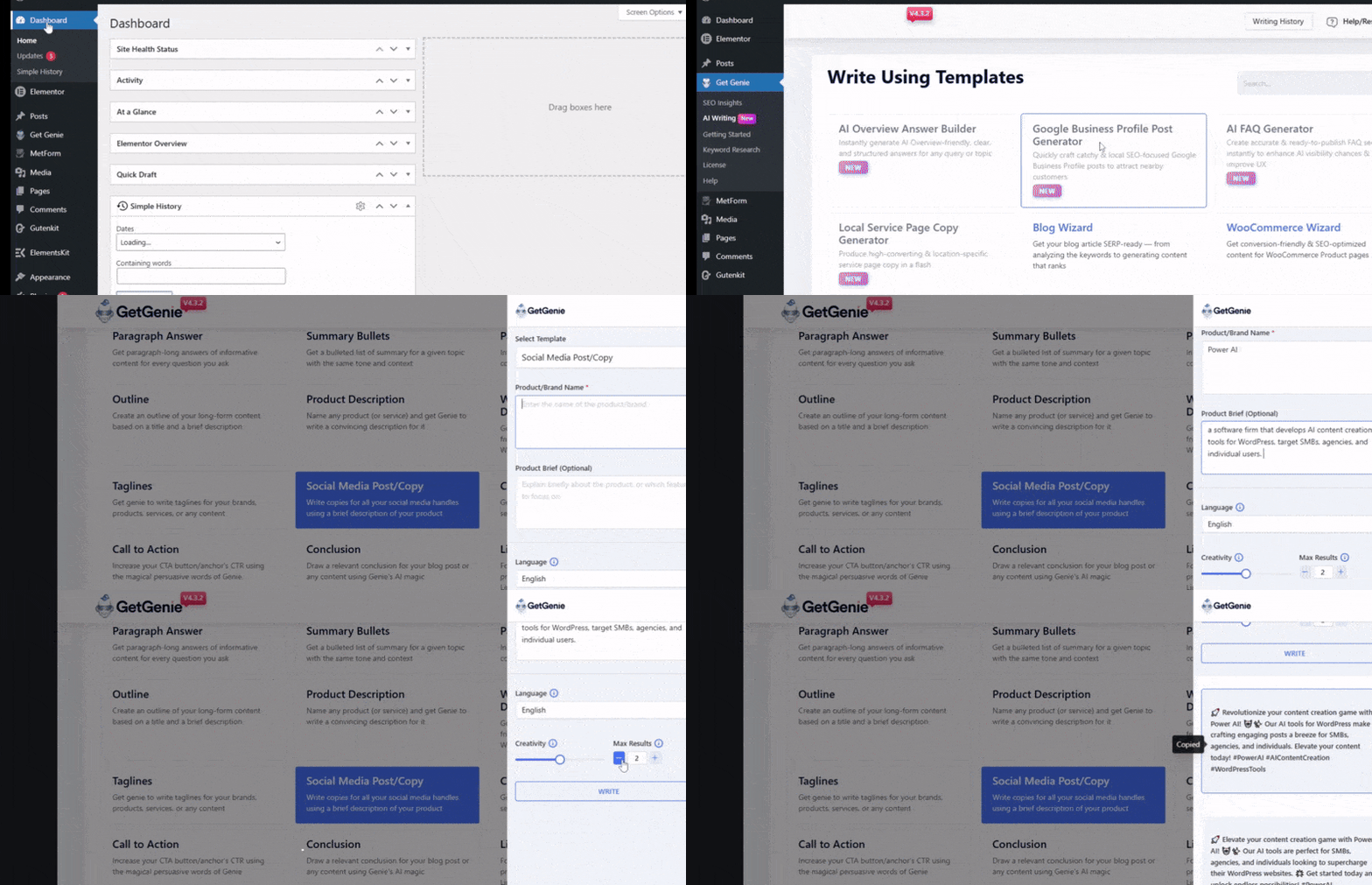
Generating Social Copies with AI Step by Step
What inputs should I prepare before I prompt an AI tool for social copies?

You should keep in mind and check:
1. Objective: awareness vs. clicks vs. signups vs. replies
2. Audience + pain point
3. Offer + proof (numbers, outcomes, testimonials—verified)
4. Brand voice rules (dos/don’ts, words to avoid)
5. Platform + format: caption, thread, carousel text, ad primary text, etc.

How do I keep AI-generated copy consistent with my brand voice?

Add context to the prompts. It will help the tool understand more about your product and brand. Also, create a brand voice checklist that you maintain to align tone, sentence length, emoji rules, prohibited phrases.

Is there any AI tool dedicated for social media copywriting?

Currently, no. But AI content creators like GetGenie offer various templates and features that generate social copies as per your prompts and inputs.

Are there templates or tools specific to certain platforms (e.g., LinkedIn, Twitter, Facebook, etc).

Yes, AI copywriting tools offer options or templates dedicated to writing copies and captions for specific platforms.  For instance, GetGenie offers templates for LinkedIn captions, Instagram Bios, Instagram Captions, and Twitter Posts.

요약하자면

AI tools help you draft powerful and appealing social copies that feed into more viewer engagements, shares, likes, comments, etc. However, you must also check and review the copies for brand tone, context, audience-friendliness, etc. 

Using GetGenie’s social media copy template will let you create engaging copies for social media for the right viewers. These copies are best used as captions of your posts. 

For more specific, platform-based copies and posts, try the following templates as well:

👉 GetGenie LinkedIn Post Generator 
👉 GetGenie Instagram Bio Generator
👉 GetGenie 인스타그램 캡션 생성기

  • 이 공유:

How Google AI Overview Selects Content – Algorithm Cues & Signals

이전 게시물

답장을 남겨주세요 답장 취소

이메일 주소는 공개되지 않습니다. 필수 필드는 *로 표시됩니다

GetGenie helps write, optimize & track your content while you focus on conversions & growth!

자원

  • 에 대한
  • 제휴 프로그램
  • 비교하다
  • 블로그
  • 로드맵
  • 기간 한정 특가
  • 직업 - 우리는 고용 중이다!

회사

  • 지원 센터
  • 제휴 정책
  • 개인 정보 정책
  • 환불 정책
  • 이용약관
  • Guide & Tutorials
  • 연락하다

비교하다

  • GetGenie Ai 대 재스퍼
  • GetGenie Ai 대 Copy.AI
  • GetGenie Ai 대 Rytr
  • GetGenie Ai 대 Writesonic

뉴스 레터

이메일을 입력하면 다음 내용에 동의하는 것으로 간주됩니다. 이용약관 그리고 개인 정보 정책.

벌다 30% 수명 제휴사로 커미션을 받으세요!

오늘 가입하세요

© 2026 GetGenie. 판권 소유.

에서 찾아주세요
아이콘 트위터 X
We've detected you might be speaking a different language. Do you want to change to:
Change language to English English
Change language to German German
Change language to Spanish Spanish
Change language to Italian Italian
Change language to French French
Change language to Danish Danish
Change language to Portuguese Portuguese
Change language to Swedish Swedish
Change language to Polish Polish
Korean
Change language to Japanese Japanese
Change Language
Close and do not switch language