









Best FAQ Generator Tools for AI Visibility


The best FAQ generator tools help you create organized and search-friendly FAQs with minimal effort. Whether you need AI-generated questions, WordPress-ready schema, or quick FAQ drafts for landing pages, these tools cover a wide range of use cases.
We’ve included and tested popular options, such as GetGenie AI, Toolsday, Originality, QuillBot, Etipad, SEOReview FAQ, and so on. Explore the tools, compare their features, and find the right one based on your needs, ease of use, and other factors.
Here are the best FAQ generator tools:
1️⃣ GetGenie AI – Offers an easy template that generates SEO-focused and PAA-style FAQs. It’s an efficient tool for SaaS and WordPress users.
2️⃣ Toolsday – Creates structured FAQs from topics, text, or uploaded files.
3️⃣ Originality.ai – Produces accurate FAQs using URLs or files with fact-checking.
4️⃣ Embarque – Builds audience-focused FAQs based on buyer intent.
5️⃣ QuillBot – Instantly generates simple, readable FAQs from minimal input.
6️⃣ Etipad – Identifies expert-level FAQs from your website domain.
7️⃣ SEOReview FAQ – Creates FAQ lists based on search intent.
8️⃣ HireMia FAQ Generator – AI-generated FAQs from topics or product details.
9️⃣ ToolBaz – Quickly generates basic FAQs for free without signing up.
🔟 SiteGPT – Provides custom FAQs from your topic using AI.
Why Do You Need an FAQ Generator Tool?
Researching and creating original and relevant FAQs manually takes a lot of time and effort. An FAQ generator helps you work smarter by quickly creating structured, relevant questions and answers.
An FAQ generator helps you to:
- Answer real user questions clearly and improve overall user experience
- Target long-tail keywords for better SEO
- Create professional FAQs easily, even for beginners
- Reduce support tickets by addressing common concerns upfront
Best FAQ Generator Tools
We’ve listed the top 10 FAQ generator tools here. Check out the tools at a glance.
| 도구 이름 | 장점 | 단점 | Pricing Idea |
|---|---|---|---|
| GetGenie AI | SEO-focused, PAA-style FAQs, easy block insertion | Though overall good, it could offer more personalization options | Freemium |
| Toolsday | Quick setup, customizable, file upload support | Manual copy-paste required, no option to choose the number of FAQs | Free / Low-cost |
| Originality.ai | Accurate, fact-checked FAQs, URL/file input | No direct CMS integration, less customization options | Free /Paid |
| Embarque | Quick and flexible for all | Limited customization options | Free / Paid |
| QuillBot | Very fast, beginner-friendly | Often needs good input prompts to avoid vague or repetitive questions. | Free / Premium |
| Etipad | A simple online tool that gives you a sample to generate FAQs | Minimal customization | Free /Paid |
| SEOReview FAQ | Allows you to paste your content into its SEO content editor | Answers can be generic and less tailored without deeper content input. | Freemium |
| HireMia FAQ Generator | Mobile-friendly, multiple templates | Doesn’t ask for deep context, so FAQs may miss niche details. | Free / Pro |
| ToolBaz | Advanced customization options and quick | Doesn’t consider business context/ideal customer profile in questions. | 무료 |
| SiteGPT | Can generate FAQs by scraping up to 5 URLs or direct topic input. | Quality depends heavily on how well the URLs are structured/content-rich. | Freemium |
GetGenie AI
GetGenie AI is an AI-powered SEO and content writing tool and is considered the best FAQ generator tool. GetGenie includes a ready-to-use FAQ generator template to create structured and search-friendly questions in minutes.
Features and output quality
The GetGenie AI FAQ generator is a quick and easy-to-use template. A single primary keyword is enough to create a full, targeted FAQ set. Also, the template offers options to set context, number of questions, language, etc.
We’ve entered “Elementor addon” as the primary keyword and “ElementsKit is the best Elementor addon” as a context. Here is the output.
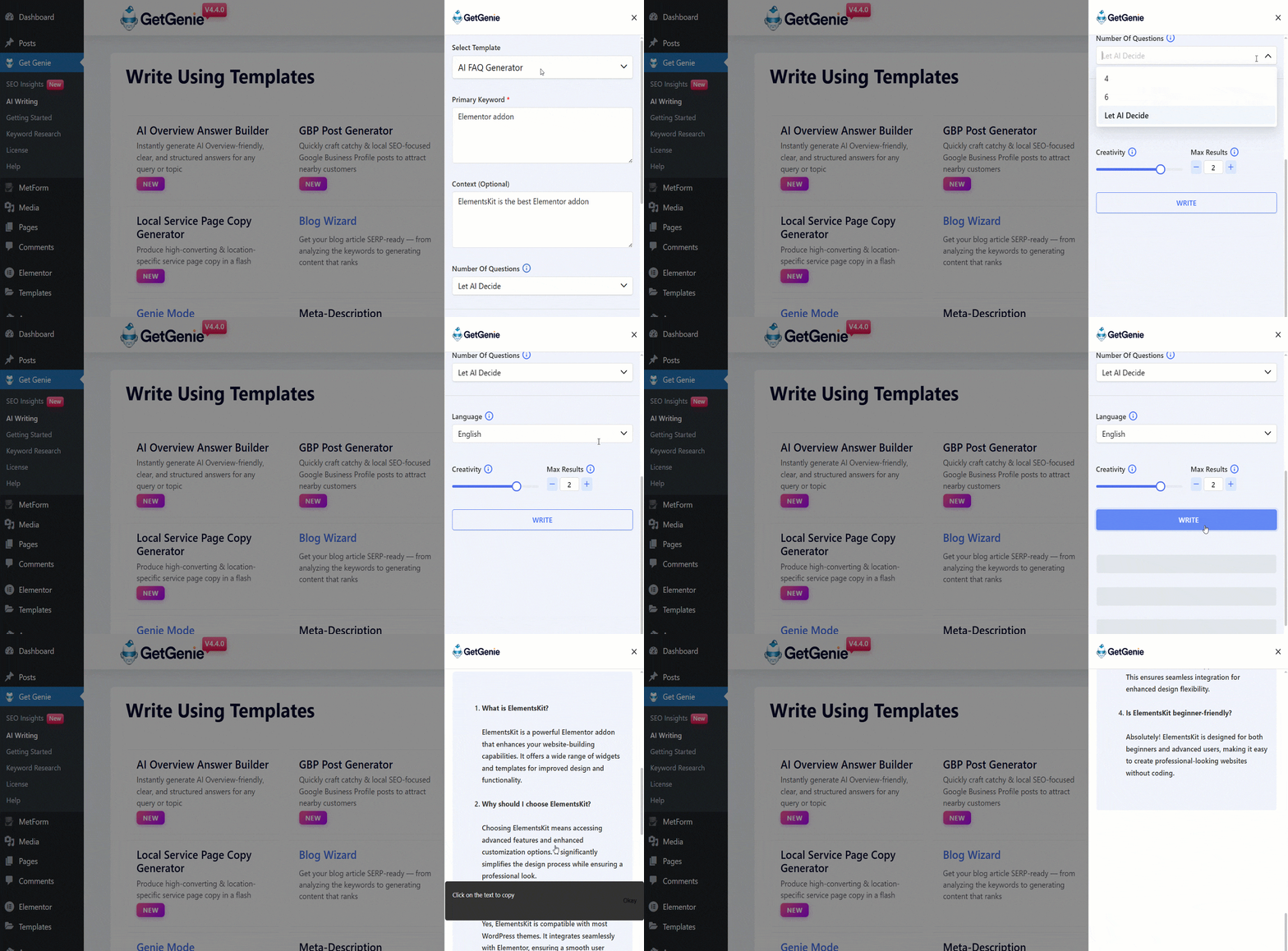
Check the quality breakdown –
| 측면 | 평가 | 평결 |
|---|---|---|
| 정확성 | ⭐⭐⭐⭐ | Highly reliable; pulls from real-world search data. |
| SEO Impact | ⭐⭐⭐⭐⭐ | Best-in-class; specifically designed for SERP visibility. |
| Tone & Style | ⭐⭐⭐⭐ | Human-like and professional; easily adjustable. |
| Technical Integration | ⭐⭐⭐⭐ | You can do manual copy-paste or use the template and insert the output directly into the editor with a single click while writing. |
| 사용의 용이성 | ⭐⭐⭐⭐⭐ | One-click generation makes it accessible for beginners. |
What’s unique about the GetGenie AI FAQ generator?
- Extracts People Also Ask–style questions from a seed keyword
- 생성 context-aware FAQs from existing page content
- Inserts FAQs directly as Gutenberg / Elementor blocks
가격
The tool costs $10/month for the Starter plan (annual billing).

Toolsday
Toolsday curates practical online tools that solve your everyday digital tasks. It features an FAQ generator that helps you create structured Q&A content quickly.
Features and output quality
Toolsday is a feature-rich tool. By inserting a topic and relevant content, you can get your required FAQs. It lets you adjust question count, tone, language, and more.
We’ve tested the tool with “Metform’s landing page” as the topic and “Metform is a form builder for WordPress” as content inputs. Let’s see what the template has generated for us.
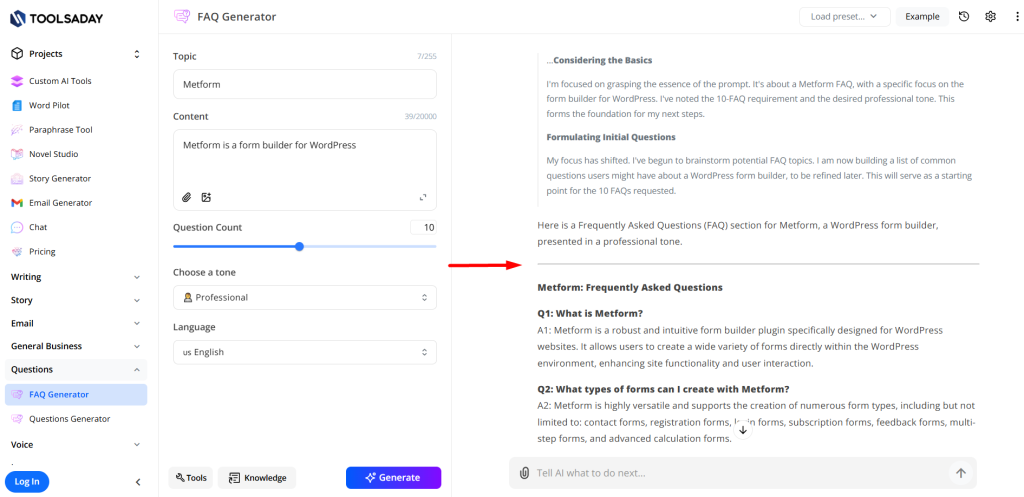
Check the quality breakdown –
| 측면 | 평가 | 평결 |
|---|---|---|
| 정확성 | ⭐⭐⭐⭐ | Very reliable and stays true to the source text provided. |
| SEO Impact | ⭐⭐⭐ | Good for basic readability, but lacks advanced NLP and SERP data. |
| Tone & Style | ⭐⭐⭐⭐ | Maintains a consistent and professional human-like voice. |
| Technical Integration | ⭐⭐⭐ | Requires manual copy-pasting as it lacks a native one-click editor sync. |
| 사용의 용이성 | ⭐⭐⭐⭐⭐ | Beginner-friendly with a fast and zero-configuration setup. |
What’s unique about the Toolsday FAQ generator?
- You can upload files to provide a clearer context by using the Knowledge option.
- “Read aloud” feature reads the output for you quickly.
- 그만큼 settings option allows more personalization features.
가격
Approximately $7.99/month on the Standard plan (includes many writing tools).
Originality.ai
Originality.ai is a comprehensive content quality control platform. It provides an FAQ generator that helps create clear, well-structured Q&A content while maintaining originality and trust.
Features and output quality
Originality.ai is a simple and handy tool. With a few inputs, you can get quick FAQs. You can personalize the outputs by choosing the number of FAQs, tone, and language.
We used “landing page” as the test topic along with a short source “PopupKit”. Below is the result from the template.
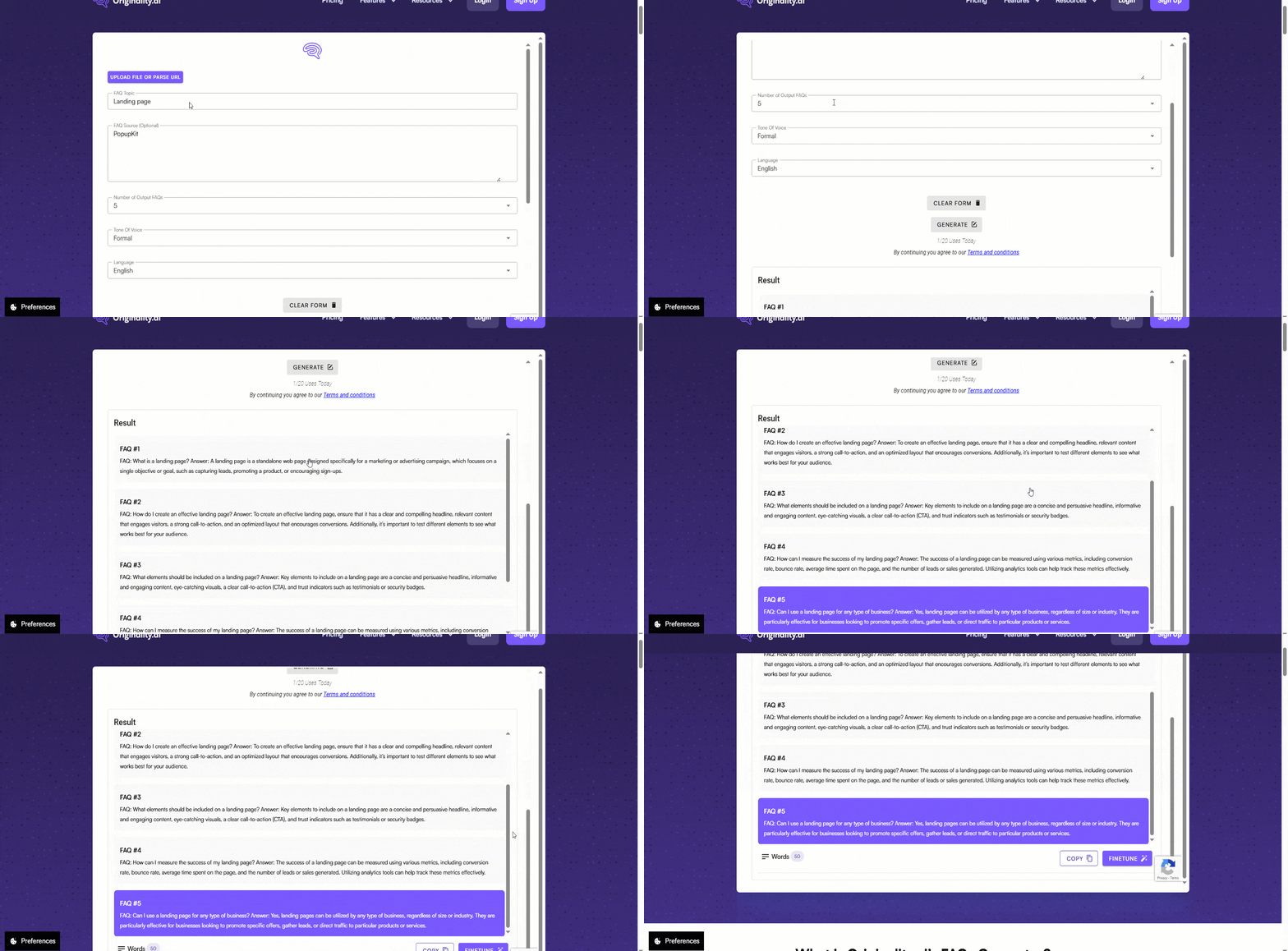
Check the quality breakdown –
| 측면 | 평가 | 평결 |
|---|---|---|
| 정확성 | ⭐⭐⭐⭐⭐ | Good fact-checking; scans your actual URL or file to prevent AI hallucinations. |
| SEO Impact | ⭐⭐⭐⭐ | Strong predictive SEO scores, though focused more on content quality than schema. |
| Tone & Style | ⭐⭐⭐⭐ | Offers several tone options; very safe for corporate and academic use. |
| Technical Integration | ⭐⭐⭐ | Manual copy-paste; it’s a web-based dashboard tool rather than a CMS plugin. |
| 사용의 용이성 | ⭐⭐⭐⭐⭐ | Very simple; just give a topic, paste a URL, or upload a file and hit generate. |
What’s unique about the Originality AI FAQ generator?
- Allows to upload input file or paste URL easily.
- 그만큼 Finetune feature lets you alter an FAQ and compare it with the fine-tuned one.
가격
약 $12.95–$14.95/month subscription (credits-based).
Embarque
Built by Embarque, it’s a quick AI-powered online platform. The platform supports FAQ-style knowledge structuring for clarity, eliminating the need to skim through hours of content.
Features and output quality
Embarque provides super quick steps to produce FAQs that help you enhance your site’s overall user experience.
To see how it works, we tested the tool by adding “GutenKit- The ultimate Gutenberg solution” as the topic and “Gutenberg users” as the audience, and we skipped the context, as it’s optional, and wrote “None”. Here’s what it generated.
See the complete quality evaluation.
| 측면 | 평가 | 평결 |
|---|---|---|
| 정확성 | ⭐⭐⭐⭐ | High; specifically pulls from real “People Also Ask” data for relevance. |
| SEO Impact | ⭐⭐⭐⭐ | Great for finding ranking opportunities, but doesn’t automate the technical markup. |
| Tone & Style | ⭐⭐⭐ | Functional and direct, but lacks variety in “creative” or brand-voice settings. |
| Technical Integration | ⭐⭐⭐ | Standard web tool; requires moving content manually into your editor. |
| 사용의 용이성 | ⭐⭐⭐⭐⭐ | No login required for quick use; very straightforward interface. |
What’s unique about the Embarque FAQ generator?
- Prioritizes FAQs by 타겟 고객
- Helps structure FAQs to match different stages of the buyer’s journey
가격
Embarque is a free tool.
QuillBot
With QuillBot, getting content live doesn’t feel like a technical task. The FAQ Section Generator lets you publish organized Q&A sections without custom development.
Features and output quality
QuillBot’s FAQ generator is really simple. You need to fill just one field to get an FAQ section. Our input was “Refund for my plugin”. Let’s see what it has generated for us.
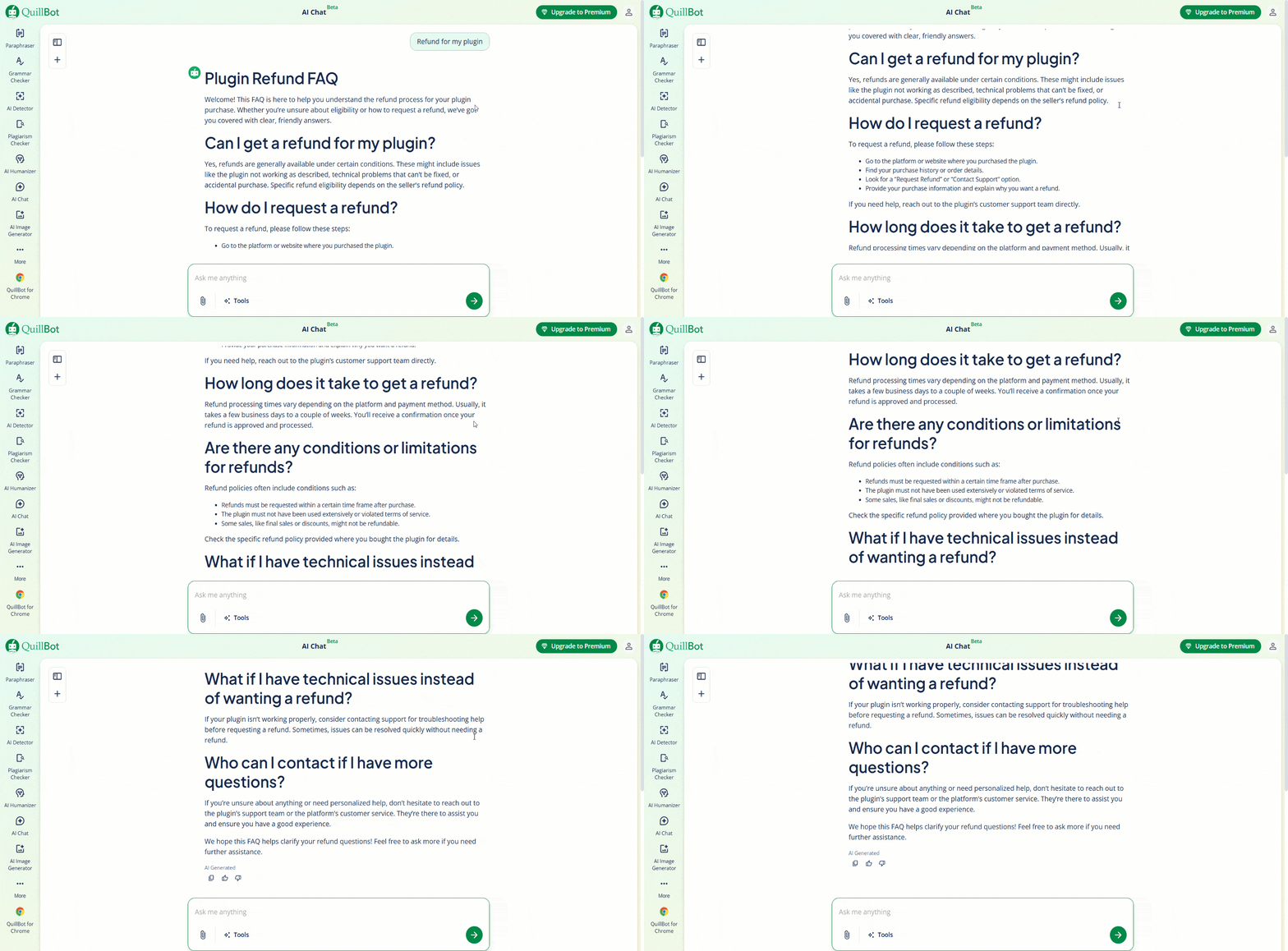
Let’s dive into the quality overview.
| 측면 | 평가 | 평결 |
|---|---|---|
| 정확성 | ⭐⭐⭐⭐ | Generates relevant FAQs, generally accurate answers that may need light review. |
| SEO Impact | ⭐⭐⭐ | Useful for capturing long-tail questions, but lacks built-in schema or SEO optimization. |
| Tone & Style | ⭐⭐⭐ | Produces neutral, readable FAQs with no tone customization. |
| Technical Integration | ⭐⭐ | No direct schema or CMS integration; FAQs must be added manually. |
| 사용의 용이성 | ⭐⭐⭐⭐⭐ | Very simple and fast, ideal for beginners and quick FAQ section creation. |
What’s unique about QuillBot’s FAQ generator?
- Creates FAQs instantly from minimal input
- Prioritizes clear, easy-to-read answers
- Integrates smoothly with QuillBot’s writing tools
가격
Premium plans begin around $8–$14/month (billed annually).
Etipad
It’s another AI FAQ generator tool powered by Editpad. It’s free and helps you create optimized FAQ lists in seconds. Using advanced AI models, it analyzes your topic or content and generates relevant questions and answers for blogs, articles, products, or services.
Features and output quality
The features are really minimal. It requires only a specific research topic. Then you can adjust the tone, topic, and number of FAQ if you want.
For the specific research topic, we’ve input “Fundraising WordPress tool“ and given a topic “Charity site owners”. Here is the output Etipad made.
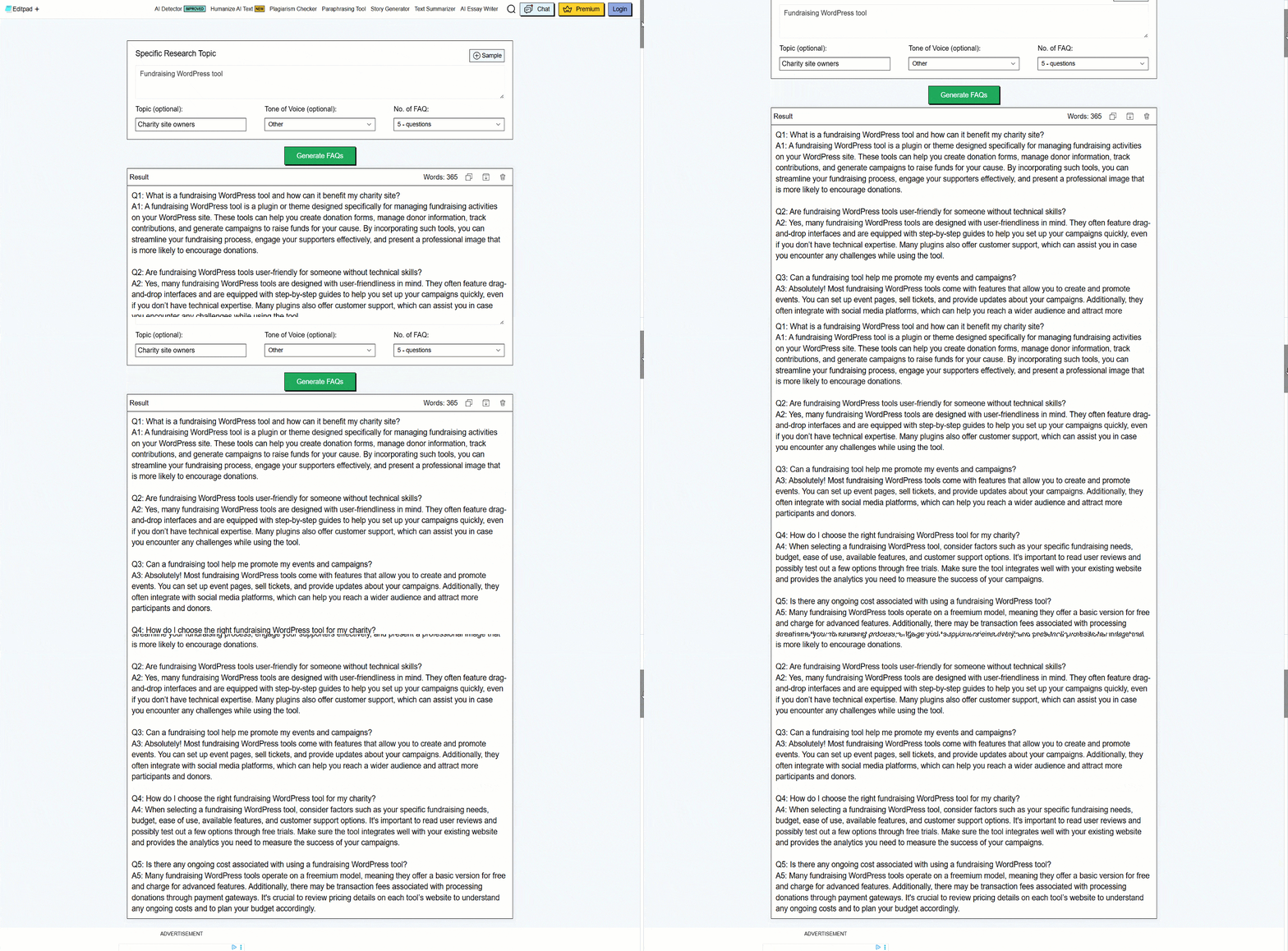
Here is a closer look at the tool’s quality standards.
| 측면 | 평가 | 평결 |
|---|---|---|
| 정확성 | ⭐⭐⭐ | Good for general Q&As, but sometimes produces generic or repetitive answers that need manual tweaking. |
| SEO Impact | ⭐⭐⭐⭐ | Strong focus on “People Also Ask” (PAA) style questions; excellent for capturing long-tail search traffic. |
| Tone & Style | ⭐⭐⭐ | Offers tone presets, but lacks deep brand-voice mimicking. |
| Technical Integration | ⭐⭐ | Minimal; it’s a “copy-paste” tool. It doesn’t offer direct API hooks or native CMS plugins (like WordPress/Shopify). |
| 사용의 용이성 | ⭐⭐⭐⭐⭐ | Extremely lightweight and fast. No account required to start; just enter a topic and hit generate. |
What’s unique about the Etipad FAQ generator?
- Works instantly and is easy for everyone
- 생성 different FAQ outputs for the same input
가격
It offers a free trial, but we found no clear public pricing.
SEOReview FAQ Generator
The next tool on our list is the SEOReview FAQ generator by SEOReview. It’s designed for depth and produces a great volume of user questions. No complexity, full AI-powered tool.
Features and output quality
You can see various essential features to generate a list of FAQs based on your topic. Besides the initial setups, the tool lets you describe your audience and set the creativity level.
We ran a quick test with “WordPress social media plugin” as the topic and a short description of “WordPress users” as the description of our audience. Below is what the tool generated.
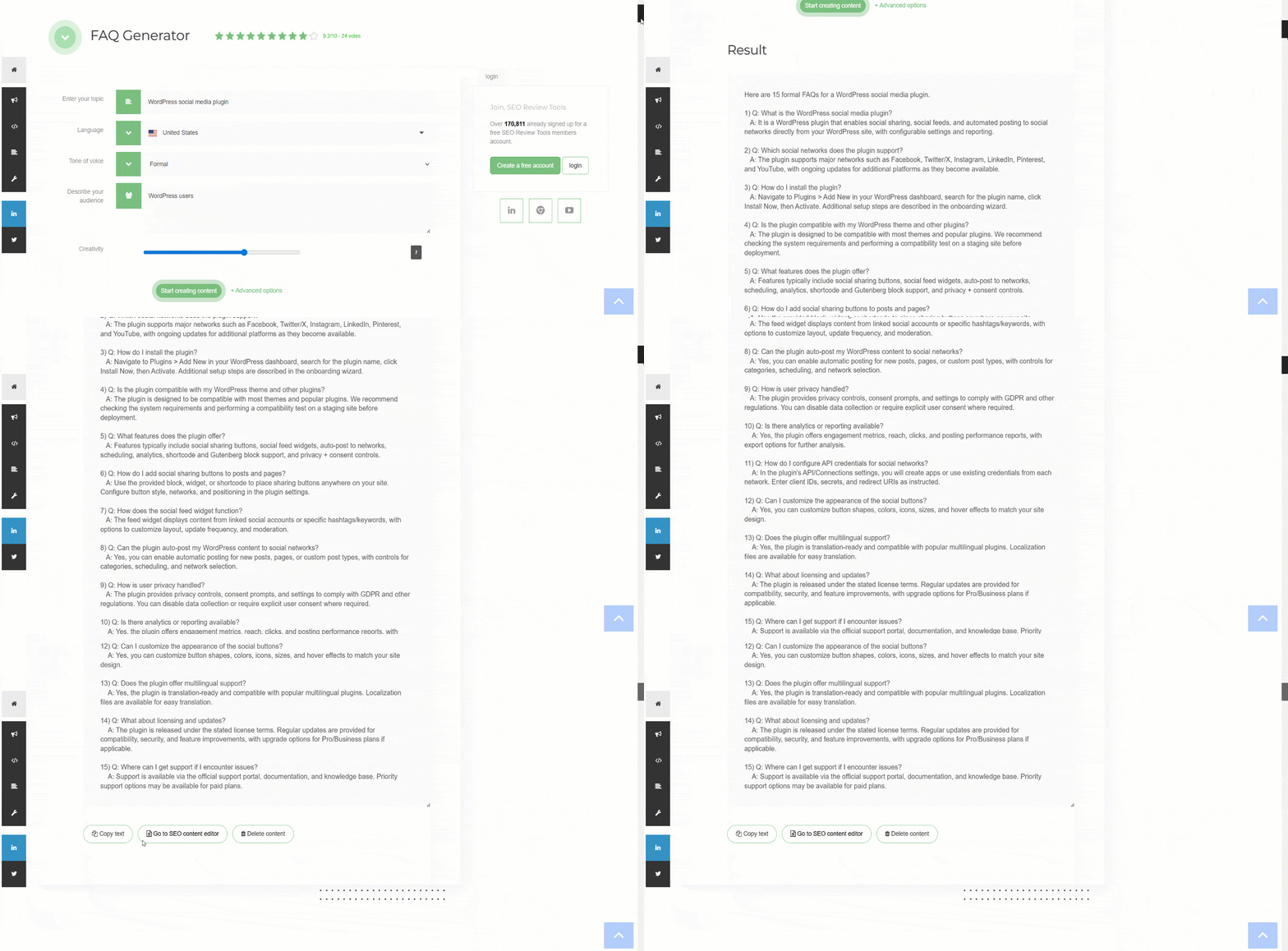
Let’s evaluate the performance and output quality.
| 측면 | 평가 | 평결 |
|---|---|---|
| 정확성 | ⭐⭐⭐⭐ | Accurate and precise at capturing 사람들은 또한 묻습니다 (PAA) search intent. |
| SEO Impact | ⭐⭐⭐⭐ | Good focus on search intent and keyword relevance. |
| Tone & Style | ⭐⭐⭐⭐ | Several options for brand or personality customization. |
| Technical Integration | ⭐⭐⭐⭐ | Copy-paste style and also lets you use the output in the SEO content editor of the tool. |
| 사용의 용이성 | ⭐⭐⭐⭐ | Many built-in features and simple to use framework. |
What’s unique about the SEOReview FAQ generator tool?
- FAQ discovery tool, not an AI writer
- Prioritizes search behavior over language quality
- Works as a validation layer before content creation, not after
가격
SEOReview FAQ generator is free to use.
HireMia FAQ Generator
HireMia is an AI assistant. It helps to write on-brand copy for any type of website. Its FAQ generator framework is cool for quick online use.
Features and output quality
The tool offers all necessary features. It allows you to adjust tone, length, and structure after generating the output. Also, you can retry if you don’t like the current output.
To test the tool, our subject was “How to make coffee”.
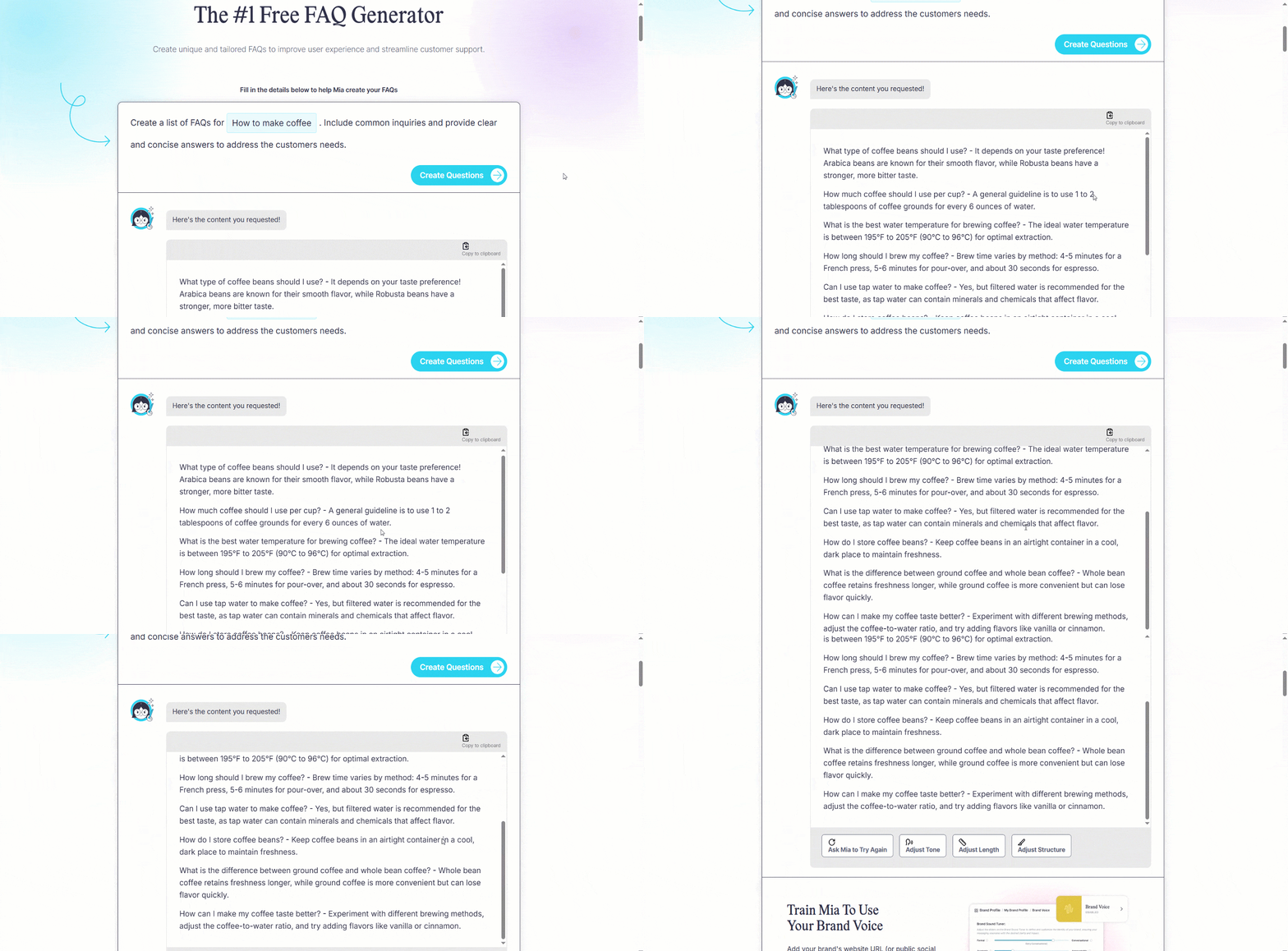
Let’s examine the results generated from this input.
| 측면 | 평가 | 평결 |
|---|---|---|
| 정확성 | ⭐⭐⭐⭐ | Real-time web search keeps facts fresh. |
| SEO Impact | ⭐⭐⭐ | Helps you rank on search engines |
| Tone & Style | ⭐⭐ | You can change the tone and structure after generating an output. |
| Technical Integration | ⭐⭐⭐ | Copy-paste style |
| 사용의 용이성 | ⭐⭐⭐⭐ | Easy for everyone. |
What’s unique about the WP responsive FAQ tool?
- Built for customer support alignment
- Reduces internal knowledge gaps by reusing verified content only
가격
Not publicly listed as a standalone figure.
ToolBaz
ToolBaz combines everyday online tools into one place. Among them is a simple FAQ generator for quickly creating question-and-answer content.
Features and output quality
The FAQ generator’s settings are easy to understand. It needs product name and description to provide you the required FAQs. Also, you can choose AI model, cretivity, tone of voice, result length, etc.
We selected “HR management tool” as the product and added a relevant description. Here’s how the tool responded.
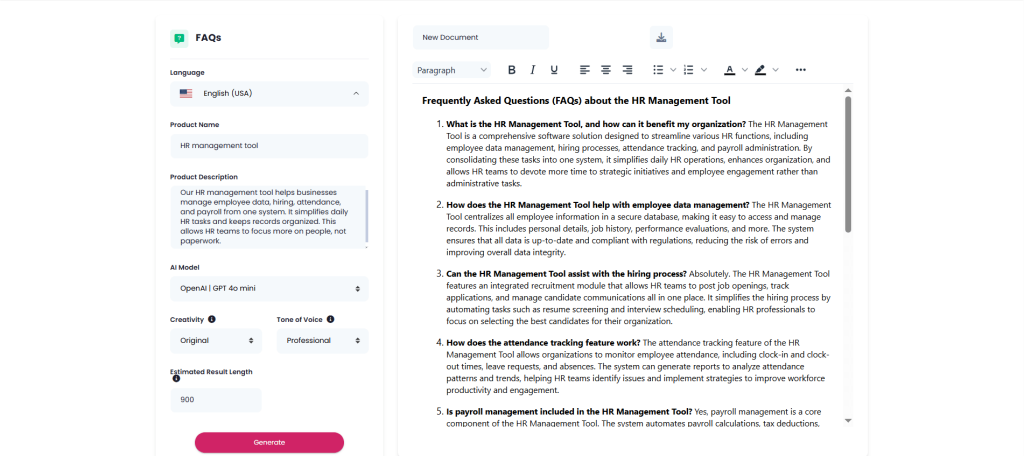
Now, let’s review the generated output in detail.
| 측면 | 평가 | 평결 |
|---|---|---|
| 정확성 | ⭐⭐⭐⭐ | Decent and relevant answers. |
| SEO Impact | ⭐⭐⭐⭐ | Good for visibility. It targets “People Also Ask” sections |
| Tone & Style | ⭐⭐⭐⭐⭐ | Highly versatile. It provides many customization options to style your FAQs. |
| Technical Integration | ⭐⭐⭐⭐ | You can copy and download the generated output. Also, you can edit the output right there. |
| 사용의 용이성 | ⭐⭐⭐⭐⭐ | Straightforward and you don’t need an account to use the tool. |
What’s unique about the ToolBaz FAQ generator?
- Generates FAQs using single-prompt input without accounts
- It lets you choose an AI model
- 제공 plain-text FAQ output for copy-paste use
가격
Paid premium features exist on ToolBaz overall, but the FAQ generator itself is free.
SiteGPT
This one is the last tool on our list, an online free tool. Like other online FAQ generators, SiteGPT is also a time-saving choice for you. It requires only a few pieces of information to generate the questions and answers you need.
Features and output quality
The tool offers all basic features. It allows you to adjust tone, number of FAQs, and language. Also, you can reset if you don’t like the current settings.
To test the tool, our content was “Homemade baby food”. Let’s check the output.
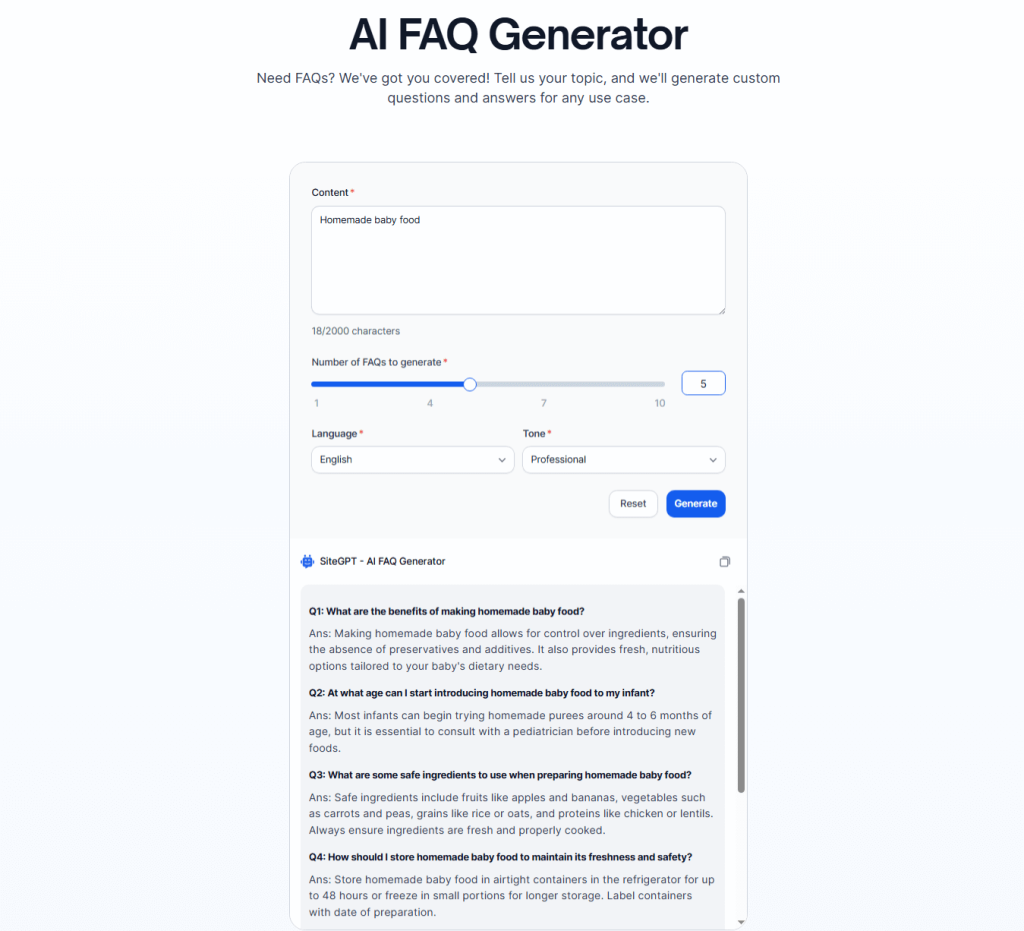
Let’s observe the outcome produced from this setup.
| 측면 | 평가 | 평결 |
|---|---|---|
| 정확성 | ⭐⭐⭐⭐ | Accuracy is as good as the user’s input. |
| SEO Impact | ⭐⭐⭐ | Includes basic schema, overall good. |
| Tone & Style | ⭐⭐⭐⭐ | Offers a lot of tones. It stays on brand. |
| Technical Integration | ⭐⭐⭐ | Simple, you just copy and paste the generated content. |
| 사용의 용이성 | ⭐⭐⭐⭐⭐ | Very easy to understand. |
What’s unique about the SiteGPT FAQ generator?
- Trains FAQs directly from your input content, so answers stay brand-accurate and up to date.
- Uses real user questions from site data instead of generic AI prompts.
가격
You can enjoy the premium plan for around at $39/월 for the Starter plan.
💡 This is also worth a read: How to Create AI-Optimized FAQs for Search Visibility
마무리
As you’ve seen, each FAQ generator tool in this list shines in a specific area. Some tools, like GetGenie AI is built for SEO-driven and PAA-style FAQs, while others are also good for speed, accuracy, and simplicity.
There’s no single “best” option for everyone. The right FAQ generator depends on whether you prioritize search visibility, ease of use, customization, or content accuracy. Try a couple of tools that match your workflow, review the outputs, and pick the one that helps you deliver clear, helpful FAQs with the least effort.
 Danish
  Swedish
  Polish