







How to Write AI Overview-Friendly Content to Get Cited

To earn AI Overview citations, your content needs to be answer-first, structured, and value-rich. That’s because AI-powered search doesn’t reward content the same way traditional search does.
You may be writing high-quality content and following SEO best practices. But that’s not sufficient to make your page visible in AI Overviews.
In this write-up, I will share with you actionable tips to write AI Overview-friendly content that actually gets picked up and cited.
- 概要
- Components of AI Overview-Friendly Content
- How to Write AI Overview-Friendly Content
- 1. Identify the Exact Question Users Ask on a Topic
- 2. Cover the Secondary Questions of the Topic
- 3. Decide the Answer Format
- 4. Write a Key Takeaways Section Before the Full Article
- 5. Expand the Content in Logical Layers
- 6. Write High-quality Content that Shows Real Expertise
- 7. Add FAQs Based on Secondary Queries
- 8. Remove Anything That Delays the Answer
- 9. Review the Page Like an AI, Not a Reader
- よくある質問 (FAQ)
- Gear up to Get Cited in AI Overviews
概要
AI Overviews prioritize content that delivers fast, structured, and reliable answers. These takeaways summarize what matters most when writing content that gets cited.
- Answer the main question in the first 1–2 sentences to make the content eligible for AI Overviews and citations
- Use clear headings, bullets, short paragraphs, and logical hierarchy to improve scannability and summarization
- Align every section with exact search intent using question-based, descriptive headings
- Expand content in layers (explanation, example, limitation) while removing fluff and long introductions
- Use AI + SEO tools like GetGenie to create structured, intent-driven, AI Overview-ready content efficiently
- Review the page from an AI’s perspective to ensure answers, entities, and insights are explicit and easy to extract
Components of AI Overview-Friendly Content
To gain visibility in AI Overviews, your content must be scannable, summarizable, and also fact-driven. The following components ensure your content aligns with how AI selects and presents answers.
- Direct & Answer-First Content
AI Overviews prioritize content that delivers the core answer immediately. Place a clear and concise response at the very beginning before adding context.
- Search Intent-Driven Headings
Headings should reflect exact user intent, not creative phrasing. Write question-based headings to help AI understand what each section answers.
- Simple & Declarative Sentences
Short and factual sentences are easier for AI to extract and summarize. Avoid complex phrasing, fillers, or multiple ideas in one sentence.
- Structured Formatting
Bullets, lists, and short paragraphs improve machine readability. Create well-structured content for AI to locate and reuse information accurately.
- Entity-Focused Writing
AI Overviews rely on entities, and not just keywords. Define tools, brands, people, or concepts clearly and use consistent naming.
- Factual & Neutral Tone
Content should read like a reliable reference source. Avoid hype or opinions and stick to verifiable information.
- Contextual Depth Without Fluff
Your main answers should follow brief explanations or examples. Avoid unnecessary background or long storytelling sections.
- Helpful & Non-Repeating FAQs
FAQs expand topical coverage without restating the same answer. So, address each question with a new angle in 2-4 concise sentences.
- Clear Content Hierarchy
Content should follow a logical flow from the answer to the details. Structure your content with strong H1-H2-H3 to help AI understand relationships between sections.
How to Write AI Overview-Friendly Content
Writing AI Overview-friendly content isn’t about creating long 5000-word content. Rather, it’s about answering user queries, formatting content properly, and providing valuable info on the topic.
Here’s what you have to stress to write AI Overview-friendly content that gets visibility & citations.
1. Identify the Exact Question Users Ask on a Topic
Before you pick a topic & start writing, you must find out the primary question your page should answer. It’s because AI Overviews usually surface one clear answer per query. So, you have to craft your content piece around a single core intent.
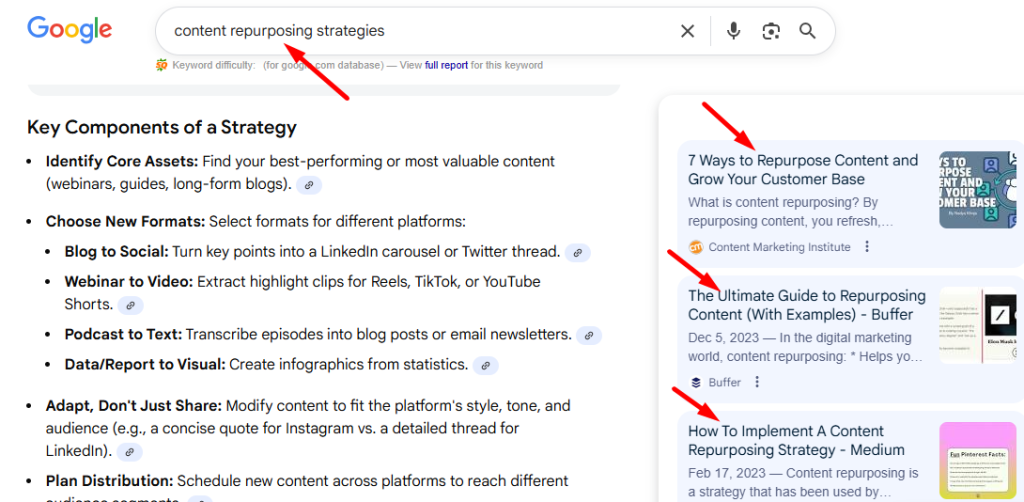
You can discover the primary question in a number of ways. Let’s say your topic is “content repurposing strategies.” To get the primary question, go straight to Google and type this topic/keyword in the search bar.
- Take a look at the SEO titles showing up in AI Overviews
- Also, note the titles appearing in the SERP for the keyword
The title type that Google shows the most for your target query is what you can consider as your main question. If the title appears as a non-question, just convert it into a question format and build your content around it.
2. Cover the Secondary Questions of the Topic
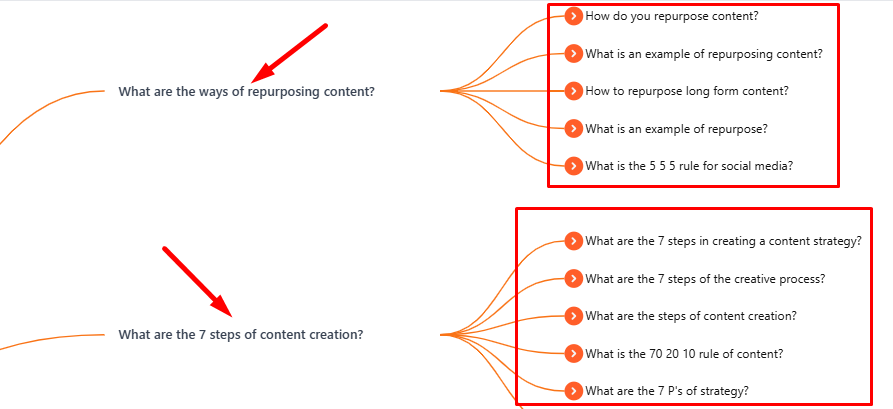
To enhance the chances of AI Overview visibility, add all the relevant secondary questions inside your content as well. For the above-mentioned topic, what can be your secondary questions? Well, through brainstorming, you can guess a few questions.
- How to convert a blog post into video content?
- How to use AI to repurpose content?
- What tools can you use for content repurposing?
You can also find some real ones from the “People also ask” & “People also search for” sections. For that, you just have to type the target topic in the search bar as mentioned above.
Another smart way is to use a popular tool called “回答ThePublic.” This tool will help you discover frequently asked questions on your given topic. Once you have all the questions in your collection, you are all set to answer them in logical order inside your content.
3. Decide the Answer Format
AI Overviews prefer to cite content that is scannable & well-structured. However, different queries require different answer formats. Some of the best content formats include paragraphs, bullet points, numbered lists, and comparison tables.
But how to choose the right format for a specific query or section? Well, the best tactic is to check the format of that query in the Google AI Overviews. Based on the existing AI Overview display, you can structure your content with high-value content.
- Formats of unordered lists will often show up as bullet points
- For ordered lists, the formats will appear as numbered lists
- For comparison questions, AI Overview will likely show answers in table formats
- To answer certain points, AI Overviews also show answers in paragraph formats
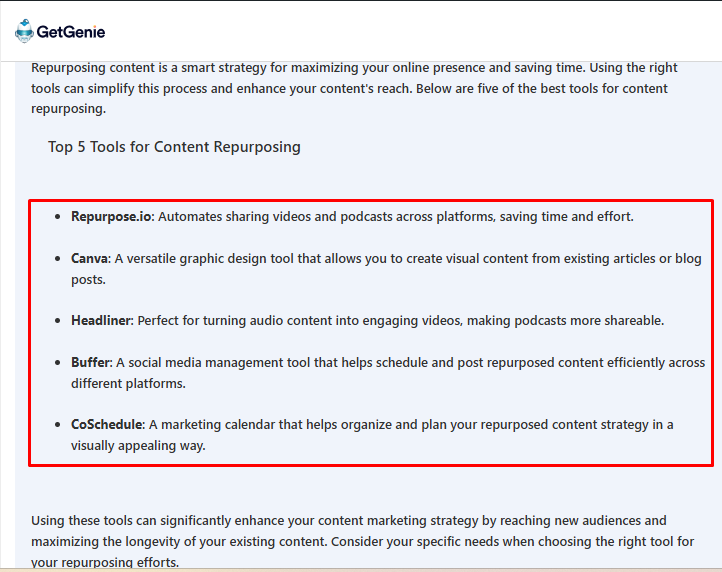
And the good thing is that you can create perfectly structured content for your target queries with an AI tool like GetGenie in seconds. All you have to do is input your question inside GetGenie’s AI Overview Answer Builder template. You can also add context optionally. Set the creativity, language & max results as well.
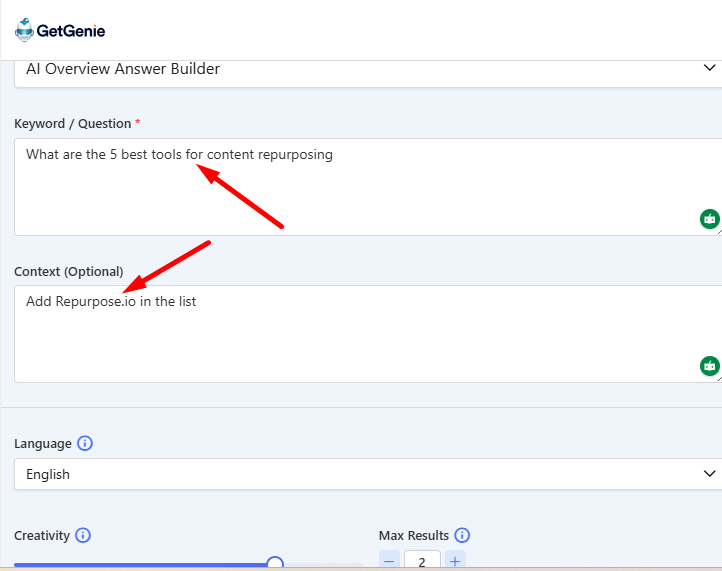
GetGenie will generate an AI Overview-ready formatted output based on your question type in seconds. All you have to do is copy the output and add it to your blog post or any other content type.
4. Write a Key Takeaways Section Before the Full Article
Draft a “Quick Overview” セクション in 5-6 points that fully answers your primary keyword or query. This central info will make it easier for AI Overviews to scan, understand, & extract info, and answer users’ questions.
This quick summary will also give readers a gist of the entire article at a glance. So, even if someone isn’t interested in going through the entire post, they can take desired actions just by browsing the “重要なポイント” section.
Take the above topic, for example. Let’s say my topic is “How to do content repurposing that drives results.” My Key Takeaways section will look like this:
- Figure out your anchor content that has engagement, traffic, & conversions through analytics tools
- Turn the content into a new format that matches audience preferences, like blog to video, text to image, etc.
- Modify for platforms like LinkedIn, YouTube, Instagram, etc., so it feels native for the platform
- Ensure your original content is repurposable beforehand with tools like Canva, Descript, etc.
- Track metrics, run A/B tests, & update with valuable info
5. Expand the Content in Logical Layers
After you answer the main query, expand the content in the layers like explanation, relevant example, and limitations or clarifications.
Explanation:
This layer answers “What does this mean for the reader?”, not just the definition.
If your heading is “What Is Content Repurposing,” the explanation can:
- Immediately connect it to how it helps to get reach and conversions
- Show how it differs from content updating
Relevant Example
This layer will show a valuable example related to the topic. For the section “What is content repurposing?” you can add the following text as an example:
A single in-depth blog post can be repurposed into multiple formats. For instance, LinkedIn posts highlighting key points, a short video summarizing the main idea, & a carousel explaining the framework.
Limitation or Clarification:
The final layer can deal with any limitation that the mentioned concept has. For the “What is content repurposing?” section, you can write about the limitations in the following style:
Without adapting the format, tone, and context, repurposed content can lose relevance and engagement. Also, weak or unclear content won’t perform better just because it’s reused.
If you follow this layered approach for your content sections, AI can easily parse info and showcase it in the AI Overviews section.
6. Write High-quality Content that Shows Real Expertise
High-quality content goes beyond polished writing. It demonstrates real knowledge, experience, and understanding of the topic. Search engines and readers alike look for content that reflects first-hand expertise, and not generic summaries.
This means you have to address real problems, explain concepts clearly, and provide insights that come from practical experience. In other words, your content has to maintain E-E-A-T (Experience, Expertise, Authoritativeness, & Trustworthiness).
Make sure to follow the points below to show real expertise:
- Focus on depth and accuracy
- Cover topics comprehensively
- Explain how and why things work
- Support claims with clear reasoning or real-world observations
Remember, when content genuinely helps readers, they can make better decisions or take confident action. It also signals credibility, improves engagement, and performs better in search results.
7. Add FAQs Based on Secondary Queries
Even though you will answer questions on every content section, don’t forget to add an “FAQ” section in your content. With this section, your content will answer any missing point & enrich the content.
Also, the FAQs section comes structured, which will make it easier for AI to skim the content & cite for user queries. You can use FAQs to address related but distinct questions users may ask as well. Consequently, it will help AI pull multiple answers from the same page without redundancy.
Refer to Google’s autocomplete, PAA boxes, Reddit, & Quora to discover relevant & high-value questions.
To make FAQ creation in seconds, you can use GetGenie’s AI FAQ Generator. With this latest template, you can create an answer-first & structured FAQ section on your chosen topic.
Just input your main topic or keyword. Add any context optionally and choose the language, creativity, & max results. With this template, you can also choose the number of questions in the output, like 4 or 6. If not sure, you can also let AI decide the number of questions for you.
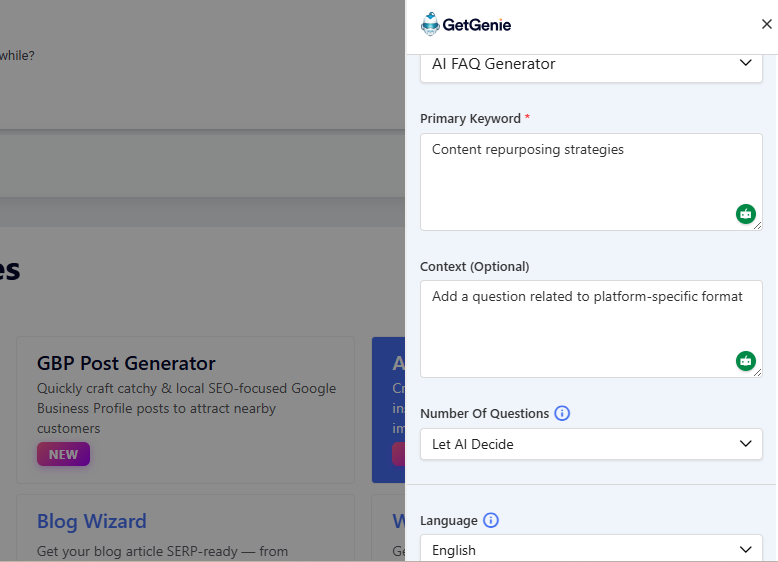
After that, click the “Write” button to get a well-structured & informative FAQ section on your primary keyword. Click the text section to copy and use it in your content.
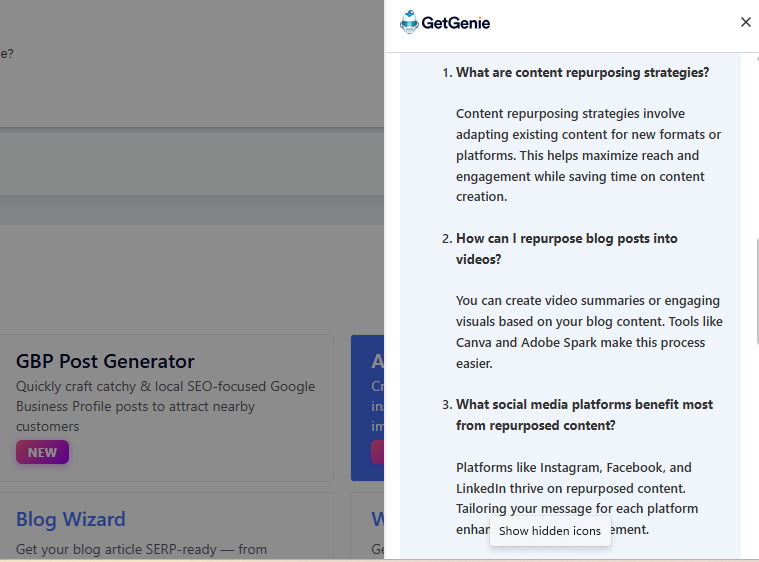
Apart from GetGenie, you can try many other FAQ generator tools like Originality, Quillbot, etc.
8. Remove Anything That Delays the Answer
To keep your readers engaged with your writing piece, answer the main query quickly. Remember, high-performing content delivers the core answer early & then expands with supporting details. This makes the content easier to scan, faster to understand, and more aligned with search intent.
Avoid long introductions, unnecessary background stories, or over-explaining concepts the audience already understands. Instead, get straight to the point, cover key insights, & present actionable takeaways.
9. Review the Page Like an AI, Not a Reader
Once your content is written, review it from an AI and search engine perspective, not just as a human reader. AI systems don’t interpret content emotionally. Rather, they look for clarity, structure, and direct answers.
This means your main question, key entities, and core conclusions should be easy to identify without reading the entire page.
Check whether each section clearly signals what it’s about through descriptive headings, concise opening sentences, and focused paragraphs.
Important answers should be stated explicitly. If an AI had to summarize your page in a few lines, it should be able to do so without guessing or stitching together scattered points.
Also review for unnecessary repetition, vague language, or buried insights. Clean structure, logical flow, and clear relationships between ideas help AI systems understand and trust your content.
When a page is easy for AI to parse, it becomes more eligible for featured snippets, AI Overviews, and higher search visibility.
よくある質問 (FAQ)
Gear up to Get Cited in AI Overviews
Apart from the above tips, also highlight insights, data, or perspectives that aren’t easily found elsewhere. Break complex ideas into digestible & structured chunks to let AI quickly extract key points.
Use practical examples, real-world scenarios, or mini case studies to make your content stand out and signal expertise. Focus on clarity as AI favors content that communicates ideas directly and consistently. And make sure to avail GetGenie’s 40+ writing templates to simplify the content creation fast.

 Danish
  Swedish
  Polish
  Korean