






How to Create Impactful Google Business Profile Posts

You have created a Google Business Profile (GBP) for your local business but your posts aren’t making impacts. You want your customers to get visibility & take action from your business’ crucial info & updates.
To create impactful GBP posts, you need clear but concise content, impactful visuals, high-intent keywords, addressing customer pain-points and a strong Call-to-Action (CTA).
There are different types of posts you can create and publish consistently. To create the posts, GBP post generator tools help write and speed up the process.
To generate impactful Google Business Profile (GB) posts, you need:
➡️ Clear but concise content,
➡️ Impactful visuals,
➡️ High-intent keywords,
➡️ Addressing customer pain-points
➡️ Strong Call-to-Action (CTA).
You can create and publish different types of GBP posts, consistently, based on Offer, Updates, and Events. Tools like ゲットジーニー can help you generate optimized and engaging posts.
What are the Different Types of GBP Posts?
Broadly, you can add posts to:
- Update or inform about general information or announcements of your business.
- Show a new discount or offer from your service/product.
- Announce new releases or new upgrades of products
- Invite or encourage customers to events by your business or related to the industry.
However, you can customize and create variations of these post types. With different intent and style. We’ll look at some popular ones.
New Product Release
You should always help your target group with updates and announcements on new releases. For example, if you are offering mobile accessories and want to inform about a new accessory arrival, the post will look like this:
Introducing Vivo Mobile’s latest cable charger!
Our new charger offers quick and easy integration with top smartphones and ensures fast charge!
The new compact USB-C wall charger is now available at our New York store, built for quick top-ups and everyday carry. Compatible with most USB-C phones and accessories (including iPhone with a USB-C cable and Android devices).
In a rush? Stop by today and pick one up in minutes—limited stock for the first drop. Don’t miss out on this opportunity to enhance your mobile charging speed!. Explore our new plugin today and discover the difference it can make for your site.
Get it Today!
Workplace Views or Visual Tours
You can also add a street view using Google Maps or your store walkthrough with the post. These virtual elements add more value and attention to your posts along with what you write.
If you are a car workshop, you would want your business to show up when people search “car workshop near me”. Then, they will get a view of how your business looks and what you offer.
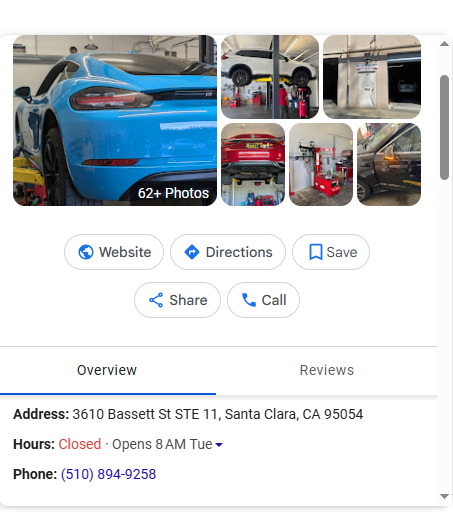
The focus here is visually presenting what you serve or offer. Along with what spots are close by so that target customers can reach you easily.
よくある質問
Adding frequently asked questions also boosts your GBP posts. You can add images with these, too.
An example is as follows:
At Business Entity Ltd. in Boston, Massachusetts, we offer a wide selection of toys for children of all ages. Our commitment to quality ensures that every toy is safe and enjoyable.
よくある質問:
1. What types of toys do you sell?
We carry educational toys, action figures, dolls, and more!
2. Do you offer any care services for toys?
Absolutely! We label all toys with their recommended age range.
3. Are your toys age-appropriate?
Of course they are! Age is just number with our toys.
Call today to learn more!
New Service Added
Another way to use an impactful GBP post is to promote a new service you just launched.
“ Now Available in Boston: Same-Day Large-Format Poster & Blueprint Printing!
Need a last-minute research poster, presentation board, or architectural plans? We’ve added large-format printing with same-day pickup for many orders. Subject to workload and file readiness.
Choose your size and finish (matte/gloss), upload your PDF, and we’ll confirm details before we print. Ideal for students, startups, events, and real estate teams across Boston.
Order online or Learn more (link to your file-upload / order page where customers can complete the action).
What are the Key Elements in a GBP Post?
A Google Business Profile (GBP) Post is built from a small set of “fields” (elements). Some are universal, and some depend on the post type (Update, Offer, Event).
Core elements (apply to most GBP posts)
- Text/description (the message): The main copy that explains what’s new, what’s included, and what the customer should do next.
- Media (recommended): あ photo or video can be added to make the post more credible and easier to scan.
- CTA button + link (when available): A button that should send customers to a page where they can complete the action (book, order, learn more, etc.).
Required elements by post type
1) Update post
2) Offer post
- Required: title, dates, and time.
- Automatically included: a “View Offer” button.
- Optional add-ons (highly useful): description, photo/video, coupon code, link, and terms & conditions.
3) Event post
- Required: title, start & end dates, and times (without times, it may show as a 24-hour event on the event dates).
- Optional add-ons: description, photo/video, and an action button.
Technical elements that matter in practice
.Check Google Help to learn in detail.
- Media specs (to avoid upload issues):
- CTA button types (common options): BOOK, ORDER, SHOP, LEARN_MORE, SIGN_UP, CALL.
- Scheduling/publishing controls: You can schedule a post to publish later, and you can post across multiple profiles if you manage more than one.
- Freshness mechanics: Posts older than 6 months can be archived unless a date range is set (important for evergreen promos).
Length constraint (common limit): GBP post content is commonly constrained to 1,500 characters.
Tips to Get More Customers with GBP Posts
To make GBP posts genuinely more useful for customers on SERPs and Maps, try the following tips. These will help your target audience decide faster, avoid surprises, and acknowledge your call to action.
- Match the post type to the user’s intent. Google explicitly structures posts into Updates, Offers, and Events. Each type of post answers a different customer question. Use the one that best fits the intent, and complete the relevant fields.
- Fill up the first line with the major facts that influence the purchase or action decision. Because users tend to skim the profile quickly, make the first line contain the “decision hook.”
- Add actionable CTAs to close off. Your CTA button should link to the exact page where the customer can complete the action. Make it user-friendly.
- Use images/videos to reduce uncertainty. Abiding by Google’s rules, add high-quality, realistic media that helps users validate what they’re about to experience.
- Keep it readable and minimal. Users view profiles on mobile frequently. So large blocks of text in images are hard to read and more likely to get cropped or ignored.
- One headline max (5–7 words)
- One optional supporting line
- Clear product/experience photo as the main signal
How to Create Impactful Google Business Profile Posts?
To post for Google Business Profile, you need to have a profile created. Once you have that, follow these easy steps to create an effective GBP post.
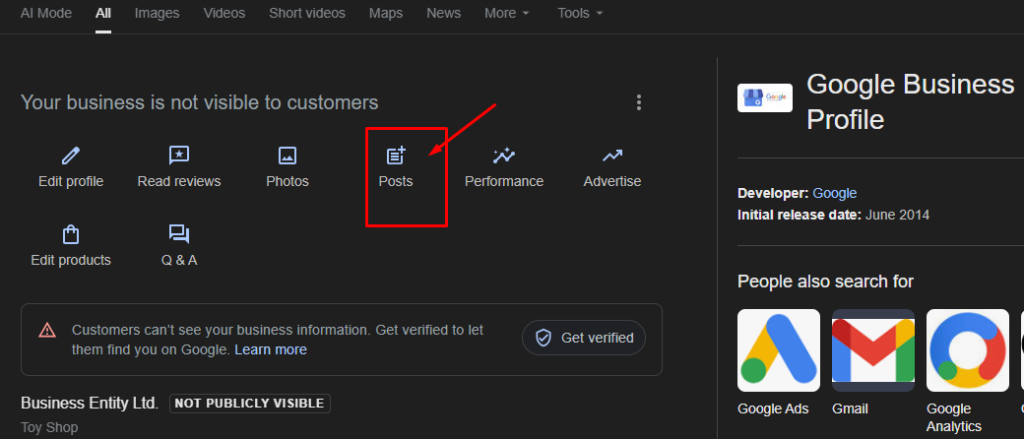
ステップ1:
Now that you have a profile, you can start adding posts. So we’ll click on the Posts option
ステップ2:
From the pop-up window, select the type of post you want to create (e.g., What’s New, Event, Offer, Product).
ステップ 3:
To help you write compelling posts and CTAs in GBP posts, you can use tools like ゲットジーニー. GetGenie helps you generate powerful posts within the WordPress dashboard with its GBP Post Generator, and use the post content for your GBP post.
So, we enter GetGenie’ WP Dashboard > GetGenie > AI Writing > GBP Post Generator.
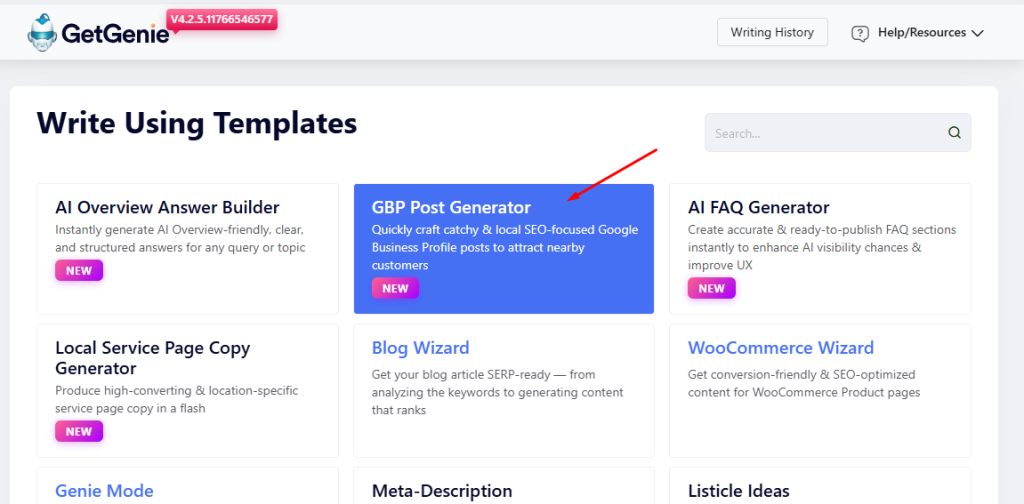
After selecting that, we’ll get a window slide in from the right. There we’ll enter the required details for the GBP post.
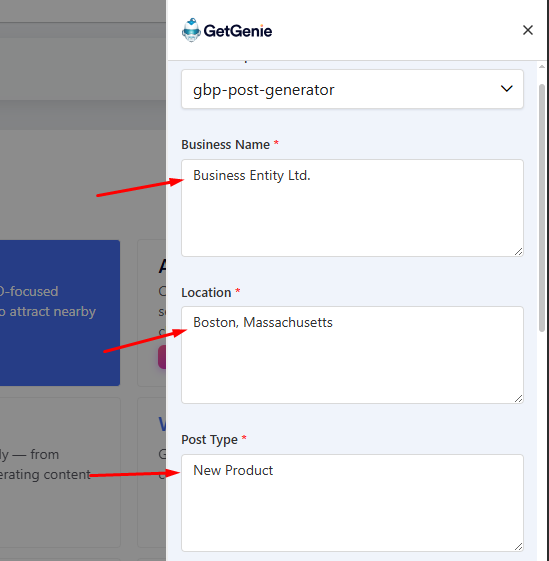
First, add the business name, location, and post type.
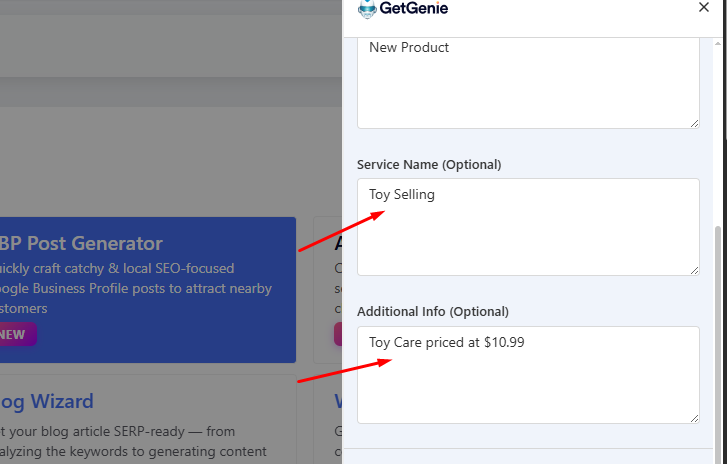
These add more information with Service Type (optional) and Additional Info to describe the context.
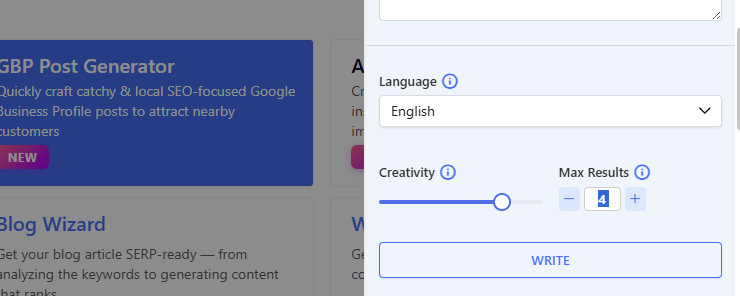
Finally, select the language (over 33), creativity level (1 to 5), and number of results. (up to 6). Then click Write to generate the post.
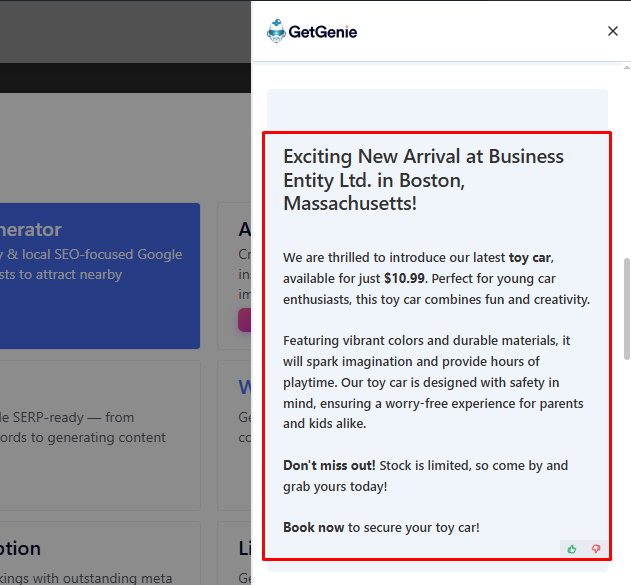
ステップ 4:
Add relevant images of your product to the post. And that’s it. Now, publish it.
How Does Google Business Profile Posts Help Users?
Google Business Profile (GBP) posts help businesses get more visibility, engagement, and conversions directly from Google Search and Maps. Right where people are already looking.
- Up-to-date info: You can share important updates or offers of your business. This lets your target customers know instantly what’s currently going on with your business.
- Core company details: 85% of consumers prioritize the presence of updated contact information. So your target customers value your posts when researching.
- Event or offer updates: In case you have an offer going on or some major event coming up, your customers will get notified. And take a desired action, like go for the offer or enter the event.
- Visual appeal: GBP posts can include photos and videos. This helps the customers get a look at what to expect from your services before committing.
- Available on any device: Target audiences can view your posts on any screen, like mobile, desktop, laptop, or tablet. You’ll always be accessible to them.
よくある質問
まとめ
Knowing the process of creating GBP posts will help you make your business stand out in Google. And attract more audiences to your business website. If you want to generate impactful GBP posts in a quick time, taking help of GBP post generators like GetGenie is a great move.

 Danish
  Swedish
  Polish
  Korean